Miranda Imagestore 750
This is a multi-image processor connector with SNMP and serial interfaces.
The connector is used to monitor the audio and video input and to set the transition and fade duration of a stream. After a user presses a button, the configuration is implemented by means of serial commands.
About
Version Info
| Range | Key Features | Based on | System Impact |
|---|---|---|---|
| 1.0.0.x | Initial version | - | - |
| 1.0.1.x | Serial interface | - | - |
| 1.0.2.x | DCF implementation | - | - |
Product Info
| Range | Supported Firmware |
|---|---|
| 1.0.0.x | - |
| 1.0.1.x | - |
| 1.0.2.x | - |
System Info
| Range | DCF Integration | Cassandra Compliant | Linked Components | Exported Components |
|---|---|---|---|---|
| 1.0.0.x | No | No | - | - |
| 1.0.1.x | No | No | - | - |
| 1.0.2.x | Yes | No | - | - |
Configuration
Connections
SNMP main connection
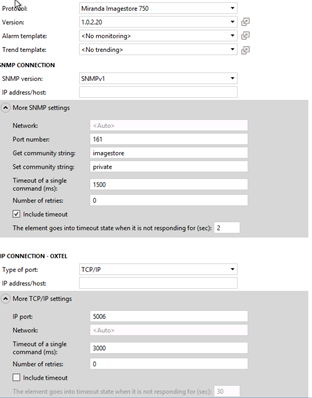
This connector uses a Simple Network Management Protocol (SNMP) connection and requires the following input during element creation:
SNMP CONNECTION:
- IP address/host: The polling IP of the device.
SNMP Settings:
- Port number: The port of the connected device, by default 161.
- Get community string: The community string used when reading values from the device. The default value is public.
- Set community string: The community string used when setting values on the device. The default value is private.
Serial connection 1
This connector also uses a serial connection and requires the following input during element creation:
SERIAL CONNECTION:
- IP address/host: The polling IP of the device.
SERIAL Settings:
- Type of Port: UDP/IP.
- IP port: The IP port of the device.
Usage
General Parameters
This page contains information about the device: the System Name, System Location, System Description, System UpTime and System Contact Person.
On the right side of the page, you can find Imagestore Info parameters (Software Version, Serial Number, Disk Usage Status and Disk Usage Percentage), as well as the page buttons Health and Network Interface. The Health page button displays information related to the Temperature, Fan, Voltage and Power Supply.
Input
This page contains three tables, Video Input, Embedded Audio, and AES Audio. Below this, External Reference values are displayed.
GPIO
This page displays the status and direction for all fifteen entries.
Video/Audio
This page displays the Fade To Black Angle and the Fade To Silent Angle.
Transitions and Audio
This page allows you to set the Transition Duration (Layer, Type and Rate) and Fade Transition (Layer, Fade Type and Fade Rate).
Audio/Image/Fade Setup
This page allows you to set an audio file in a layer and then play it or stop playing it. You can also load an image to a layer and select the fade. The Arm, Disarm, and Take actions for the Fade Keyer Up/Down commands are also implemented.
When executing the Disarm Fade Keyer action, you need to specify the Arm/Disarm Layer. The connector will automatically check the keyer direction that is currently armed and apply the disarm (if there is an Armed Keyer).
The Disarm All button will disarm all currently armed commands on the Imagestore.
Input Mode
This page allows you to change between SDI and Black.
Load Shuffle Preset
This page loads a named shuffle preset into a shuffle block associated with a specific input stream, voiceover, or output, to change the crosspoints in bulk.
Default Settings
This page allows you to set up predefined actions and combinations of actions using an interface.
Web Interface
This page shows the webpage of the device. The web interface is only accessible when the client machine has network access to the product.
DCF Implementation
The inputs are retrieved from the video table and connected to the program output. All the connections are static and can only be disconnect or connected.
Notes
From version 1.0.2.20 onwards, the connector can prevent a potential problem where rebooting causes the device to freeze. To enable this feature, set the parameter Reboot Precaution to Enabled. You can set a delay to start up the serial connection. You will need to adapt the connection setting as well.
This is an example of what this should look like: