OneWeb Enterprise
About
The purpose of this connector is to monitor OneWeb Enterprise devices and services through available APIs over HTTP using JSON-formatted data.
OneWeb is a global communications company that operates a constellation of Low Earth Orbit (LEO) satellites to deliver broadband connectivity to enterprises, governments, and remote communities. By utilizing LEO satellites, OneWeb offers low-latency and high-throughput internet services, even in challenging and remote environments.
The OneWeb Enterprise connector enables the monitoring of key resources and metrics related to user terminals, products, organizations, and sites. It provides visibility on user terminal and product performance metrics, service usage, and consumption reports. This data helps organizations optimize their operations, ensure service availability, and manage their satellite connectivity more effectively.
This connector is designed for enterprise environments with access to OneWeb's API infrastructure. At present, the connector focuses on monitoring only and does not support device control or provisioning features.
Configuration
Connections
HTTP Connection
This connector uses an HTTP connection and requires the following input during element creation:
HTTP CONNECTION:
- IP address/host: api.oneweb.net
- IP port: 80
Initialization
When you have created the element, on the General page, specify the Client ID and Client Secret provided by OneWeb. Once these credentials have been submitted, the connector will send a "Hello OneWeb" message to the OneWeb API. If authentication is successful, a confirmation will be displayed, and the connector will start a polling timer to begin regular data polling.
How to use
To use this connector, create an element in DataMiner using the OneWeb Enterprise connector and configure the necessary HTTP connection details. The connector communicates with the OneWeb API using JSON over HTTP to retrieve monitoring data.
Polling behavior can be configured on the Polling Settings page. Default polling intervals are predefined for each API call, but they can be adjusted to suit specific monitoring requirements.
Once the polling configuration is in place, authentication can be performed. Upon successful authentication, the connector begins collecting and displaying data from the OneWeb platform.
Relations between tables
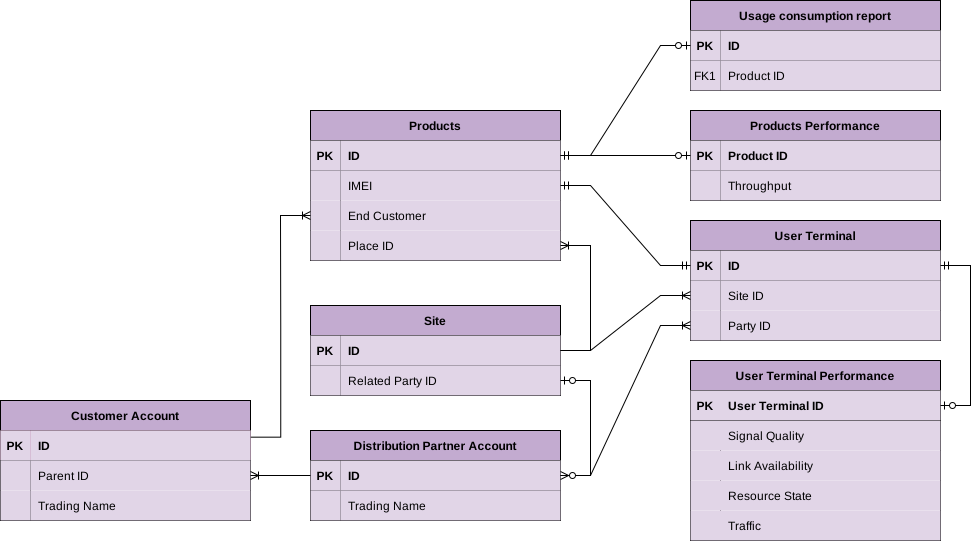
The data retrieved and stored in the different tables can be linked to each other. The ERD illustrates the logical relationships between tables, showing how data stored in different entities can be linked and retrieved efficiently.
User Terminals
The User Terminals page provides comprehensive details about each user terminal. It includes essential information such as IMEI, user terminal name, and operational state. Additionally, it offers insights into network status, firmware version, hardware components, and manufacturer details.
Relational data is also available, including associations with the distribution partner and site connectivity. Location information such as geographic coordinates is also included.
User terminal components (e.g., "AIM","CNX", "EGR", "MDM", "MIM", "SSM") metadata information is displayed in the User Terminal Components table.
Products
The Products page retrieves the inventory of service plan products. It displays a list of available products, each identified by a unique identifier and name. Each product is linked to a distribution partner and a specific site, establishing its deployment context.
A key aspect of this page is the relationship between products and user terminals — each product is associated with the IMEI of the terminal utilizing the service. Additionally, products are connected to end customer accounts and sites, providing a complete view of ownership and location.
Organizations
The Organizations page retrieves a list of distribution partners and end customers, along with their account hierarchy. The structure reflects parent-child relationships, where the Distribution Partner Account represents the parent organization, and the Customer Account represents the associated child organizations.
Sites
The Sites page retrieves a list of sites that can be associated with product instances. A site represents a physical location and defines where a product is deployed. It serves as a reference point for linking product instances to their corresponding deployment locations.
Performance Monitoring
The Performance Monitoring page provides insights from two key tables: User Terminal Performance and Products Performance.
The User Terminal Performance table retrieves metrics such as Link Availability, Signal Quality, Resource State, Traffic, and Link Metrics. These metrics are subject to varying delays depending on the report definitions in the API documentations.
The Products Performance table focuses on throughput metrics, also retrieved with a delay.
All performance parameters support trending, enabling continuous tracking and historical analysis of metric values over time.
Usage Consumption
The Usage Consumption page provides a near real-time snapshot of data usage for site connectivity products. It includes details such as monthly entitlement, remaining allowance, consumed overage blocks, and current balance. The report reflects cumulative usage starting from the bill cycle reference date — typically the first of the month — offering a progressively increasing usage view throughout the billing period.
Each usage record is linked to a Product ID, which allows further association with a user terminal via the terminal's IMEI, as defined in the Products table.
Polling Settings
The Polling Settings page displays the Polling Manager table, which lists all API calls used to retrieve data from the OneWeb API. For each API call, you can enable/disable the call, configure the polling interval, view the current status and timestamp of the last poll, and manually trigger the API call using the Poll column.
This configuration ensures flexible and controlled data retrieval from the external API.