ScheduAll Manager
ScheduAll is an application running on Windows OS that manages bookings (a.k.a. work orders) and resources.
About
This connector allows communication to and from ScheduAll via a web service API and/or via an interop chorus API.
The web service API is an XML interface over HTTP. DataMiner can send requests and receives responses accordingly. The interop chorus API works in a different way. Via interop, ScheduAll sends data in a specific format to DataMiner without getting a request first (i.e., eventing). The structure of this message is defined via message templates in ScheduAll.
Version Info
| Range | Description | DCF Integration | Cassandra Compliant |
|---|---|---|---|
| 2.0.0.x | Initial version | No | Yes |
| 2.0.1.x | Support for SRM added | No | Yes |
| 2.0.3.x | Support for Unicode added | No | Yes |
| 3.0.2.x | Changes made to interfacing Resource Manager | No | Yes |
Configuration
Connections - Range 2.0.0.x / 2.0.1.x /2.0.3.x
This connector uses HTTP to communicate with the ScheduAll services, and requires the following input during element creation:
HTTP connection:
- IP address/host: The IP address of the main HTTP connection.
- Port: The main port the connector will communicate through.
WEB SERVICE API BACKUP connection:
- IP address/host: The IP address of the web service API.
- Port: The port used for the web service communication.
INTEROP SERVICE connection:
- IP address/host: any. (Note that if any is configured, DataMiner will behave similarly to a server since it will be listening for incoming events on the port configured below.)
- Port: The port used for the interop service communication.
INTEROP LISTENER connection:
- IP address/host: The IP address of the interop listener.
- Port: The port used for the interop listener communication.
Note
To make sure the ScheduAll Manager has sufficient time to retrieve the information from the Resource Information table, increase the timeout to 60s.
Connections - Range 3.0.0.x / 3.0.1.x / 3.0.2.x
This connector uses a smart-serial connection and requires the following input during element creation:
SMART-SERIAL CONNECTION:
- IP address/host: The polling IP or URL of the destination.
- IP port: The IP port of the destination.
ScheduAll table structure
The connector combines data coming from several tables in ScheduAll. Below, you can find an overview of the different tables in ScheduAll:
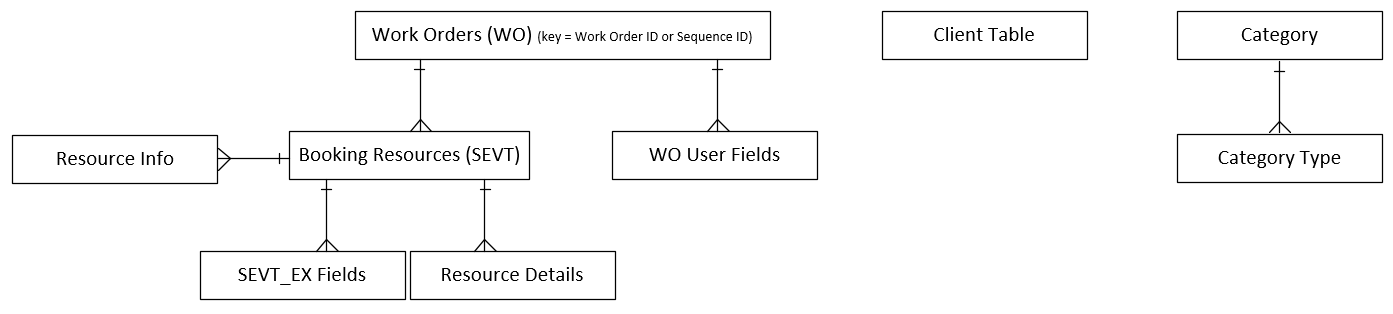
Usage (range 2.0.0.x / 2.0.1.x)
General
This page indicates the ScheduAll status for both Web Service and the Interop Services.
Configuration
This page contains basic configuration parameters for both the web and the interop services. It is among others possible to enable or disable either of the two services here.
This page includes both the Task Configuration and the Message Fields Configuration.
The task configuration is used to launch an automation script when new bookings (or updates) are retrieved.
Configuration - Web Service
This page contains communication configuration parameters related to the web service. This includes the following settings:
- Disabling or enabling the communication with the web service.
- Adjusting the polling time with the Communication Web Service Polling Time parameter.
- Disabling or enabling polling of the client info or resource info tables from ScheduAll.
- Time format used by ScheduAll.
Note
In range 2.0.3.x, additional parameters are available on this page:
- Resolve DNS Name: Indicates if the hostname (if specified) should be DNS-resolved. Set to false by default.
- Dynamic URL: Base URL path to append to the polling IP/host for each request.
- Authentication Provider Username: Used for setting the username if another authentication layer is used.
- Authentication Provider Password: User for setting the password if another authentication layer is used.
Only the Basic Auth authentication type is supported. Username and password are joined with a colon, encoded with Base64 encoding, and set in the Authorization header.
Timespan configuration
With a start and stop parameter, the size of a sliding window in which data (bookings + resources) have to be retrieved can be defined (in minutes). For example, if you configure a start of -1440 min and a stop of 1440 min, DataMiner is going to retrieve all bookings that have a start or stop time 24 hours before and 24 hours after the current time.
Query Configuration
If not all bookings have to be retrieved from ScheduAll but only a subset, this section can be used to define a filter. There are two filters available:
- Work Order Query Resource Filter: Only bookings that contain one of the resources defined in this filter will be retrieved.
- Work Order Query Resource Group Filter: Only bookings that contain resources that are in the resource group defined in this filter will be retrieved. Note that in order for this to work, the polling of the Resource Information table has to be enabled.
The Message field configuration allows you to define which data fields from ScheduAll have to be retrieved:
- Work Order Custom Fields: Here you can define which fields have to be retrieved in addition to the default fields from the work order table in ScheduAll. Per work order, the values are JSON-encoded and stored in the Custom WO Fields column in the Work Order Overview table.
- Query Custom WO USER Fields: Here you can define which fields have to be retrieved in addition to the default fields from the WO_USER table in ScheduAll. Per work order, the values are JSON-encoded and stored in the Custom WO USER Fields column in the Work Order Overview table.
- Resource Custom Fields: Here you can define which fields have to be retrieved in addition to the default fields from the booking resource table in ScheduAll. Per resource, the values are stored in the RES Custom xx columns in the Resource Overview table.
- Query Custom SEVT EX Fields: Here you can define which additional fields have to be retrieved on top of the default ones from the SEVT_EX table in ScheduAll. Per resource, the values are JSON-encoded and stored in the Custom SEVT EX Fields column in the Resource Overview table.
- Query Custom Resource Details Fields: Here you can define which fields have to be retrieved in addition to the default fields from the Resource Details table in ScheduAll. Per resource, the values are JSON-encoded and stored in the Custom Resource Details Fields column in the Resource Overview table.
- Query Custom Client Details Fields: Here you can define which fields have to be retrieved in addition to the default fields from the client table in ScheduAll. Per resource, the values are JSON-encoded and stored in the Custom Client Details Fields column in the Client Overview table.
- Query Custom Values: Here you can define which fields have to be retrieved in addition to the default fields from the resource info table in ScheduAll. Per resource, the values are stored in the Custom x columns in the Resource Information table.
Query Filtering
It is possible to specify additional filters to append to the WorkOrderQuery filter tag by adding rows to the Work Order Query Filtering table. Adding and removing rows is done through the right-click menu of the table. Keys of the table are mapped to ScheduAll field names, which will be used for the filtering. Values can be added as a semicolon-separated list.
For example, if a row is added with key "EXTID" and field value "1;9;4", this is what will be appended to the WorkOrderQuery filter: AND (EXTID=' 1' OR EXTID=' 9' OR EXTID=' 4')
You can enable or disable this feature with the Work Order Query Filter by Field parameter.
External mappings
When the EventModify request is used, ScheduAll Manager needs to tie the resource ID (RESID) of a resource booking in ScheduAll with an external ID (EXTID). With the DataMiner Combined IDS Field parameter, you can define which parameter from the Custom Resource Details Fields will be used as a mapping to the RESID.
Configuration - Interop Service
This page contains the interop-specific configuration parameters. Via the Credentials button, you can access a subpage where you can enter user credentials. These credentials are the ScheduAll credentials that will allow communication between DataMiner and the interop service.
Configuration - Parameter Mapping
This page contains a table of Parameter Mapping Names. Via the right-click menu, you can add extra mapping lines to this table. This table can be used by automation scripts to map field names from ScheduAll with field names in DataMiner.
Work Order Overview
This page contains a table of current work order information. This table contains an overview of all the information related to the present work orders, and provides the possibility to delete a specific work order.
Note that this page also displays the current resources scheduled by ScheduAll.
Category Overview
This page contains two tables. The table on the left lists all Category Names, while the table on the right contains Category Type information.
Client Overview
This page contains a table of Client Names.
Statistics - Web Service
This page contains web service statistics for current queries and work orders.
Statistics - Interop Service
On this page, a single parameter displays the Interop Received Time. In addition, there is a button linking to the Interop Listener. The interop listener provides information on the responses DataMiner receives from the interop service.
Usage (range 2.0.3.x)
General
This page indicates the ScheduAll status for both the Web Service and the Interop Services.
Configuration
This page contains Communication Configuration parameters for both the Web Service and the Interop Services, allowing you to enable or disable the referred services.
The page also includes the Task Configuration, which allows you to define the validation of the work orders content as well as the the data used to launch the configured automation script when new or modified work orders are retrieved.
Configuration Subpage - Ignored DataMiner Resource Pools
On this subpage, you can configure which resource pools from DataMiner should be ignored upon work order creation.
Configuration Subpage - Task Automation Script
This subpage contains the configuration of the automation script specified with the Task Automation Script Name parameter on the Configuration page. You can specify the following settings:
Startup Trigger: Defines whether the automation script is triggered at connector startup (Enabled) or not (Disabled).
Default Behavior: Defines whether the default behavior is enabled or disabled:
Enabled: The Task Automation Script will be triggered with the default input script parameter:
[ "Work Order ID": WO ID [IDX] ]. Note that in case the processing state is set to Bulk, the referred input script parameter will have a serialized list of "WO ID [IDX]".Disabled: The Task Automation Script will be triggered according to the data present in the Input Script Parameters table.
Processing State: Defines whether the Task Automation Script processing is Single or Bulk:
Single: The Task Automation Script will be triggered individually for each new/modified work order.
Bulk: The Task Automation Script will be triggered once, receiving as input argument a serialized list of new or modified work orders according to the current configuration of the Input Script Parameters table.
Pending Script Processing Buffer: Defines whether there is a buffer holding the pending work orders to be passed as input script parameter (Enabled) or not (Disabled):
Enabled: A buffer will be used to hold the work orders that will be passed as input parameter of the Task Automation Script if the script is still processing those same work orders.
For example, if there is a running script busy processing "#WO12345", that work order will be stored in the referred buffer.
Note
If this option is selected, the Task Automation Script will be responsible for triggering the script again in order to process the pending work orders that have been added, which can be done by setting the pending work order IDs (separated by ;) in the Work Order IDs Pending Script Processing parameter (ID=35). The following example illustrates the format in which the work order IDs should be set:
12345;123456;123457.Disabled: The Task Automation Script will be triggered once, receiving as input argument a serialized list of new or modified work orders according to the current configuration of the Input Script Parameters table.
Note
At most five of these scripts can run concurrently. The execution queue can hold up to fifty scripts. These limits cannot be adjusted. These are required to prevent system instability issues.
On this subpage, you can also define the Input Script Parameters, which are passed as an argument of the referred automation script for either new or modified work orders:
- [Full WO w/ Resources in JSON]: JSON containing new or modified work orders alongside with their associated resources.
- [Full WO wo/ Resources in JSON]: JSON containing new or modified work orders.
- SEQNUM [WO ID]: ID of the new or modified work orders.
- JOBDESC [WO Description]: Clip name of the new or modified work orders.
- WO_START [WO Start Time]: Start time of the new or modified work orders.
- WO_END [WO End Time]: End time of the new or modified work orders.
- STAT [WO DMS Task State]: Mirrors work orders status, which is mapped to the DataMiner booking status through the Task Status Definition subpage.
- STATUSEX [WO DMS Task State Extended]: Mirrors work orders extended status, which is mapped to the DataMiner booking status through the Task Status Definition subpage.
- STAT.STATUSEX [WO Status]: Combined work orders status, as defined on the Task Status Definition subpage.
- WONUM [WO Number]: Number of the work orders.
- CREATEDBY [WO Created By]: User who has created the work orders.
- DATECREAT [WO Date Created]: Creation date of the work orders.
- MOD_BY [WO Modified By]: Last user who has modified the work orders.
- LAST_MOD [WO Last Modified]: Last modified date of the work orders.
- CL_ID [WO Client ID]: Client record(s), which can either identify an agency or a contact.
It is also possible to configure which Work Order Status Transitions will trigger the referred automation script. Note that if no transition is defined, the automation script will be triggered for each work order status change.
- Previous Status: Defines the previous work order status for the each configured transition.
- Current Status: Defines the current work order status for the each configured transition.
- Valid Status for New Work Orders: Defines which status is valid to trigger the automation script for new work orders. Note that this table column is independent from the other columns and is only applied for new work orders.
- Valid Status for Existing Work Orders: Defines which status is valid to trigger the automation script for existing work orders. Note that this table column is independent from the other columns and is only applied for existing work orders.
Configuration Subpage - Task Status Definition
This subpage defines the mapping between the STAT and STATUSEX ScheduAll fields and the corresponding Booking Status in DataMiner, either for the Web Service or for the Interop Services.
Configuration - Web Service
This page contains communication configuration parameters related to the web service. This includes the following settings:
- Disabling or enabling the communication with the web service.
- Adjusting the polling time with the Communication Web Service Polling Time parameter.
- Disabling or enabling polling of the client info or resource info tables from ScheduAll.
- Time format used by ScheduAll.
Query Timespan Configuration
With a start and stop parameter, the size of a sliding window in which data (bookings + resources) have to be retrieved can be defined (in minutes). For example, if you configure a start of -1440 min and a stop of 1440 min, DataMiner is going to retrieve all bookings that have a start or stop time 24 hours before and 24 hours after the current time.
Query Configuration
If not all bookings have to be retrieved from ScheduAll but only a subset, this section can be used for defining a filter. There are two filters available:
- Work Order Query Resource Filter: Only bookings that contain one of the resources defined in this filter will be retrieved.
- Work Order Query Resource Group Filter: Only bookings that contain resources that are in the resource group defined in this filter will be retrieved. Note that in order for this to work, the polling of the Resource Information table has to be enabled.
Query Resources Configuration
- Resources Information Polling: Defines whether the Resources Information table will be polled (Enabled) or not (Disabled).
- Query Resource Groups: Defines the groups of the resources that will be retrieved in the Resources Overview table, meaning that only the work orders containing resources belonging to the configured groups will be polled.
- Query Custom Values: Defines which fields have to be retrieved in addition to the default fields from the resource info table in ScheduAll. Note that per resource, the values are stored in the Custom x columns in the Resource Information table.
Message Fields Configuration
- Work Order Custom Fields: Here you can define which fields have to be retrieved in addition to the default fields from the work order table in ScheduAll. Per work order, the values are JSON-encoded and stored in the Custom WO Fields column in the Work Order Overview table.
- Query Custom WO USER Fields: Here you can define which fields have to be retrieved in addition to the default fields from the WO_USER table in ScheduAll. Per work order, the values are JSON-encoded and stored in the Custom WO USER Fields column in the Work Order Overview table.
- Resource Custom Fields: Here you can define which fields have to be retrieved in addition to the default fields from the booking resource table in ScheduAll. Per resource, the values are stored in the RES Custom xx columns in the Resource Overview table.
- Resource Custom User Fields: Here you can define which fields have to be retrieved from the RES_USER table in addition to the default fields from the booking resource table in ScheduAll. Per resource, the values are stored in the Custom Resource Details Fields column in the Resource Overview table.
- Query Custom SEVT EX Fields: Here you can define which additional fields have to be retrieved on top of the default ones from the SEVT_EX table in ScheduAll. Per resource, the values are JSON-encoded and stored in the Custom SEVT EX Fields column in the Resource Overview table.
- Query Custom Resource Details Fields: Here you can define which fields have to be retrieved in addition to the default fields from the Resource Details table in ScheduAll. Per resource, the values are JSON-encoded and stored in the Custom Resource Details Fields column in the Resource Overview table.
- Query Custom Client Details Fields: Here you can define which fields have to be retrieved in addition to the default fields from the client table in ScheduAll. Per resource, the values are JSON-encoded and stored in the Custom Client Details Fields column in the Client Overview table.
Configuration - Interop Service
This page contains the interop-specific configuration parameters. Via the Credentials button, you can access a subpage where you can enter user credentials. These credentials are the ScheduAll credentials that will allow communication between DataMiner and the interop service.
Configuration - Parameter Mapping
This page contains a table of Parameter Mapping Names. Via the right-click menu, you can add extra mapping lines to this table. This table can be used by automation scripts to map field names from ScheduAll with field names in DataMiner.
Work Order Overview
This page contains a table of current work order information. This table contains an overview of all the information related to the present work orders, and provides the possibility to delete a specific work order.
Note that this page also displays the current resources scheduled by ScheduAll.
Resource Overview
This page contains a table that displays an overview of the resources contained in the work orders currently present in the Work Order Overview table.
Note that from the ScheduALL Application point of view, a resource contained in a work order is an Event Resource.
Category Overview
This page contains two tables. The table on the left lists all Category Names, while the table on the right contains Category Type information.
Client Overview
This page contains a table of Client Names.
Resource Information
This page displays a table containing all the Resources in the system, displaying the Resource Group where they belong as well as custom properties associated with each resource.
Work Order Update Status (2.0.3.x)
This page displays the last work orders and event updates performed towards the ScheduAll Application.
Statistics - Web Service
This page contains web service statistics for current queries and work orders.
Statistics - Interop Service
On this page, a single parameter displays the Interop Received Time. In addition, there is a button linking to the Interop Listener. The interop listener provides information on the responses DataMiner receives from the interop service.
Usage (range 3.0.0.x)
Events
This page contains the Booking Overview and Timeline Reservations tables. These tables display the scheduled bookings and the resource reservations.
- The Booking Overview Table includes parameters such as Work Order Number, Language, Start Time, End Time, Work Order Status, etc.
- The Timeline Reservations Table includes parameters such as Reservation GUID, Work Order Sequence Number, Source, Resource, Start Time, End Time, etc.
Via the Configuration page button, you can access various configuration options, including As-Run Log File Location, Work Order Failure Margin, Booking Maximum Age, and Pre-Tally configuration options.
Resources
This page contains the Resources table, which lists all the resources available for reservations. This table includes parameters such as Mnemonic, Identification, Type, Task ID, etc.
Via the context menu of the table, you can add new resources and delete existing resources.
There are also buttons available that can be used to import a .csv file containing the list of resources.
A progress bar at the bottom of the page displays the progress of slow operations such as the import of a large .csv file or the deletion of a large group of resources.