Siemens Desigo CC
This connector will subscribe to the values in the Siemens Desigo CC system that were provided with an Excel file.
About
Version Info
| Range | Features | Based on | System Impact |
|---|---|---|---|
| 1.0.0.x [SLC Main] | Initial version. | - | - |
Product Info
| Range | Supported Firmware |
|---|---|
| 1.0.0.x | 6.0.97.105 |
System Info
| Range | DCF Integration | Cassandra Compliant | Linked Components | Exported Components |
|---|---|---|---|---|
| 1.0.0.x | No | Yes | - | - |
Configuration
Connections
HTTPS Connection
This connector uses an HTTPS connection and requires the following input during element creation:
HTTPS CONNECTION:
- IP address/host: The polling IP or URL of the destination.
- IP port: The IP port of the destination (default: 8080).
- Device address: The bus address of the device. If the proxy server has to be bypassed, specify BypassProxy.
HTTPS Connection - Redundant
This connector uses an HTTP connection and requires the following input during element creation:
HTTPS CONNECTION:
- IP address/host: The polling IP or URL of the destination.
- IP port: The IP port of the destination (default: 8080).
- Device address: The bus address of the device. If the proxy server has to be bypassed, specify BypassProxy.
Initialization
When you have created the element, fill in the username and password so the connector can retrieve information.
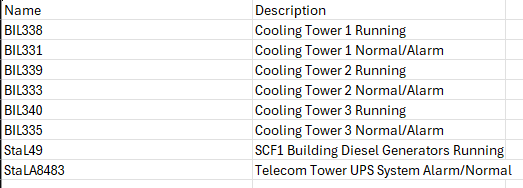
Next, import an Excel file with the parameters that should be retrieved. This Excel file must contain one column with the name of the value from on the Siemens Desigo CC system. You can find this name in the GUI.
The Excel file can for example look like this:
How to use
The values table will be filled in with the values that are provided through the Excel file.
The connector will subscribe to the values, so these should be pushed by the Siemens system to DataMiner.