Skyline Lock Manager
About
The Skyline Lock Manager connector allows the management of locks within a DataMiner System for any kind of object by providing a centralized manager accessible through a public API.
System Info
| Range | DCF Integration | Cassandra Compliant | Linked Components |
|---|---|---|---|
| 1.0.0.x | No | Yes | Skyline Lock Manager ConnectorAPI Nuget 1.0.X |
| 1.0.1.x | No | Yes | Skyline Lock Manager ConnectorAPI Nuget 1.1.X |
| 1.0.2.x | No | Yes | Skyline Lock Manager ConnectorAPI Nuget 1.2.X |
| 1.0.3.x | No | Yes | Skyline Lock Manager ConnectorAPI Nuget 1.3.X |
| 1.1.0.x | No | Yes | Skyline Lock Manager ConnectorAPI Nuget 2.0.X |
Connector range 1.0.x.x is compatible with Skyline Lock Manager ConnectorAPI Nuget version 1.x.x, which has a dependency on Skyline DataMiner Core InterAppCalls Common Nuget version 1.1.1.1.
Connector range 1.1.x.x is compatible with Skyline Lock Manager ConnectorAPI Nuget version 2.x.x, which has a dependency on Skyline DataMiner Core InterAppCalls Common Nuget version 1.0.1.1.
Configuration
Connections
Virtual Connection
This connector uses a virtual connection and does not require any input during element creation.
Initialization
On the Element Configuration page, configure the following parameters:
- InterApp Timeout: A time span used by the Skyline Lock Manager ConnectorAPI Nuget, indicating when communication with this element should time out.
- Default Auto Lock Release Timespan: When no specific auto unlock timestamp is provided by the API, the value of this parameter will be added to the timestamp of reception of the lock request to define the actual auto unlock timestamp.
Logging Configuration
As of range 1.0.3.x, the connector supports persistent logging. This allows logs to be written that persist when the element restarts. The files created by the persistent logging have the following name template: C:\Skyline DataMiner\Logging\[element name]_[suffix].txt.
The logging behavior can be configured on the Logging Configuration subpage, with the following parameters:
- Status: Enables or disables the persistent logging.
- Logging Level: Defines the minimum level of logging that should be stored persistently. Possible values are:
- Error: Logs when an error occurs.
- Warning: No logs at this level are currently implemented.
- Info: Logs when locks are granted and released.
- Debug: Logs InterApp request and response info.
- Trace: Logs when QActions trigger and for which trigger parameter.
- Max Log File Size: Defines the maximum size (in MB) of a single log file. When this size is exceeded, a new log file is created.
- Max Log File Count: Defines the maximum number of log files that are kept. When the number of log files exceeds this value, the oldest log file is re-used and its logs are overwritten.
- Log File Name Suffix: Sets the suffix of the log file name in
C:\Skyline DataMiner\Logging\[element name]_[suffix].txt.
How to use
By using the Skyline Lock Manager ConnectorAPI Nuget, other components within the DataMiner System (e.g., automation scripts, connectors, etc.) can communicate with an element running this connector to request a lock for any kind of object.
The connector keeps track of which locks are taken, along with some metadata like the timestamp of when the lock was taken, as well as the context that holds the lock. This data is stored in memory. You can view it in the Locked Objects table. When you have the element card open in Cube, the table is populated every 10 seconds. You can also force an immediate refresh with the Refresh Table button. When the element is restarted, this data is lost.
When an object has been locked, any incoming request for the same object ID will be answered with the lock not being granted.
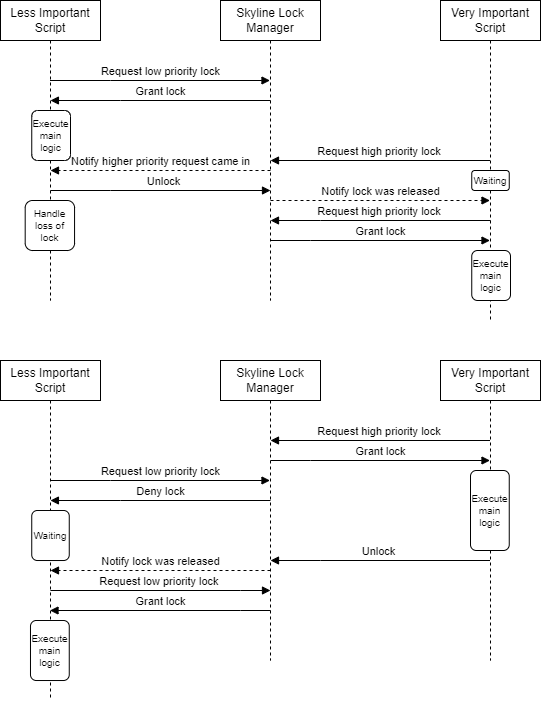
System with multiple lock priority levels
When a lock is requested, a priority level can be specified. This allows more important components to get a lock even when less important components already hold a lock for the same object.
The diagram below shows how this could be implemented.