ZDF BFE KSC Core
This custom connector functions as a (virtual) control panel that receives information pushed from the BFE KSC Core using the SC05 BD-Protocol.
About
Version Info
| Range | Key Features | Based on | System Impact |
|---|---|---|---|
| 1.0.0.x [SLC Main] | Retrieves groups and labels from the source and destination layouts. | - | - |
Product Info
| Range | Supported Firmware |
|---|---|
| 1.0.0.x | v1.0 |
System Info
| Range | DCF Integration | Cassandra Compliant | Linked Components | Exported Components |
|---|---|---|---|---|
| 1.0.0.x | No | Yes | - | - |
Configuration
Connections
Smart-Serial Connection - Main
This connector uses a smart-serial connection and requires the following input during element creation:
SMART-SERIAL CONNECTION:
- IP address/host: should always be set to any.
- IP port: The IP port of the destination (default: 2011).
Logic
This connector is designed for a specific use case where BFE KSC Core contains the matrix inputs and outputs each linked to a label for a designated group. The connector will receive the input and output groups, together with the labels of the connections that are part of these groups.
The way the connector does this is by sending ButtonPressed commands to the control panel and checking what the result of each button press is.
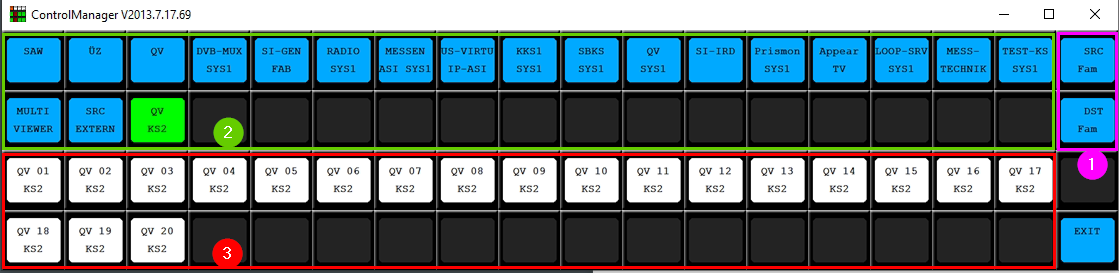
- The SRC Fam and Dest Fam buttons are used to switch between the input and output groups, respectively.
- The groups are depicted in the green box and each contain a set of labels.
- The labels represent physical connections of the matrix.
Requirements
In order for the connector to interact with the BFE KSC Core and correctly interpret what is being displayed, make sure the BFE KSC Core has the following layout (as illustrated in the image above):
- The two buttons in the purple box are used to switch between input and output groups. Pressing the top button causes the input groups to be displayed. Pressing the bottom button causes the output groups to be displayed. The colors and text of these buttons can be freely adjusted, but their positions cannot.
- Every button in the green box that has a text and a color is considered a group. The active group (= the currently selected group) is determined by the green background color (RGB 0;255;0). This means that any group can be added, with any text or background color except for green (RGB 0;255;0), as long as it is part of the green box. The color to visualize the active group cannot be adjusted.
- Every button in the red box that has a text and a color is considered a label. Labels can be added freely with any text or background color as long as they reside in the red box.