Using the Alarm Console quick filter box
In the lower-right corner of the Alarm Console, a quick filter box is displayed.
This filter box can be used in different ways:
Like any other quick filter in Cube, by adding text in the filter box. While you are typing, suggestions will be displayed above the box. When you empty the filter box, or return the focus to the filter box after it had been elsewhere, history items will also be displayed. To search for a suggested word or history item, select it in the list.
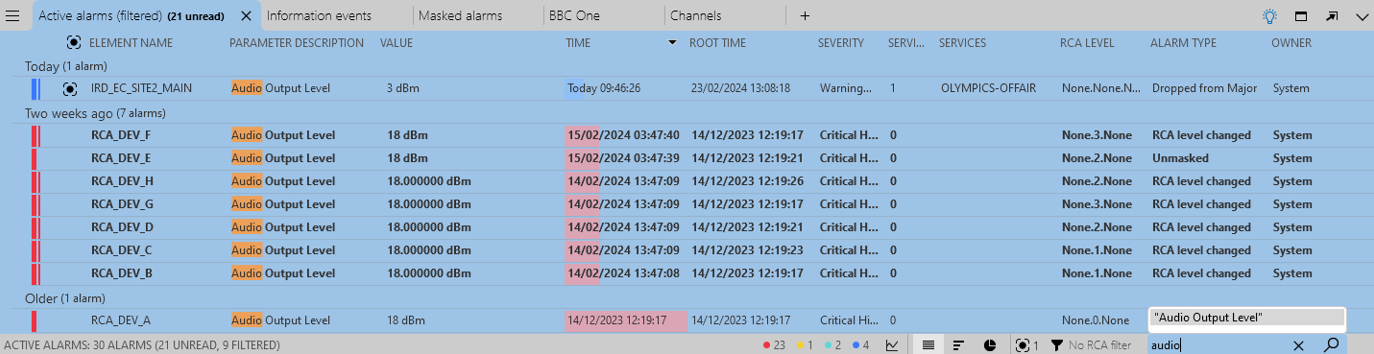
Alarm Console in DataMiner 10.4.5Alternatively, it is also possible to add items to the quick filter box, or remove items from the quick filter box, by highlighting them in the Alarm Console. To do so, while pressing the key configured for this in the user settings (by default the left Ctrl key), click on the words you wish to add. You can also press this key and right-click a word to open a context menu with the following options:
Add [highlighted text] to filter
Remove [highlighted text] from filter: Only available if you have already added items to the filter.
Exclude [highlighted text] in filter: This option can only be used on an item that is not yet in the filter, and adds a negative filter for this item. This is the equivalent to adding an exclamation mark in front of an item when you type text in the filter.
Search for [selected text] in new tab: This option opens a new Search alarms tab in the Alarm Console, in which you can search through alarms using this filter. This option is only available if the DMS uses self-managed storage with indexing database.
Copy [highlighted text]
Clear filter: Only available if you have already added items to the filter.
Tip
See also: Cube settings
When the filter is applied, the alarm tab is displayed with a blue background to indicate that it is being filtered. The total number of alarms is still indicated in the alarm bar, but the number of filtered alarms that are being displayed is added in parentheses.