Matrix parameters
Matrix parameters combine a series of inputs and outputs in a matrix. An input and an output can be connected to one another with the crosspoints in the matrix.
By default, the inputs of a matrix parameter are displayed to the left of the matrix and the outputs are displayed above the matrix, but a different layout can be specified in the element protocol or in the Cube matrix layout. To configure this in Cube, right-click the matrix, click Edit, go to layout, and select the matrix layout you prefer in the dropdown list.
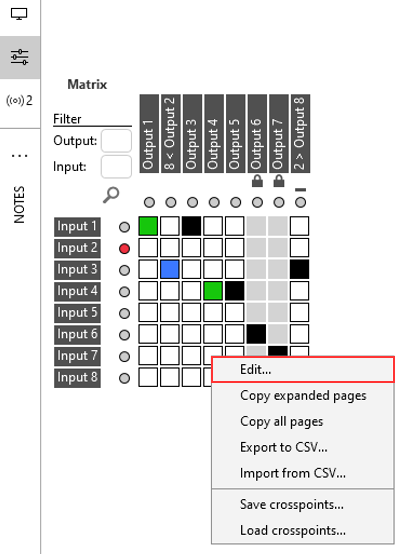
Matrix parameter in DataMiner 10.4.5
For more information on how to configure matrix parameters, see Configuring matrix parameters.
Note
On a matrix parameter, like on any other parameter, you can also apply alarm thresholds. If you do so, every crosspoint representing a monitored value will bear the color of its current alarm severity level. See Configuring alarm thresholds for matrix parameters.