QAOps test packages
Important
This section contains information that is only applicable to Skyline employees.
QAOps test packages (.dmtest) are stored in the DataMiner Catalog. Each package is self-contained and includes setup, teardown, and test execution logic.
Only a QAOps system can execute these packages. A package can contain installation logic, setup logic, test code, execution scripts, and result parsing logic.
You can combine multiple test packages into a QAOps test suite. This concept is specific to the QAOps platform.
Creating a DataMiner test package
Creating a DataMiner test package is very similar to creating a DataMiner installation package.
The test package project type is included in the Skyline DataMiner Software Development Kit (SDK). It is available as DataMiner Test Package Project in the Visual Studio templates that are installed with DIS.
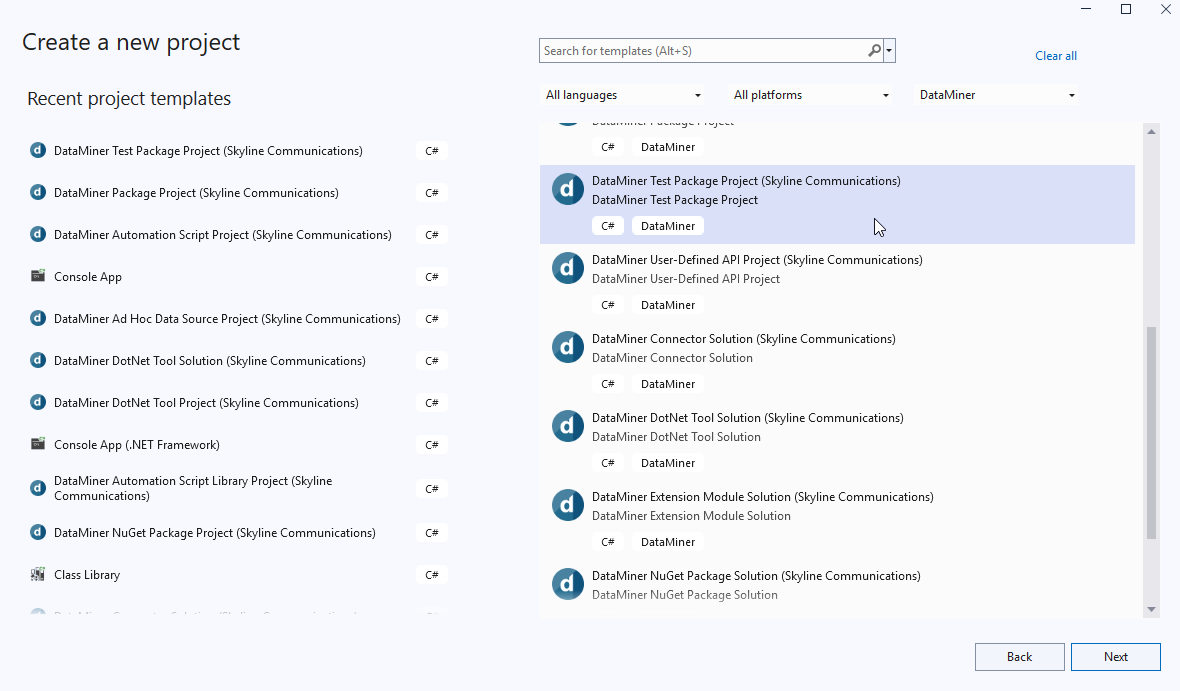
The project has the same basic behavior as an installation package project:
When you compile a C# DataMiner test package project, it produces a
.dmtestfile in thebinfolder.When you publish the project, it publishes the version configured in the
.csprojfile to the DataMiner Catalog.
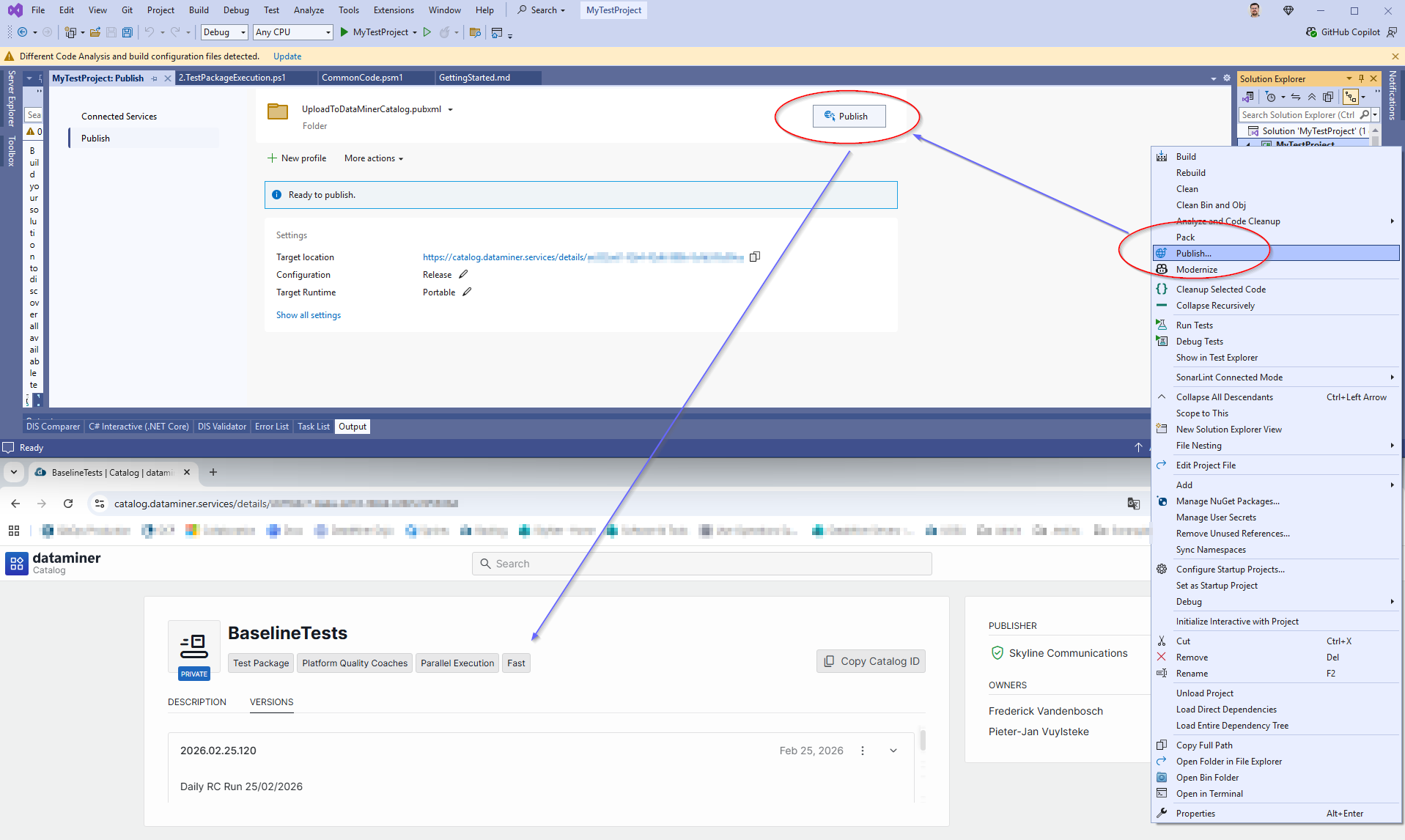
All functionality supported by a DataMiner installation package (.dmapp) is supported, and it is extended with test-specific functionality in the TestPackageContent directory.
When you run a test suite, QAOps first installs all packages in that suite. It then executes tests in the package execution order defined in the QAOps operator application.
Note
For information about how to send back test results to the QAOps System, refer to QAOps test results.
Setting up test package content
Use the TestPackageContent directory as the root for all test assets.
TestPackageContent/
├── TestHarvesting/           # Required: auto-generated test discovery
├── TestPackagePipeline/      # Required: test execution scripts
├── Tests/                    # Optional: static tests in repository
├── Dependencies/             # Optional: static dependencies in repository
└── qaops.config.xml          # Optional: configuration file
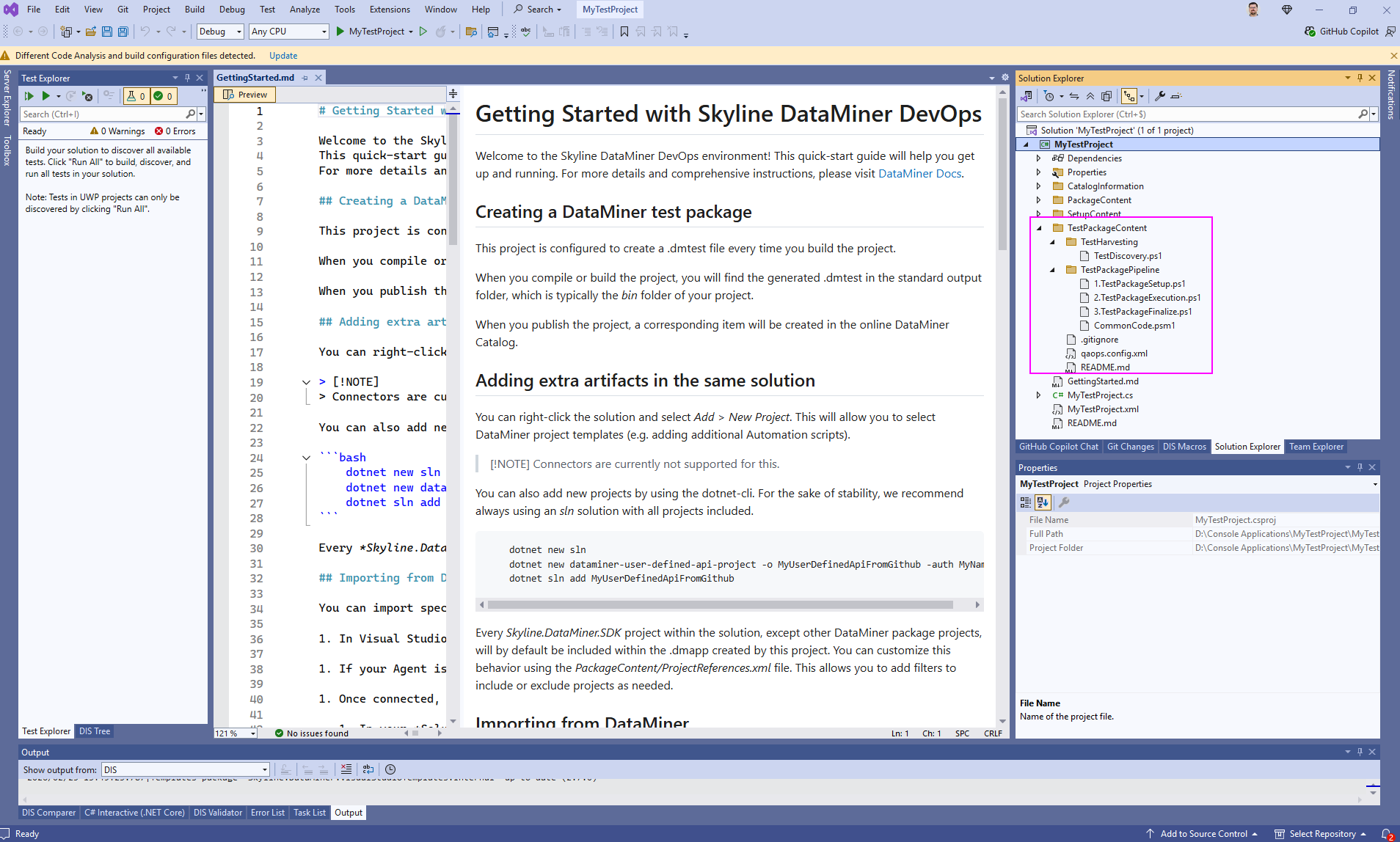
Required components:
TestHarvesting with a
TestDiscovery.ps1script.TestPackagePipeline with at least one numbered PowerShell script.
Optional components:
Tests and Dependencies for project-committed tests and their assets.
qaops.config.xml for custom configuration.
TestHarvesting
The TestDiscovery.ps1 script can be written to harvests tests from your whole Git repository during the build process.
If all your tests are already within the same solution, this script may not be necessary. It is mainly intended for repositories that have more than one solution. You can use other features such as:
If your tests are done through DataMiner components as part of the same solution, you can use default DataMiner installation package logic, to just let it install a connector, automation script, etc. with your tests and then use the TestPackagePipeline to trigger the tests and retrieve their results.
If your tests are part of the build output of projects in your solution, such as MSTest or NUnit assemblies, you could opt to use post-build actions on those projects to copy the output to the Tests directory and then use the TestPackagePipeline to trigger the tests and retrieve their results.
If your tests can be written directly in PowerShell scripts, the simplest way is to write everything within the scripts and then use the TestPackagePipeline to trigger the tests and forward their results to QAOps.
If used, the harvesting process creates these directories:
dependencies.generated: Can contain any type of dependency files.tests.generated: Can contain any type of test files.xmlautomationtests.generated: This is mostly for legacy support within the Platform team. The following structure must be used:One directory per test.
Each test directory contains the following items:
A
script.xmlfile.An optional
dllsfolder for additional assemblies.
Scripts in xmlautomationtests.generated are added to the package and installed on DataMiner during the test run. For that reason, this directory is not present on the test system.
Important
When executed from Visual Studio, harvesting uses the highest available PowerShell 5 version. When executed from the command line, it uses the highest available PowerShell 7 version and falls back to the highest available PowerShell 5 version if PowerShell 7 is not installed.
For the most stable results, we recommend developing your harvesting scripts for PowerShell 5 compatibility.
Do not create generated directories manually
The following directories are automatically created during a build. Do not create or commit them manually:
dependencies.generated/tests.generated/xmlautomationtests.generated/
The project template includes a .gitignore file that excludes these generated directories. This ensures the following:
Your repository stays clean and does not contain build artifacts.
Test discovery remains consistent across environments.
Test harvesting is refreshed on each build.
Local generated content does not cause conflicts between team members.
Your TestDiscovery.ps1 script regenerates these directories every time you build the project.
Example directory structure
TestHarvesting/
├── dependencies.generated/
│   ├── shared-dependency.dll
│   └── helper-config.json
│
├── tests.generated/
│   ├── example-login.spec.ts
│   └── example-navigation.spec.ts
│
└── xmlautomationtests.generated/
    ├── MyFirstTest/
    │   ├── script.xml
    │   └── dlls/
    │       └── helper-library.dll
    │
    └── MySecondTest/
        └── script.xml
TestPackagePipeline
The TestPackagePipeline directory must contain PowerShell scripts that define your test execution workflow (or the actual tests). During a test run, the QAOps bridge will execute these scripts sequentially.
These scripts can also contain the test logic.
Script naming requirements
Make sure the names of your scripts follow this pattern: {number}.{description}.ps1.
The QAOps bridge will sort scripts numerically by the leading number, and scripts will be executed in ascending order, for example, 1.setup.ps1, 2.execute-tests.ps1, and 3.finalize.ps1.
Script template structure
Each PowerShell script must accept this mandatory parameter:
param (
    [Parameter(Mandatory = $true)]
    [string]$PathToTestPackageContent
)

# TODO: Add your test logic here
# Use $PathToTestPackageContent to access test files and dependencies
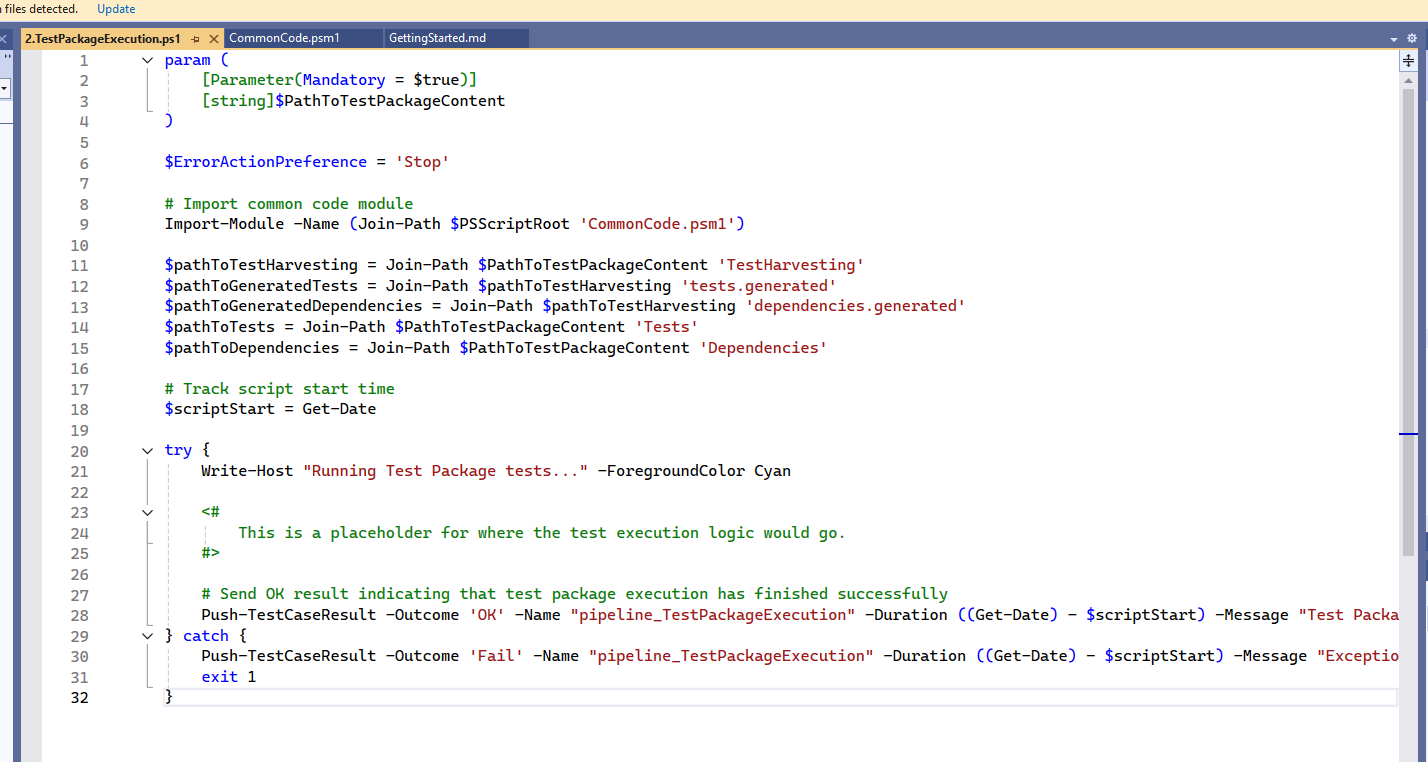
Example pipeline structure
TestPackagePipeline/
├── 1.setup.ps1          # Environment setup and prerequisites
├── 2.install-deps.ps1   # Install test dependencies
├── 3.run-tests.ps1      # Execute your actual tests
├── 4.finalize.ps1       # Collect results
└── helpers/             # Optional helper files directory
    ├── test-utilities.psm1
    ├── data-processor.py
    ├── config-validator.js
    └── shared-functions.ps1
Adding helper code and utilities
You can include additional code files next to the numbered PowerShell scripts to organize and reuse functionality. The QAOps bridge only executes numbered .ps1 files as entry points. From those scripts, you can call other code files.
Examples of helper files:
PowerShell modules (
.psm1) for reusable PowerShell functions.Python scripts (
.py) for data processing or API interactions.JavaScript or Node.js files (
.js) for web automation or JSON processing.Configuration files (
.json,.xml,.yaml) for script settings.Additional PowerShell scripts without numbers for utility functions.
Batch files (
.bat) or shell scripts for system operations.
Tip
For information about how to send back test results to the QAOps System, please refer to QAOps test results.
Usage pattern:
# In your numbered script (e.g., 3.run-tests.ps1)
param (
    [Parameter(Mandatory = $true)]
    [string]$PathToTestPackageContent
)

# TODO: Call your helper code from here
# Examples:
# . "$PSScriptRoot\helpers\shared-functions.ps1"
# python "$PSScriptRoot\helpers\data-processor.py"
# node "$PSScriptRoot\helpers\config-validator.js"
Accessing supplementary files
Supplementary files are runtime inputs uploaded when the test run is submitted. Use them for files that should not be embedded in the .dmtest package, for example large upgrade packages, configuration files that change per run, scripts, or simulator data.
For information about uploading these files, see Run with supplementary files.
QAOps Bridge extracts the files in two locations:
| Location | Availability | Intended use |
|---|---|---|
<PathToTestPackageContent>\SupplementaryFiles |
Agent executing the test package pipeline | Numbered PowerShell pipeline scripts |
Directory specified by the machine-level QAOPS_SUPPLEMENTARY_FILES environment variable |
Every Agent in the cluster | C# tests, automation scripts, and other processes that can run on any Agent |
Do not hard-code the shared directory under C:\ProgramData. If files from a previous run are still locked, QAOps Bridge can use a different directory for the next run. The environment variable always points to the directory for the active run.
Accessing supplementary files from PowerShell
For a pipeline script running on the test package execution Agent, you can use the package-local copy:
$configurationPath = Join-Path `
  $PathToTestPackageContent `
  'SupplementaryFiles\configuration.json'
To access the shared copy, read the machine-level environment variable explicitly:
$supplementaryFilesPath = [Environment]::GetEnvironmentVariable(
    'QAOPS_SUPPLEMENTARY_FILES',
    [EnvironmentVariableTarget]::Machine)

if ([String]::IsNullOrWhiteSpace($supplementaryFilesPath) -or
    -not (Test-Path -LiteralPath $supplementaryFilesPath -PathType Container)) {
    throw 'This test requires supplementary files, but none are available for the current run.'
}

$configurationPath = Join-Path $supplementaryFilesPath 'configuration.json'
Use the shared copy when the consumer can run outside the package pipeline process or on a different Agent.
Accessing supplementary files from C# test code
Long-running processes can cache their environment when they start. For this reason, read the machine-level value explicitly instead of using the one-argument Environment.GetEnvironmentVariable overload:
string? supplementaryFilesPath = Environment.GetEnvironmentVariable(
    "QAOPS_SUPPLEMENTARY_FILES",
    EnvironmentVariableTarget.Machine);

if (String.IsNullOrWhiteSpace(supplementaryFilesPath) ||
    !Directory.Exists(supplementaryFilesPath))
{
    Assert.Fail(
        "This test requires supplementary files, but none are available for the current run.");
}

string configurationPath = Path.Combine(
    supplementaryFilesPath,
    "configuration.json");

Assert.IsTrue(
    File.Exists(configurationPath),
    $"Supplementary file not found: {configurationPath}");
The directory and environment variable are not present when the test run does not include supplementary files. Code that requires a file should report a clear error when the path or file is missing.
QAOps Bridge clears the shared directory before each run and removes it and the environment variable afterwards. Files that remain locked during cleanup do not change the completed test result. QAOps Bridge logs a warning and retries cleanup during a later run.
Note
Supplementary files are available to every process started by the test run. This capability has been verified by the security team as a safe mechanism for transferring secrets, credentials, and other sensitive data to your test execution environment as long as you do not commit or store the secrets.
Tests
If you add a Tests directory, it contains static test files that are committed to the repository and do not require harvesting.
Dependencies
If you add a Dependencies directory, it should contain static dependency files that are committed to the repository and used by tests in the Tests directory.
When to use the Dependencies directory
You can use this directory for the following files:
Third-party libraries specific to your test package.
Configuration files required by static tests.
Resource files, such as images, data files, or certificates.
Custom assemblies built specifically for this test package.
Directory organization
Dependencies/
├── libraries/
│   ├── custom-test-framework.dll    # Custom testing utilities
│   ├── data-validation.dll          # Validation libraries
│   └── protocol-helpers.dll         # Protocol-specific helpers
├── config/
│   ├── logging.config               # Logging configuration
│   ├── database.connectionstring    # Database connection settings
│   └── api-endpoints.json           # API configuration
├── resources/
│   ├── test-data.xml                # Static test data files
│   ├── certificates/                # Security certificates
│   │   ├── test-cert.pfx
│   │   └── ca-root.crt
│   └── images/
│       ├── reference-screenshot.png
│       └── ui-baseline.jpg
└── scripts/
    ├── setup-environment.ps1        # Environment setup scripts
    └── database-seed.sql            # Database initialization
qaops.config.xml
If you need to customize QAOps test execution behavior, use qaops.config.xml to configure package installation settings.
Configuration options
At present, only one option can be configured:
PerformPackageInstallation: Controls whether the
.dmtestpackage is installed on DataMiner. Can be set totrueorfalse.Set this value to
falsefor lightweight tests that only require PowerShell script execution. This will skip the package installation and run only PowerShell-based tests, allowing faster execution. Scripts inTestPackagePipelinestill execute regardless of this setting.Set this value to
truefor full DataMiner tests. This will install the.dmtestpackage and run comprehensive automation tests.
Example configuration
Create qaops.config.xml as follows:
<?xml version="1.0" encoding="utf-8"?>
<QAOpsConfig>
  <!-- Set to false if you only need PowerShell script execution -->
  <PerformPackageInstallation>true</PerformPackageInstallation>
</QAOpsConfig>