QAction Compilation
A C# QAction gets compiled into a DLL by DataMiner. When a QAction gets compiled depends on whether the precompile option is specified on the QAction:
- If the QAction does not have the precompile option, the QAction is compiled the first time it is triggered.
- If the QAction has the precompile option, it is compiled when an element is created that runs the protocol in which the QAction is defined.
By default, a compiled QAction has the following name: [protocolName].[protocolVersion].QAction.[QActionID].dll, e.g., Microsoft Platform.1.0.0.1.QAction.1.dll. This default name can be customized via the dllName=name.dll option. For more information on how a custom name can be used, see dllName=name.dll.
The QAction DLLs are stored in the directory C:\Skyline DataMiner\ProtocolScripts.
DataMiner uses the .NET Compiler Platform (version 2.9) to compile QActions, allowing the use of C# syntax up to and including version 7.3.
DataMiner detects the most recent version of the .NET Framework that is installed and uses this version to compile the QActions against and to execute these in the SLScripting process. The compiled QActions will then target this version of the .NET Framework.
QActions are executed by the SLScripting process, which is 32-bit process.
Note
- If a QAction has no triggers, it should have the precompile option. QActions with the precompile option are compiled in the order in which these appear in the protocol XML. Therefore, if you have a precompile QAction that references another precompile QAction, the referenced precompile QAction should be defined earlier in the protocol XML document.
- By default, QActions are compiled in Release mode. To let them compile in Debug mode, you can use the debug option.
Referencing assemblies in QActions
A QAction can make use of the functionality defined in an external DLL. In order to be able to use an external DLL, make sure the DLL is specified in the dllImport attribute of the QAction.
<QAction id="6" name="Process Response" encoding="csharp" triggers="6" dllImport="System.xml.dll">
It is also possible to use [ProtocolName] and [ProtocolVersion] placeholders in the dllImport attribute. With these placeholders, you can avoid having to update the references every time the protocol name or version is updated.
<QAction id="6" name="Process Response" encoding="csharp" triggers="6" dllImport="System.xml.dll;[ProtocolName].[ProtocolVersion].QAction.1.dll">
A QAction results in a DLL that is stored in the same folder (C:\Skyline DataMiner\ProtocolScripts). This raises the question whether a QAction can reference another QAction to use functionality defined in the other QAction. This is indeed possible.
Referencing another QAction is mainly done in case the referenced QAction contains generic code. This allows you to centralize code in one QAction that is then used by other QActions that make use of the functionality defined in this generic QAction. This is the recommended practice as it helps avoid code duplication.
Note
The generic QAction typically will not be triggered by any parameters (i.e., no triggers attribute is present for the QAction containing the generic code), and the QAction does not have an entry point method.
The QAction that is referred to by another QAction must be compiled before the referring QAction is compiled. Therefore, QActions that are referred to by other QActions must use the precompile option.
The following code fragment shows an example of a generic QAction that is used by another QAction. The generic QAction defines a data model class "Probe", which can then be used in the other QAction.
<QAction id="1" name="Generic Functionality" encoding="csharp" options="precompile">
<![CDATA[
namespace Skyline.Protocol.Model
{
    public class Probe
    {
        public string Name { get; set; }
        public int State { get; set; }
        public double Capacity { get; set; }

        public Probe(string name, int state, double capacity)
        {
            this.Name = name;
            this.State = state;
            this.Capacity = capacity;
        }

        ////...
    }
}
]]>
</QAction>
<QAction id="7" name="Process Table Content" encoding="csharp" triggers="7" dllImport="[ProtocolName].[ProtocolVersion].QAction.1.dll">
<![CDATA[
using Skyline.DataMiner.Scripting;
using Skyline.Protocol.Model;

public static class QAction
{
  public static void Run(SLProtocol protocol)
  {
     Probe probe = new Probe("Probe 1", 0, 1000);

      ////...
  }
}
]]>
</QAction>
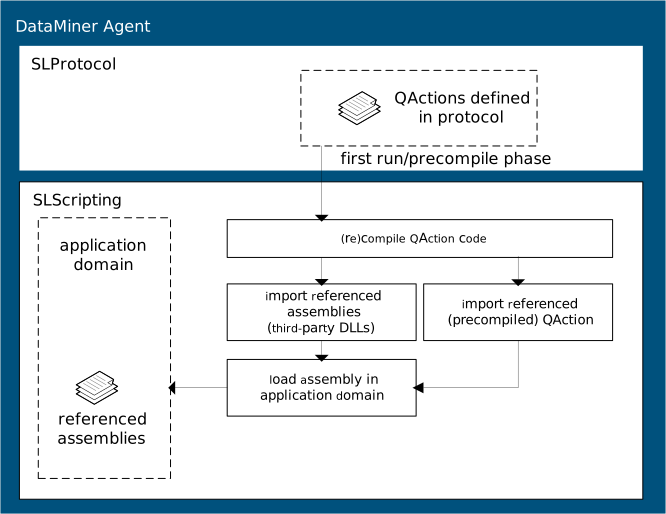
There is an important difference between QAction DLLs and third-party DLLs. When a protocol is updated, the QActions are recompiled and the new versions of these QActions are loaded in the application domain. The protocol will then start using these new versions of the QActions. This allows the editing of QActions of protocols without the need for a restart of the SLScripting process (which requires a DataMiner restart). Restarting the elements that run the protocol suffices to start using the edited QAction. This is not the case for third-party DLLs. Once loaded in the application domain, these cannot be unloaded, so a DataMiner restart is required in order to start using an edited third-party DLL.
Preprocessor directives
DataMiner compiles QActions with the following preprocessor directives:
DCFv1: This preprocessor directive ("#define DCFv1") is automatically added when a QAction is compiled.
In QActions, all DCF-related code can then be enclosed within the following preprocessor directives:
#if DCFv1 // DCF related code. #endifDBInfo: This preprocessor directive ("#define DBInfo") is automatically added when a QAction is compiled. The presence of this directive indicates that the GetLocalDatabaseType method (SLProtocol) can be used to get the type of the local database.
Before this method call was used, it was good practice to use "#if DBInfo" in order to check whether the method was supported on the DataMiner Agent. However, since the minimum supported DataMiner version now already supports this method, enclosing the call as illustrated below is no longer required. For example:
#if DBInfo
string databaseType = protocol.GetLocalDatabaseType();
protocol.Log("Local DB type is: " + databaseType);
#else
protocol.Log("This version cannot check local DB.");
#endif