Ticketing 2.1.0
Prerequisites
DataMiner 10.5.9/10.6.0 or higher must be installed. If you intend to use MediaOps Plan alongside Ticketing (see below), DataMiner 10.6.4/10.7.0 or higher must be installed.
Standard Data Model Registration 2.0.x or higher must be installed.
The user installing Ticketing needs the following user permissions:
If you are upgrading an existing Ticketing installation to this version, make sure the hidden Ticketing Lock Manager element is explicitly configured to use version 1.0.3.4 of the Skyline Lock Manager connector. Do not set the element to use the Production version; it must reference version 1.0.3.4 directly.
Any users who will use the Ticketing Solution (including the user installing the solution) will need to have write access to the root view and the Ticketing Lock Manager element under the root view (via Permissions > Views; see Configuring a user group).
Installing the following apps alongside the Ticketing Solution will provide access to additional functionality:
- MediaOps.Plan 1.6.x or higher: Required to be able to assign people to tickets.
- InfraOps: Required to be able to link assets to tickets.
To be able to send email notifications to people, SMTP needs to be configured on all DMAs of the DMS.
New features
Status progress context menu [ID 45900]
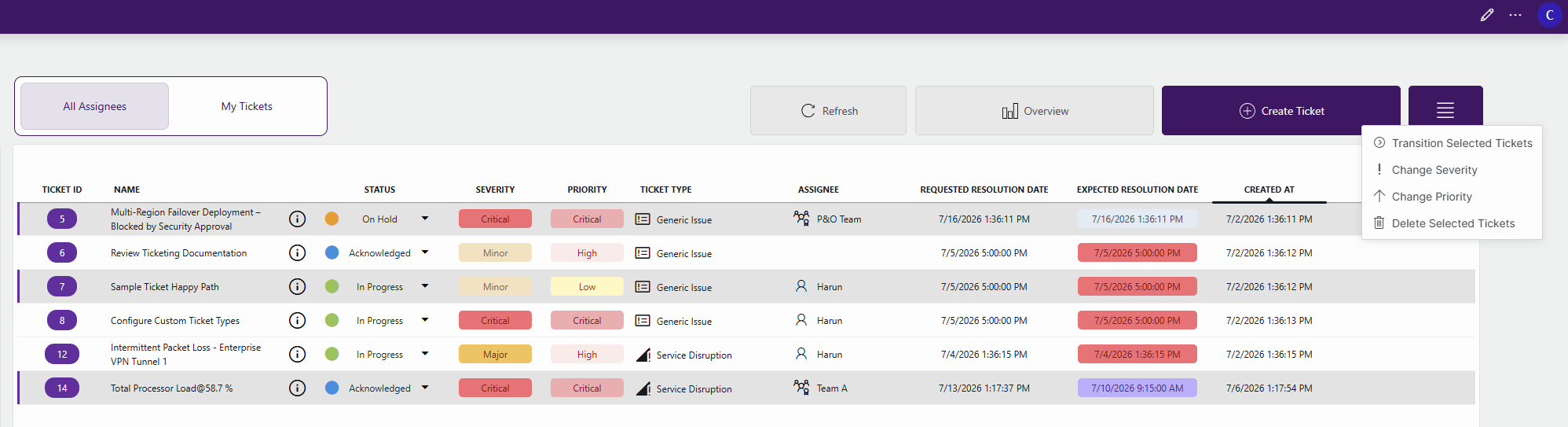
You can now transition tickets directly from the Tickets table without opening the ticket details page.
The Status column now includes a drop-down indicator with a context menu that only shows transitions available for the ticket's current state. The most likely transition (i.e., the next step in the standard workflow or "happy path") is listed at the top for quick access.
This reduces the number of clicks needed to progress tickets and streamlines common ticket management actions.
Ticket history [ID 45904]
A new Ticket History view is now available from the ticket Information page via the History button.
This view provides a complete audit trail of ticket field and status changes, including the following:
- Date and time of the change.
- Modified field or status.
- User who made the change.
- Previous value.
- New value.
Note
Updates to user notes are not included in this ticket history.
Tickets can now be assigned to teams [ID 45911]
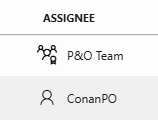
It is now possible to assign tickets directly to a team from the People & Organizations app. Previously, tickets could only be assigned to contacts.
Dedicated icons have also been added so you can easily distinguish between teams and contacts when assigning tickets:
Improved access to linked resources from tickets [ID 45913]
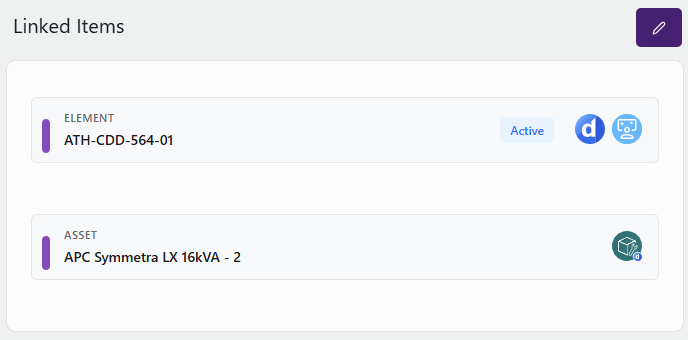
Previously, for linked elements, services, and alarms, only hyperlinks to the Monitoring app were available. Now you can also navigate to Cube for these resources. While navigating to the Monitoring app is perfect for operational monitoring and quick access, the new Cube link will be especially helpful in case more advanced analysis or troubleshooting is needed.
To make navigation more intuitive, dedicated icons indicate the available Monitoring and Cube links. In addition, linked assets now use the Asset Manager icon, making them easier to distinguish from other resource types.
Email notifications for ticket activity and status changes [ID 45914]
An email notification system has been added so users can stay informed about ticket activity and status changes. This includes the following features:
Automatic notifications for assigned users:
- Users assigned to a ticket automatically receive email notifications for all changes made to that ticket.
- This notification cannot be disabled while the ticket remains assigned; assigned users will continue to receive notifications until the ticket is reassigned or unassigned.
Subscription-based notifications:
- Users can subscribe to tickets they want to follow, even when they are not assigned.
- Non-assigned users can opt in or out of notifications at any time.
- Upon subscribing or unsubscribing, users receive a confirmation email.
- Whenever changes are made to a ticket, including notes and other ticket modifications, subscribers receive an email update.
Direct ticket access from notifications:
- Notification emails include a direct link to the corresponding ticket.
- The ticket URL is currently configured as a predefined link but will become configurable in a future release to support customer-specific endpoints.
Note
Automatic notifications for assigned users are only possible in case a valid email address is configured for these users in the People & Organizations app.
Base, extended, and standalone ticket types [ID 45925]
Ticket types can now be organized using a base, extended, and standalone model.
- Base ticket types define reusable fields and cannot be used directly to create tickets.
- Extended ticket types inherit fields from a base ticket type and can define additional fields.
- Standalone ticket types define their own fields and do not inherit from a base ticket type.
This makes it easier to reuse common field definitions while still allowing ticket-type-specific extensions where needed.
For example, a Network Issue Base ticket type can define common fields such as Affected Service, Customer Impact, and Location. Extended ticket types such as Router Issue and Link Issue can then inherit these fields while adding information specific to their respective issue categories. The Router Issue ticket type could include fields such as Routing Protocol Affected, Failover Status, and Configuration Change Detected, while the Link Issue type could include fields such as Affected Circuit, Link Utilization, and Observed Packet Loss.
The ticket type UI provides visibility into these relationships by displaying the base ticket type from which an extended ticket type inherits and which ticket types extend a given base ticket type.
To ensure data consistency, validation rules prevent modifications that would invalidate existing ticket data, such as changing, removing, or deleting ticket type relationships that are already in use.
Bulk actions for ticket management [ID 45950]
Managing large numbers of tickets is now more efficient with the introduction of bulk actions. You can now select multiple tickets and perform common operations in a single action instead of updating each ticket individually.
The following bulk actions are available via the Bulk Action button:
- Transition Selected Tickets: Move multiple tickets to a new lifecycle state in a single operation.
- Change Severity: Update the severity level of multiple tickets at once.
- Change Priority: Modify the priority of multiple tickets simultaneously.
- Delete Selected Tickets: Remove multiple tickets in a single action.
These capabilities help operators and support teams manage high ticket volumes more efficiently, reduce repetitive manual work, and ensure consistent updates across related tickets.
Changes
Enhancements
Ticket type fields can now be filled in during ticket creation [ID 45915]
When creating a ticket via the Ticketing app or in Cube, you can now immediately provide values for ticket type-specific fields. Previously, these fields had to be filled in afterwards through Ticket Information > Additional Info.
This streamlines ticket creation and helps ensure that all relevant ticket metadata is captured from the start.
Prevent editing of ticket types that are already in use [ID 45920]
To protect ticket data integrity, Ticketing now restricts changes to ticket type definitions once those ticket types are already used by existing tickets.
When a ticket type is already in use:
- Custom fields can no longer be removed.
- The data type of an existing field can no longer be changed.
- Enumeration values that are already in use can no longer be modified or deleted.
In addition, base ticket types can no longer be structurally modified if an in-use extended ticket type depends on them.
However, the following actions remain possible when a ticket type is in use:
- New fields can still be added.
- New enumeration values can still be added.
- Existing field names can still be updated.
These restrictions help prevent inconsistencies and potential information loss that can occur when ticket type field definitions are changed after tickets have been created.
Sample tickets and ticket types for new installations [ID 45923]
To improve the first-time user experience, Ticketing now automatically creates sample tickets during a fresh installation.
These examples showcase key Ticketing concepts, including ticket states, priorities, severities, assignments, notes, People & Organizations integration, and custom ticket types.
Example tickets include tasks such as deploying the Ticketing solution, reviewing the documentation, configuring ticket types, creating a first custom ticket, and progressing tickets through various lifecycle states. This allows users to explore the application and its workflows without starting from an empty environment.
Automatic linking of elements and assets [ID 45926]
Ticketing now automatically resolves relationships between elements and assets when linked items are added to a ticket.
When you add an element that has a linked asset, the asset is added automatically. Likewise, when you add an asset that has a linked element, the element is added automatically. This happens both during ticket creation and ticket editing, ensuring that any existing element–asset relationship is reflected in Ticketing.
Linked items are displayed together in the Linked Items section of the ticket, which supports elements, services, assets, and alarms, allowing tickets to provide visibility into the operational context associated with the reported issue.
For example, imagine a ticket is created for the element Router-A. If no asset is linked to that element, only the element is added to the ticket. If Router-A has a linked asset in Asset Manager, that asset is automatically added as well, making both objects visible in the Linked Items section.
Automatically added items are protected from accidental removal. When a user attempts to remove a linked item, a confirmation dialog is shown to determine whether the related item should also be removed.
Affected resources are displayed using their resource type (Element or Service) rather than including the type in the resource name itself.
Enhanced ticket color coding [ID 45941]
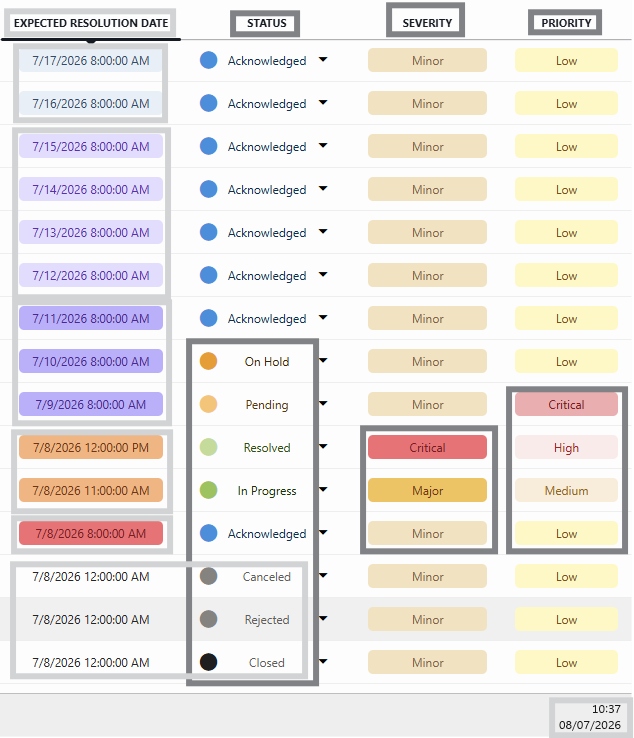
To improve ticket visibility and help operators quickly assess ticket status, urgency, and SLA risk, the Ticketing app now uses a standardized color-coding scheme for Status, Severity, Priority, and Expected Resolution Date.
These color indicators provide immediate visual feedback, making it easier to identify tickets that require attention and prioritize follow-up actions.
Status colors
The status color allows operators to quickly distinguish active tickets from completed or inactive tickets. Ticket statuses are represented using the following colors:
| Status | Color |
|---|---|
| Acknowledged | Blue |
| In Progress | Green |
| Pending | Amber |
| On Hold | Orange |
| Resolved | Light Green |
| Closed | Black |
| Rejected | Gray |
| Canceled | Gray |
Severity colors
The severity colors make high-impact incidents immediately recognizable within ticket lists and dashboards. Severity indicates the impact of the issue and is displayed using distinct colors:
| Severity | Color |
|---|---|
| Critical | Red |
| Major | Orange |
| Minor | Light Brown |
Priority colors
Priority indicates how urgently a ticket needs to be resolved. These colors help support teams focus on the most urgent work first.
| Priority | Color |
|---|---|
| Critical | Red |
| High | Light Red |
| Medium | Beige |
| Low | Light Yellow |
Expected resolution date colors
The expected resolution date is color-coded based on the remaining time before the target resolution date:
| Resolution Timeline | Color |
|---|---|
| Closed, Rejected, or Canceled tickets | No coloring applied (inactive tickets) |
| Past due date | Red |
| Due today | Orange |
| Due within the next 3 days | Dark Purple |
| Due in 4–7 days | Light Purple |
| Due more than 1 week away | Light Pigeon Blue |
This color scheme helps operators identify overdue tickets, upcoming deadlines, and tickets with sufficient remaining resolution time at a glance. Tickets that are no longer active do not display urgency-based coloring because no further action is required.
Fixes
Resolution dates not sorted chronologically [ID 45908]
When you sorted on Expected Resolution Date or Requested Resolution Date, tickets were not correctly ordered chronologically.
This issue has been resolved, improving visibility of upcoming and overdue resolutions.
Deprecated contacts could still be used in ticket assignment [ID 45912]
In some cases, deprecated contacts from the People & Organizations app could still be returned and used when assigning tickets. This could cause unexpected behavior when multiple contacts shared the same email address and one or more of those contacts had been deprecated.
This issue has been resolved. Ticket assignment and the My Tickets filter now correctly use the active contact linked to the user's email address.