DataMiner web apps Feature Release 10.6.3
This Feature Release of the DataMiner web applications contains the same new features, enhancements, and fixes as DataMiner web apps Main Release 10.5.0 [CU12].
Note
For known issues with this version, refer to Known issues.
Tip
- For release notes related to the general DataMiner release, see General Feature Release 10.6.3.
- For release notes related to DataMiner Cube, see DataMiner Cube Feature Release 10.6.3.
Highlights
DOM security UI now supports instance-level security [ID 44385]
With the DOM security UI, you can now not only configure security settings on DOM definition level, but also on DOM instance level. This means that you can now allow user groups access to an individual DOM instance based on whether that DOM instance contains at least one of a specified set of values for a specified FieldDescriptor.
For example, with the configuration illustrated below, the user group London office will only be able to read the "Jobs" instances where the Assigned office field (i.e., a DomInstanceFieldDescriptor) contains the ID of the DOM instance for the London office.
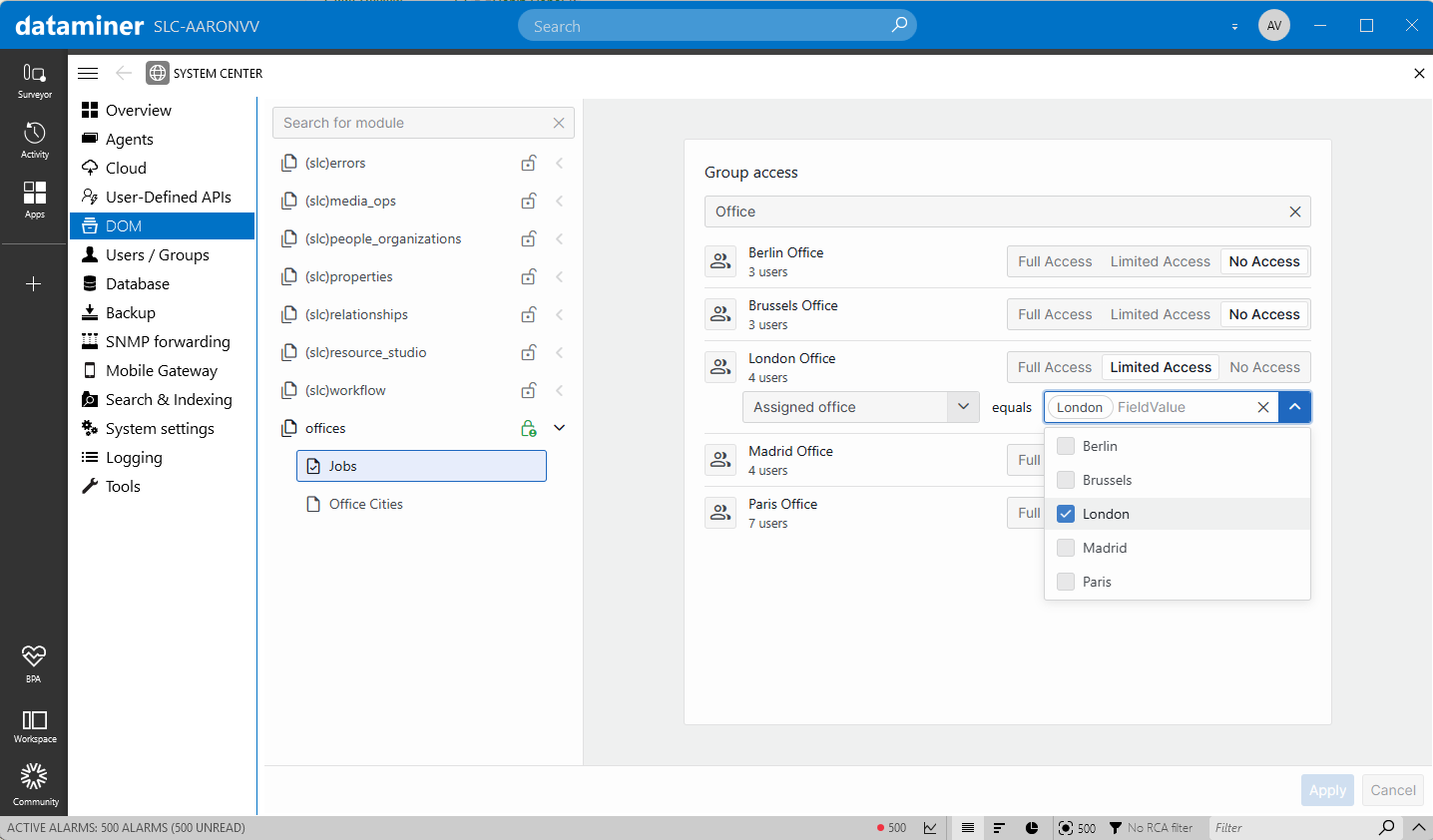
For more information on the server-side changes behind this feature, see DataMiner Object Models: Fine-grained security on instance level [ID 44233].
Note
To access the DOM security UI, go to https://<DMA IP or hostname>/dom. In DataMiner Cube, this UI can be accessed via System Center > DOM.
New features
Dashboards app: Improved Add button in navigation pane [ID 44432]
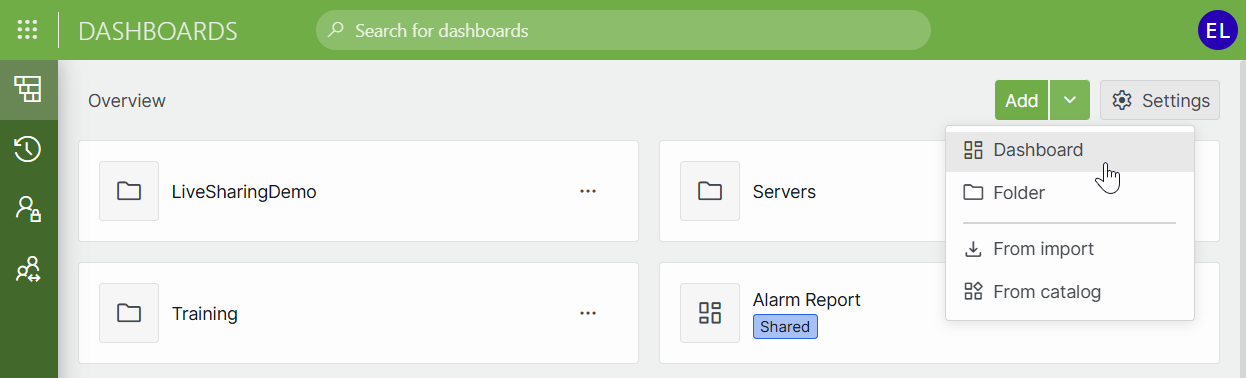
In the navigation pane, a new Add button is now available to users with permission to add dashboards.
Clicking Add will create a new dashboard.
Clicking the down arrow on the right will open a menu with the following commands:
- Dashboard
- Folder
- From import
- From catalog
GQI DxM: New internal data source 'Get active sessions' & additional internal metrics [ID 44447]
The GQI DxM now contains an internal data source named Get active sessions, which will retrieve information about the query sessions that are currently active. Also, a number of internal metrics have been added meant for future debugging and performance investigations.
Get active sessions
The data retrieved by this new data source is a snapshot of all query sessions that were active at the time the first page was requested, including the session used to fetch the active session data. This means that later pages may include sessions that have been closed since then.
Prerequisites:
- Only user with the Modules > System configuration > Tools > Admin tools permission will be able to fetch data using this data source.
- This data source will only be available in the query builder if the
GQIOptions.EnableInternalCapabilitiessetting is set to true in the GQI DxM.
Default columns:
| Displayed name | Internal name | Type | Description |
|---|---|---|---|
| Session ID | sessionId | Guid | ID of the query session. |
| Query Name | queryName | string | Query name/tag, i.e., a custom identifier that can be provided by the client when executing a query. |
| User | user | string | Username of the user who opened the session. |
| Created | created | DateTime | Time at which the session was opened. |
Other columns:
| Displayed name | Internal name | Type | Description |
|---|---|---|---|
| Last Updated | lastUpdated | DateTime | Time at which the session was last opened, was last used to fetch data, last received a heartbeat, etc. |
| Fetch type | fetchType | int | Setting provided by the client when opening the session to indicate how the query should be optimized. Possible values: - "Page by page" (0) - "All data" (1) |
| Enabled Updates | enabledUpdates | bool | Whether or not the client has enabled updates for the session. |
| Locale | locale | string | The culture used for the session. See: CultureInfo.Name Property |
| Time Zone | timeZone | string | The ID of the time zone used for the session. See: TimeZoneInfo.Id Property |
| Rows Fetched | rowsFetched | int | The total number of rows that have been fetched from the session. |
| Pages Fetched | pagesFetched | int | The total number of pages that have been fetched from the session. |
Dashboards app: Breadcrumbs in details pane [ID 44481]
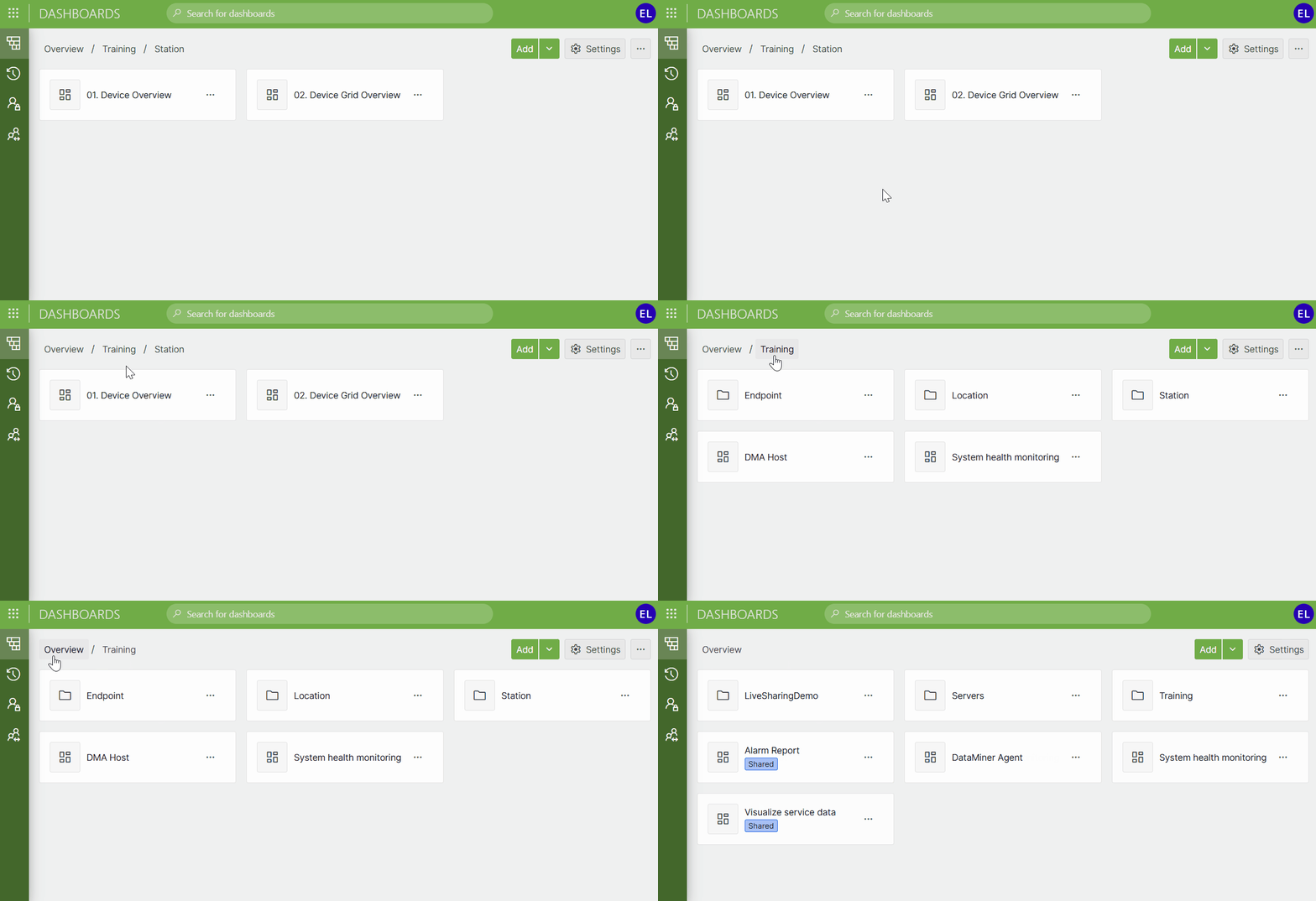
Breadcrumbs have now been added to the details pane.
By clicking the first breadcrumb, which is named Overview, you will navigate back to the root view.
Dashboards/Low-Code Apps - Timeline component: Zooming vertically while keeping the ALT key pressed [ID 44524]
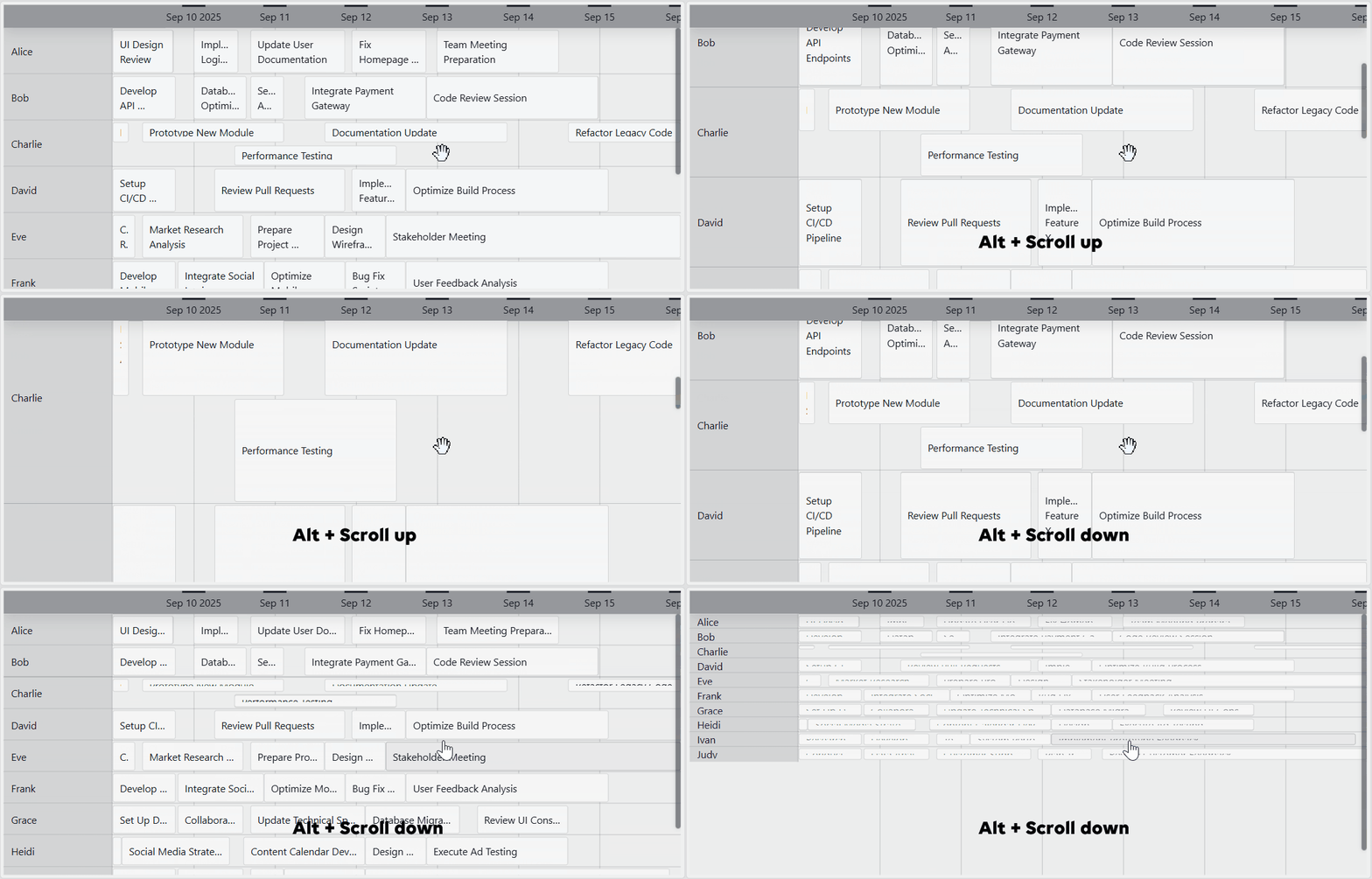
In a Timeline component, it is now possible to vertically zoom in or out.
To have all data on a timeline grow or shrink in height, rotate the mouse wheel while keeping the ALT key pressed.
Note that items cannot shrink below 1/10th of their initial height or grow above 10 times their initial height.
Dashboards/Low-Code Apps - Timeline component: Group templates [ID 44557]
When a Timeline component has grouping applied, from now on, the appearance of those groups can be customized using the template editor.
To do so, go to Layout > Groups > Template.
Low-Code Apps: Support for custom CSS files [ID 44570]
When editing a low-code app, you can now make it use a custom CSS file.
To do so, go to App settings. There you can add, update, and delete such a file.
Caution
This feature is intended for advanced users only. Use it at your own risk. Also, we cannot guarantee long-term support of CSS customizations as the default HTML structure of low-code apps may change over time.
Dashboards/Low-Code Apps - Timeline component: Group height can now be set to either 'Fixed' or 'Grow' [ID 44577]
When a Timeline component has grouping applied, from now on, under Layout > Groups > Height, the height of those groups can be set to either "Fixed" or "Grow".
When set to "Fixed" (i.e., the default setting), the items within a group will shrink depending on the number of items in that group. That way, the height of the group will stay the same.
When set to "Grow", all items within a group will have the same height, and the height of the group will grow accordingly.
Note
Up to now, "Grow" was the default behavior. In order not to break existing setups, Timeline components in existing dashboards and low-code apps will not have their group height automatically set to "Fixed".
Changes
Enhancements
Dashboards/Low-Code Apps: Enhanced component data mechanism [ID 44015]
Many components in dashboards and low-code apps can be configured to be linked to component data, i.e., data that is made available by other components in the dashboard or app. This mechanism has now been reworked in order to enhance overall performance, scalability, reliability and robustness.
Dashboards/Low-Code Apps: Enhanced theme logic [ID 44336]
Because of a number of enhancements to the theme logic, overall performance has increased when loading a dashboard or a low-code app.
Note
As the theme folder structure has been changed, an incorrect theme could be assigned to dashboards and low-code apps imported as part of a Catalog package.
Dashboards/Low-Code Apps - Column & bar chart component: Minor enhancements [ID 44416]
A number of minor enhancements have been made to the Column & bar chart component.
For example, while data was being loaded, up to now, no loader bar would be displayed when a view was applied in the component. From now on, a loader bar will also be displayed when a view is applied.
Also, API calls will only be performed again when their arguments change, and no abort errors will be shown anymore.
Dashboards app: List of recently opened dashboards will now be sorted chronologically [ID 44452]
In the sidebar of the Dashboards app, up to now, the list of recently opened dashboards would be sorted alphabetically. From now on, the dashboards in that list will be sorted by the time at which they were opened, from most recent to least recent.
Dashboards/Low-Code Apps - GQI components: 'Empty result message' setting can now be cleared [ID 44472]
In the Table, Column & bar chart, Line & area chart, Pie & donut chart, Grid, Timeline, and Node edge graph components, the Empty result message setting allows you to specify a custom message that is displayed when a query returns no results.
From now on, it will be possible to clear this setting's value. If you do so, no message will be displayed when a query returns no results, and the component will be empty.
Dashboards app: Context menu no longer accessible from 'Recent items', 'Private dashboards', or 'Shared dashboards' pane [ID 44491]
When, in the sidebar, you right-clicked in any of the panes, up to now, the same context menu would appear, i.e., a menu allowing you to add a dashboard, add a folder, or open the Dashboards settings window.
From now on, you will only be able to open this context menu when right-clicking the navigation pane. You will no longer be able to open this context menu when right-clicking in the Recent items, Private dashboards, or Shared dashboards pane.
Dashboards/Low-Code Apps: Clearer error message indicating that a component name is already in use [ID 44498]
When you tried to rename of component, and the name you entered was already in use, up to now, the following error message would appear:
This configuration name is already used in this page/panel.
This message has now been changed to make it clearer.
This name is already used in this page/panel.
GQI DxM: Domain user name will now be included in the OnInitInputArgs of a GQI extension [ID 44509]
Up to now, for a GQI extension (i.e., an ad hoc data source or a custom operator) to be able to retrieve the username of the user who launched the query, an additional connection had to be set up, which could cause overall performance of the extension to decrease.
From now on, the OnInitInputArgs will include a Session object that will contains the domain user name of the user who launched the query.
Important
This feature will only work in conjunction with DataMiner server version 10.5.0 CU12/10.6.0/10.6.3 or newer.
Landing page and web apps: Icons, favicons, and titles updated [ID 44520]
The icons and favicons of the DataMiner landing page and the following DataMiner web apps have been updated:
- Dashboards
- DOM
- Monitoring
Also, the app titles have been standardized to ensure consistency across all apps.
Interactive automation scripts: UI components Time and Calendar can now all display seconds [ID 44521]
Up to now, in interactive automation scripts launched from web apps, only the UIBlockType.Time component with AutomationTimeUpDownOptions had the ability to show seconds. From now on, all the following UIBlockType.Time components, as well as the UIBlockType.Calendar component, will also have that ability. Their option classes will now all have a ShowSeconds property, which will be set to false by default.
UIBlockType.TimewithAutomationDateTimePickerOptionsUIBlockType.TimewithAutomationDateTimeUpDownOptionsUIBlockType.TimewithAutomationTimePickerOptionsUIBlockType.CalendarwithAutomationCalendarOptions
Important
This feature will only work in conjunction with DataMiner server version 10.6.0/10.6.3 or newer.
Visual Overview in web apps: Redesigned popup windows [ID 44530]
In web apps, the popup windows that appear in visual overviews have now been redesigned.
Dashboards/Low-Code Apps: Themes will now be included when exporting or importing a dashboard or a low-code app [ID 44540]
When you export or import a dashboard or a low-code app, from now on, the theme will now automatically be included in the export or import package.
Interactive automation scripts in web apps: New UsePreviousCollapsedState property will allow tree nodes to restore their IsCollapsed state when the UI is updated [ID 44541]
When, in an interactive automation script, a TreeView control was used with the SupportsLazyLoading option set to false, up to now, each time the UI was updated, all tree nodes would revert their expanded state back to the IsCollapsed setting.
Tree nodes now have a new UsePreviousCollapsedState property. By default, this property will be set to false. When set to true, each time the UI is updated, the previous state of the tree node in question will be restored. If no previous state is available, the current IsCollapsed state will be applied.
Important
This feature will only work in conjunction with DataMiner server version 10.6.0/10.6.3 or newer.
GQI DxM: 'Get parameters for elements where' data source can now query indexed logger tables [ID 44553]
From now on, it will be possible to use the GQI data source Get parameters for elements where to query indexed logger tables that are stored in an Elasticsearch or OpenSearch database.
Note
This will not be possible on systems using STaaS. This only applies to systems with an Elasticsearch or OpenSearch database.
Web apps: Title of login screen will now display the app name in bold [ID 44561]
When you try to log in to a certain web app (e.g., Dashboards, Monitoring, etc.), the title of the login screen mentions the name of the app you want to access: Sign in to <System name> to access <App name>.
In that title, the app name will now be displayed in bold to make it stand out more.
GQI DxM: Enhanced filtering on object reference columns [ID 44567]
Up to now, it was not possible to add an equals filter on e.g., an elementID column. It was only possible to add a contains filter.
From now on, it will be possible to add an equals filter on all columns containing the following object references:
- ElementID
- InterfaceID
- ParamID
- RedundancyGroupID
- ServiceID
- ViewID
Also, when using the following data sources, it will now also be possible to use a filter value in order to retrieve only the necessary data from the DataMiner System:
| Data source | Columns on which can be filtered |
|---|---|
| Get parameters for elements where | elementID |
| Get Alarms | element ID and parameter ID |
| Get behavioral change events | element ID and parameter ID |
| Get trend data pattern events | element ID and parameter ID |
| Get relational anomalies | element ID and parameter ID |
Important
The sorting behavior of these columns has changed. Up to now, the columns would be sorted according to the internal logic of these reference objects. From now on, they will be sorted by the key (string) value of the reference objects.
Dashboards/Low-Code Apps: Icons of the editor buttons on the left are now aligned vertically [ID 44612]
In the Browse templates window, the icons of the editor buttons on the left are now aligned vertically.
Fixes
Dashboards/Low-Code Apps - State timeline component: Problems when processing state changes [ID 44277]
A number of issues have been fixed with regard to the State timeline component. These issues would mostly occur when processing state changes.
Dashboards/Low-Code Apps: Maps component would incorrectly fetch markers with larger bounds than necessary when you zoomed in or out [ID 44381]
In some cases, a Maps component would incorrectly fetch markers with larger bounds than necessary when you zoomed in or out.
As this issue has now been fixed, overall performance has increased when zooming in or out in a Maps component.
Web Services API: Problem connecting to the offline agent of a Failover pair [ID 44410]
Up to now, the Web Services API would fail to establish a persistent admin connection towards the offline agent of a Failover pair. An attempt to establish such a connection would be made each time an API method was called on the offline agent, causing the logging of SLNet and the Web Services API to get flooded with error messages.
From now on, it will be possible for the Web Services API to establish a persistent admin connection towards the offline agent of a Failover pair. Also, the API will now be aware that the agent is offline.
Web apps: Problem when deleting a web app [ID 44411]
Up to now, when a web app was deleted, its info file would get deleted first. However, without this file, it cannot be determined whether a user has permission to delete the app. Also, in cases where the delete operation would partially fail, the absence of the info file would make it impossible to retry the delete operation.
From now on, when a web app is deleted, its info file will be deleted last.
Dashboards/Low-Code Apps - Line & area chart component: More data points displayed than necessary when 'Trend points' was set to 'Average (fixed interval)' [ID 44422]
When in a Line & area chart component, the Trend points option was set to "Average (fixed interval)", in some cases, the trend graph would incorrectly display more data points than necessary.
DataMiner web upgrade packages would incorrectly downgrade the DataMiner Assistant DxM when the installed version was more recent [ID 44441]
When you installed a DataMiner web upgrade package, up to now, the DataMiner Assistant DxM would incorrectly be downgraded when the system found an installed version that was more recent than the one included in the package.
From now on, a DataMiner web upgrade package will no longer be allowed to downgrade the DataMiner Assistant DxM. It will only be allowed to install a new DataMiner Assistant DxM if the installed version is older than the one included in the package.
Dashboards/Low-Code Apps -Timeline component: Scrolling could cause the groups to no longer be aligned with the timeline items [ID 44445]
When you scrolled inside a Timeline component in which multiple groupings were applied, in some cases, the different groups would no longer be aligned with the timeline items.
Dashboards/Low-Code Apps -Timeline component: Problem after a transition from summer time to winter time or vice versa [ID 44455]
When the DataMiner Agent had a fixed time zone, and the client computer had a time zone with a daylight saving time, up to now, transitioning from summer time to winter time and vice versa could yield unexpected results in a Timeline component. For example, timeline items could be too long or too short, be positioned incorrectly, or even be missing.
From now on, all timeline items will be displayed correctly after a transition from summer time to winter time or vice versa.
GQI DxM: Problem with Timer callbacks could cause the GQI DxM to stop working [ID 44460]
In some cases, exceptions could be thrown in the callback of System.Threading.Timer, causing the GQI DxM to stop working.
See also: GQI: Problem with Timer callbacks could cause SLHelper to stop working [ID 44458]
Dashboards/Low-Code Apps - Maps component: Problem when re-applying the selection [ID 44461]
Up to now, re-applying the selection in a Maps component would incorrectly select all markers with the same underlying row key, even across different queries. From now on, the query columns and the row key will be taken into account.
Dashboards/Low-Code Apps - Alarm table component: Problem when an alarm was removed from a group that had been deleted earlier [ID 44463]
When the alarms in an Alarm table component are grouped by time, they are grouped under group names such as "Today", "Yesterday", and "Last Week".
Up to now, when a certain group name had been removed (e.g., by means of an automation script), and an alarm under that group name returned to its normal state, an error would occur when the Alarm table component attempted to remove the alarm.
GQI DxM: Aggregations performed on columns of type integer would incorrectly produce a column of type double [ID 44492]
Up to now, when a min, max, or sum aggregation was performed on a column of type integer, the column containing the aggregation results would incorrectly be of type double instead of type integer. As a result, operators that required a column of type integer would throw an exception when reading the column in question.
Low-Code Apps: Problem with mouse actions when using a Chromium-based browser [ID 44528]
When you had opened a low-code app in a Chromium-based browser, and you clicked the mouse button in one panel while another panel had the focus, nothing would happen. You incorrectly had to click twice to execute the mouse action.
Dashboards/Low-Code Apps - Templates: Default tooltip would show 'Undefined' when selecting a table preset for a component other than a Table component [ID 44529]
When you selected a table preset for a component other than a Table component, up to now, the default tooltip would show "Undefined" because the template could not be mapped to a column.
From now on, when you selected a table preset for a component other than a Table component, no default tooltip will be set.
Dashboards/Low-Code Apps - Color picker: Problem when selecting presets [ID 44531]
When you opened the color picker and selected a preset, up to now, the color scale of the previously selected preset would incorrectly be shown until you selected another preset.
Dashboards app: Folder named ';THEMES' would incorrectly appear in the navigation pane [ID 44532]
In some cases, a folder named ;THEMES would incorrectly appear in the navigation pane on the left.
Low-Code Apps: Problem when using a default theme [ID 44554]
In some cases, a low-code app using a default theme could throw a console error.
GQI DxM: Memory leak in DataMiner GQI Extension Worker SLNet process [ID 44564]
Up to now, in some cases, the DataMiner GQI Extension Worker SLNet process could leak memory. This process is responsible for maintaining shared SLNet connections for GQI extensions (i.e., ad hoc data sources and custom operators).
Dashboards/Low-Code Apps - Node edge graph component: Problem when moving nodes [ID 44571]
When, in a Node edge graph component, node positioning was set to "Linked to data" and the initial viewport was set to "Auto", up to now, when a node was moved, the border of the node would incorrectly not be taken into account. As a result, the new X and Y coordinates of the node would be incorrect, causing the node to not end up at the intended location.
Dashboards/Low-Code Apps - Timeline component: Problem when zooming out until the component switched to minimized view [ID 44581]
When, in a Timeline component, you zoomed out until the component switched to minimized view, certain shapes would not get rendered at the correct position.
Dashboards/Low-Code Apps - Parameter table component: Strings containing decimal values would be sorted incorrectly [ID 44595]
In some cases, strings containing decimal values would be sorted incorrectly.
Dashboards/Low-Code Apps - Timeline component: Changes to certain settings would not get applied correctly [ID 44596]
When changes had been made to the settings of a Timeline component, in some cases, these changes would not get applied correctly.
For example, changes to Layout > General > Query name > Start/End column would not get applied when you removed an older query from the timeline.
Low-Code Apps - Action editor: Script outputs could incorrectly be linked to numeric inputs [ID 44598]
Up to now, it would incorrectly be possible to link the output of a script to a numeric input.
As the output of a script is always a string value, from now on, it will only be possible to link the output of a script to a text input.
Dashboards/Low-Code Apps - Timeline component: Null reference exception could be thrown [ID 44602]
In some cases, a null reference exception could be thrown in a Timeline component.
Web DcM: Problem when generating a PDF report [ID 44613]
In some rare cases, the Web DcM could throw an error while generating a PDF report.
Dashboards/Low-Code Apps - Maps component: Fetched zones would not be cleared when the query changed [ID 44619]
When, in a Maps component, the query was changed, up to now, the zones that had been fetched would incorrectly not be cleared. As a result, panning to those zones would still show markers that matched the previous filter instead of the new one.
From now on, all zones will be cleared whenever the query changes, and the markers will be fetched again with the new query.
Dashboards/Low-Code Apps - Node edge graph component: Problem with real-time updates when a column filter is applied [ID 44622]
Up to now, when a Node edge graph component with real-time updates enabled had a column filter applied, only the value of that column would be updated when an update was received. As a result, when e.g., a node had been moved, in some cases, that node would keep its former position.
From now on, all values will be updated, even those that are not associated with a column filter.
Low-Code Apps: Falsy values would incorrectly not be passed to script input parameters [ID 44631]
Up to now, falsy values (e.g., 0, null, false, empty string, etc.) would incorrectly not be passed to script input parameters.
For example, when a numeric input box passed the value 0 to an input parameter of a script, that script would incorrectly receive '[]' (i.e., an empty JSON array). From now on, the script will receive '["0"]' instead.
Dashboards/Low-Code Apps: Pivot table component would remain empty until you interacted with the dashboard or low-code app [ID 44634]
In some cases, the Pivot table component would remain empty until you interacted with the dashboard or low-code app.
This component is being retired. From DataMiner 10.5.0 [CU10]/10.6.1 onwards, it will only appear in the list of available visualizations if the URL option showAdvancedSettings=true is used.
Dashboards/Low-Code Apps - Data pane: Indices data set would disappear when opening the Element selection box again in the Indices section [ID 44641]
When, in the DATA pane, you opened the Indices section, and selected an element and a parameter, up to now, the indices data set would incorrectly disappear when you opened the Element selection box again.
Dashboards/Low-Code Apps - Numeric input component: Problem with step sizes of type float [ID 44643]
When, in a Numeric input component, the step size was set to the value of type float, up to now, it would not be possible to perform certain step operations. For example, when the component had its value set to 11287.809961 with a step size of 0.000001, it would not be possible to click the Down button.
Also, in some cases, the error message Only steps of size ... are allowed would appear when it should not have appeared.