Managing billable events
A billable event is the event being costed and billed, i.e., the entity for which the calculation is performed.
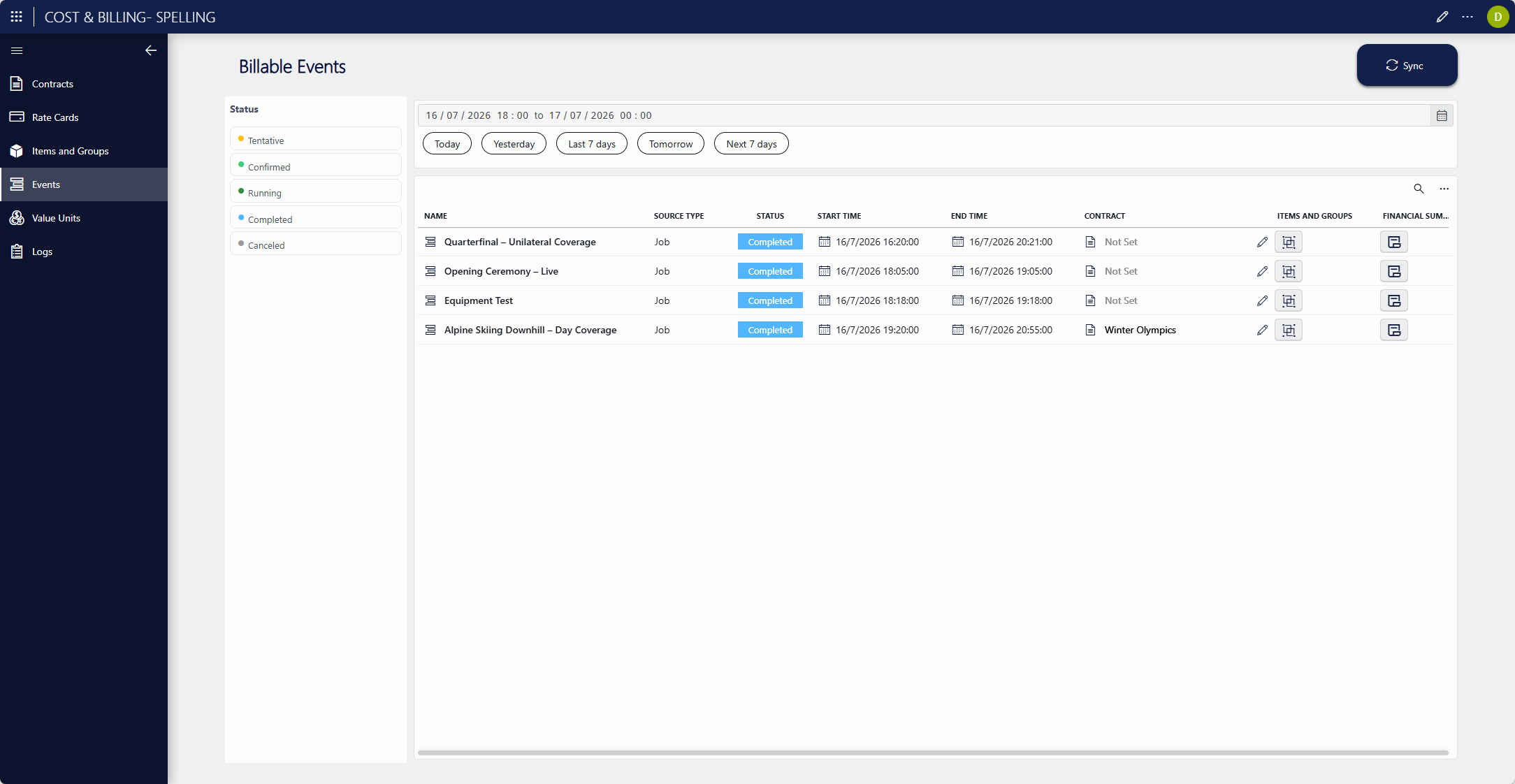
On the Billable Events page, you can manage all billable events brought in from the external solution. If the MediaOps Plan sample integration is used, the billable events are the jobs.
For each billable event, you can:
- View the linked items and groups involved in the event.
- Perform the cost and billing calculation, at any stage of the billable event.
Syncing billable events
With the Sync button on the Billable Events page, you can retrieve all billable events from the integrated external solution.
Important
If Cost & Billing is integrated with MediaOps Plan, this sync must be performed at least every 24 hours. This must be scheduled via DataMiner Scheduler.
This is necessary because on initial installation, the MediaOps Plan Adapter retrieves every available billable event. After that, each sync retrieves the billable events starting from the past 24 hours. If more than 24 hours pass without a sync, changes that happened before that window will not be reflected in Cost & Billing.
Calculating the cost and billing for billable events
To calculate the cost and billing of a billable event:
Make sure the event has a contract assigned.
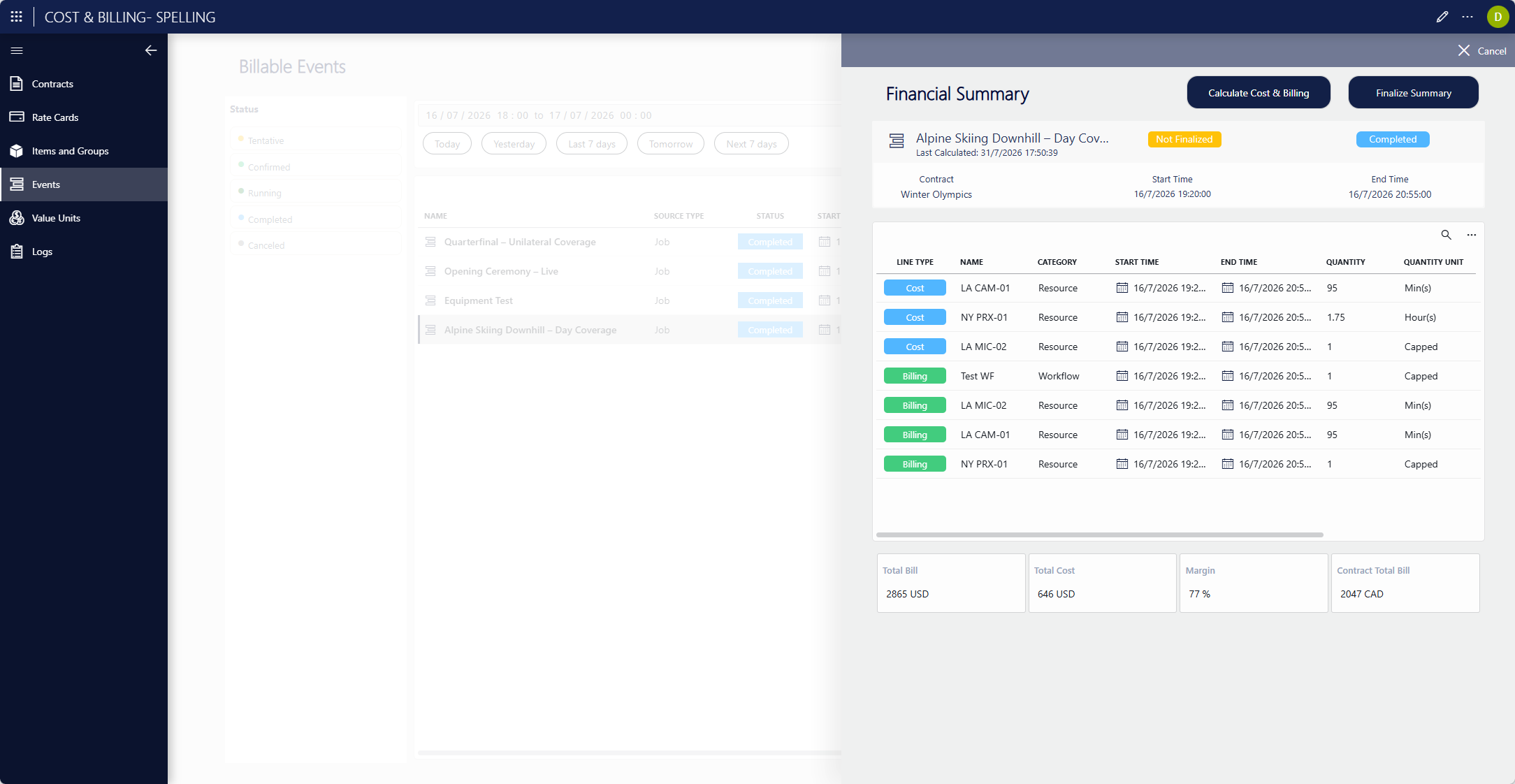
In the Billable Events table, click the corresponding Financial Summary button.
This will open the Financial Summary panel.
In the panel, click the Calculate Cost & Billing button at the top.
The details of the cost and billing will be displayed.
Calculation method with MediaOps Plan
Note
The section below describes the calculation as implemented in the MediaOps Plan sample calculation script, which is time-based. As with the adapter, this script is specific to the MediaOps Plan sample integration: it can be reused as is for other time-based integrations, or used as a basis and customized where a different integration requires different logic. The behavior described below reflects the sample script only. A customized script may calculate differently.
When a calculation is triggered on a billable event, the sample script produces a set of billable items (calculation lines) for that event: one side for cost (what the activity costs your organization) and one side for billing (what the customer is charged). The two sides are calculated independently but follow the same time-based logic.
Calculation script parameters
The calculation script has the following parameters:
- Input: The identifier of the billable event to calculate.
- Output: Exits "success" with a summary or "fail" with the reason of the failure.
Cost calculation
Per item of a billable event, the cost is calculated as follows:
The cost rate card is resolved. For each item, the script looks for a cost rate card assigned to the item itself. If the item has none, it falls back to the rate card of its parent item (in MediaOps terms, the resource pool the resource belongs to). If neither has a cost rate card, the item is skipped and added to the Errors table (available on the Logs page), and it contributes nothing to the cost.
The charged time is determined. The item's real duration (end time − start time) is adjusted by the rate card's timing rules:
- Minimum time interval: The floor. Usage shorter than the interval is charged as the full interval.
- Minimum time increment: The step size beyond the interval. Any excess above the interval is rounded up to the next whole increment.
Rates are applied. The charged time is converted into an amount using the rate card's rates (per minute, per hour, per day). Larger units are filled first, and the smallest available unit absorbs the remainder. A per-use rate, if present, adds a fixed amount on top regardless of duration. If a capped rate is set, the item's cost cannot exceed it.
The result is written. Each rate produces a billable item line, and the lines are summed into the item's total cost. If items were skipped during the calculation, these are added to the Errors table (available on the Logs page).
Optionally, an item's cost can be overridden. After the calculation, the total calculated amount of any billable item can be overridden manually. This value replaces that item's calculated cost entirely, and it is preserved on recalculation: when the event's total cost is computed again, the override is used in the total cost sum instead of the recalculated value.
Billing calculation
Billing is calculated in a similar way, but driven by the contract assigned to the billable event, and only if the event falls within the contract's validity period:
The script determines what is billed. The contract's billing type decides whether billing is calculated for items, groups, or items and groups. In case the billing type is Item and Group, both are calculated independently and their totals are summed.
The billing rate card is resolved. The script looks for a billing rate card assignment on the contract, at the most specific level available:
- For an item: The specific item → its parent item → the item's category.
- For a group: The specific group → the group's category.
If no billing rate card assignment is found, the entry is skipped and added to the Errors table (available on the Logs page).
The charged time is determined. The item or group's real duration (end time − start time) is defined by the billing rate card's timing rules:
- Minimum time interval: The floor. Usage shorter than the interval is charged as the full interval.
- Minimum time increment: The step size beyond the interval. Any excess above the interval is rounded up to the next whole increment.
Rates are applied. The charged time is converted into an amount using the billing rate card's rates. If a capped rate is set, the calculated amount cannot exceed it.
The contract's commercial modifiers are applied. After the base amount is calculated, the contract's rules are applied:
- Uplift %: A percentage increase, applied first.
- Discount %: A percentage reduction, applied after the uplift (so
base × (1 + uplift) × (1 − discount)). - Total bill override amount (per contract): When set, the whole event total becomes that fixed amount and no per-entry billing is calculated.
Rounding is applied. Finally, the contract's rounding mode (no rounding, round up, round down) and decimal precision are applied to each billable item and to the event total.
Optionally, item or group billing can be overridden. After the calculation, the total calculated amount of any billable item and group can be overridden manually. This value replaces that calculated bill, and it is preserved on recalculation: when the event's total bill is computed again, the override is used in the total bill sum instead of the recalculated value.
Currency conversion
Rate cards may be defined in a different value unit than the solution's nominal value unit.
Before it is written to the billable item and rolled into the event totals, any amount produced by a rate card is converted into the nominal value unit, using the exchange rate valid at the time of the billable event (Value Unit Table). This ensures that every total on the event is expressed in the same nominal unit.
Finalizing a billable event
After a calculation, at any point, you can mark a billable event as finalized using the Finalize Summary button in the calculation panel. This freezes the calculated results, so that the billable event can no longer be recalculated.
This can for example be useful when a rate card configuration or a contract condition changes afterwards: freezing the result guarantees that such changes will not affect it.
Note that this action is irreversible: once a billable event is finalized, it cannot be unfrozen or recalculated, and there is no way back.
As long as it has not been finalized, a billable event can be calculated as many times as needed.