Configuring the IP network ports
A DataMiner System makes extensive use of TCP/IP communication. Below, you find an overview of the TCP and UDP ports being used, as well as instruction on how to change port configurations. This information will especially prove useful when you have to configure firewalls in your network.
Note
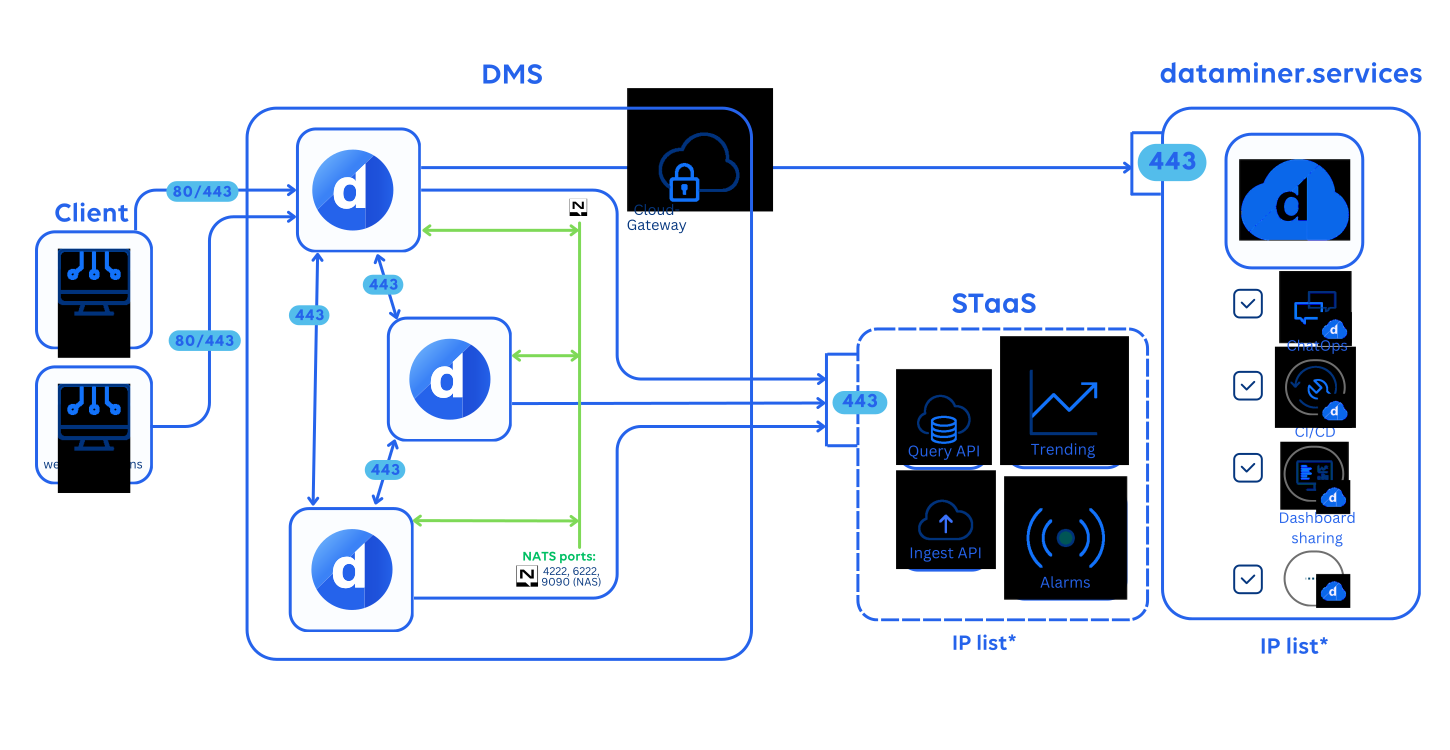
In new DataMiner installations from DataMiner 10.1.11/10.2.0 onwards, only the essential ports are opened by default (80, 8004, as well as 162 from DataMiner 10.1.12 onwards). To make use of DataMiner functionality that requires additional ports, you will need to manually create a firewall rule for those ports.
Tip
See also: DataMiner hardening guide
Overview of IP ports used in a DMS
| Protocol | Ports used | Application |
|---|---|---|
| SNMP | 161/udp 162/udp |
SNMP |
| .NET Remoting | Configurable port Default port: 8004/tcp |
Inter-DMA communication (unless gRPC is configured instead) DataMiner Cube (unless gRPC is configured instead) Alerter |
| HTTP(S) | 80/tcp 443/tcp |
Inter-DMA communication (if gRPC is configured) DataMiner Cube Alerter Web apps (e.g., Monitoring, Jobs) Dashboards, Reporter |
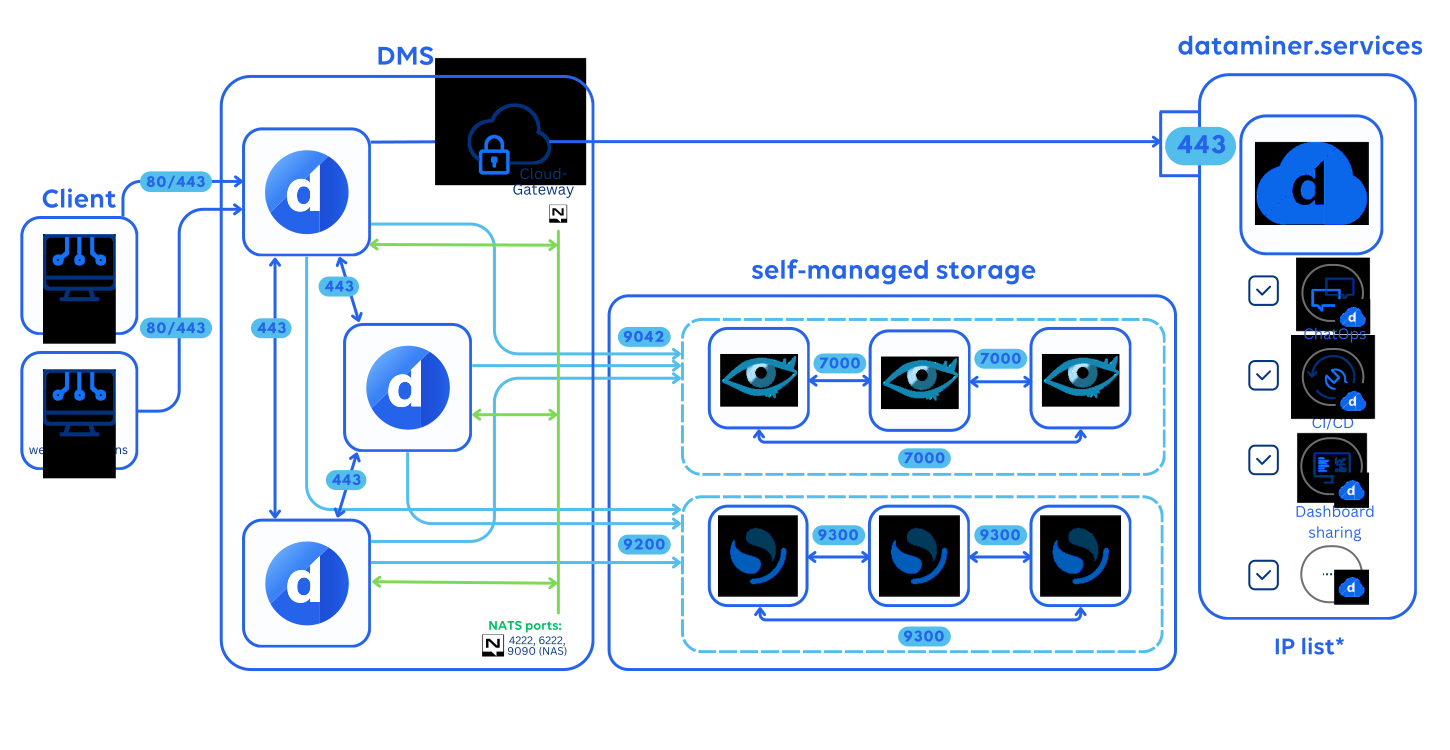
| N/A | 7000/tcp | Cassandra: non-TLS setup (inter-node communication in Failover setups) |
| N/A | 7001/tcp | Cassandra: TLS setup (available from DataMiner 10.1.3 onwards) |
| N/A | 7199/tcp | Cassandra: cluster backups |
| N/A | 9042/tcp | Cassandra: non-TLS setup (server listening for client requests) |
| N/A | 9142/tcp | Cassandra: TLS setup (server listening for client requests) |
| N/A | 9200/tcp | OpenSearch/Elasticsearch |
| N/A | 9300/tcp | OpenSearch/Elasticsearch (inter-node communication) |
| Multiple protocols | 4222/tcp 6222/tcp |
NATS (required from DataMiner 10.1.1 onwards) |
| Multiple protocols | 8222/tcp | NATS Monitoring (relevant from DataMiner 10.1.1 onwards) |
| NAS | 9090/tcp | NATS Account Server (required from DataMiner 10.1.1 onwards) |
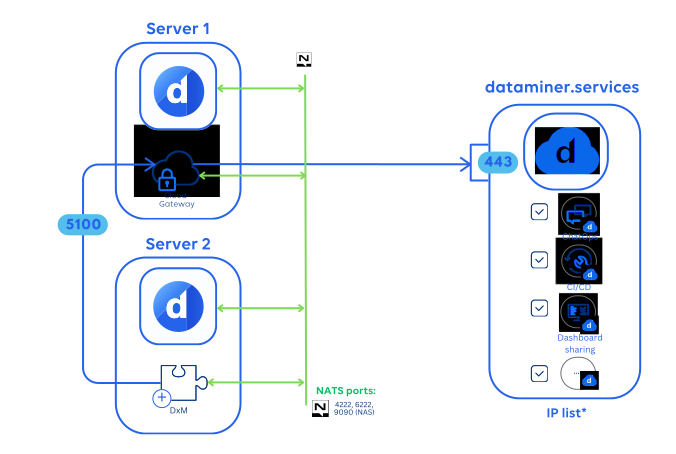
| HTTP(S) | 5100/tcp (internal) | dataminer.services endpoint hosted in DataMiner CloudGateway (by default required from DataMiner 10.3.6/10.4.0/CloudGateway 2.10.0 onwards) |
| Telnet | 23/tcp | Stream (by default disabled) |
Note
- When viewing Stream via DataMiner Cube, access to port 23/tcp is not required. Access is only required when using a Telnet client. However, note that Telnet is by default disabled. For more information on how to enable this, see DataMiner.xml
- Prior to DataMiner 10.1.0 CU10 and 10.2.1, port 8222 is also opened for NATS monitoring. In later DataMiner versions, we recommend manually opening the port in order to be able to debug NATS. With port 8222, you can extract metrics and performance indicators from the NATS message broker, which in turn may allow you to debug if required. However, for maximum security, only expose port 8222 on internal networks to prevent the leaking of sensitive information.
Caution
A problem can occur where port 9090 is already used by a third-party software. For more information, see Default NATS port is already in use.
Graphical representation of IP communication within a DMS
Recommended setup
The image below shows how communication within a DataMiner System should be set up, when you use DataMiner with Storage as a Service (STaaS). The DMAs in the cluster communicate via gRPC (recommended from DataMiner 10.3.6/10.3.0 [CU3] onwards) over HTTPS port 443.
If a server running a DxM does not have CloudGateway installed, any outgoing communication to dataminer.services will go through a CloudGateway available elsewhere in the cluster. In the example below, this means server 2 uses the CloudGateway on server 1 over port 5100.
*IP list: A list of IP addresses that must be allowed through the firewall. For dataminer.services, see Connecting to dataminer.services. For STaaS, firewall rules must allow:
The necessary Skyline-managed endpoints, depending on the region you have registered your system for:
Region IP address West Europe 20.76.71.123 Central US 64.236.64.187 East US 2 72.153.119.116 South East Asia 20.247.192.226 UK South 20.162.131.128
Other setups
The diagrams below shows how communication within a DataMiner System should be set up, when you use DataMiner with dedicated clustered storage (not recommended). The light blue lines indicate the communication towards the databases (in this case an OpenSearch and Cassandra cluster of three nodes each).
Using gRPC (recommended from DataMiner 10.3.6/10.3.0 [CU3] onwards):
Using .NET Remoting:
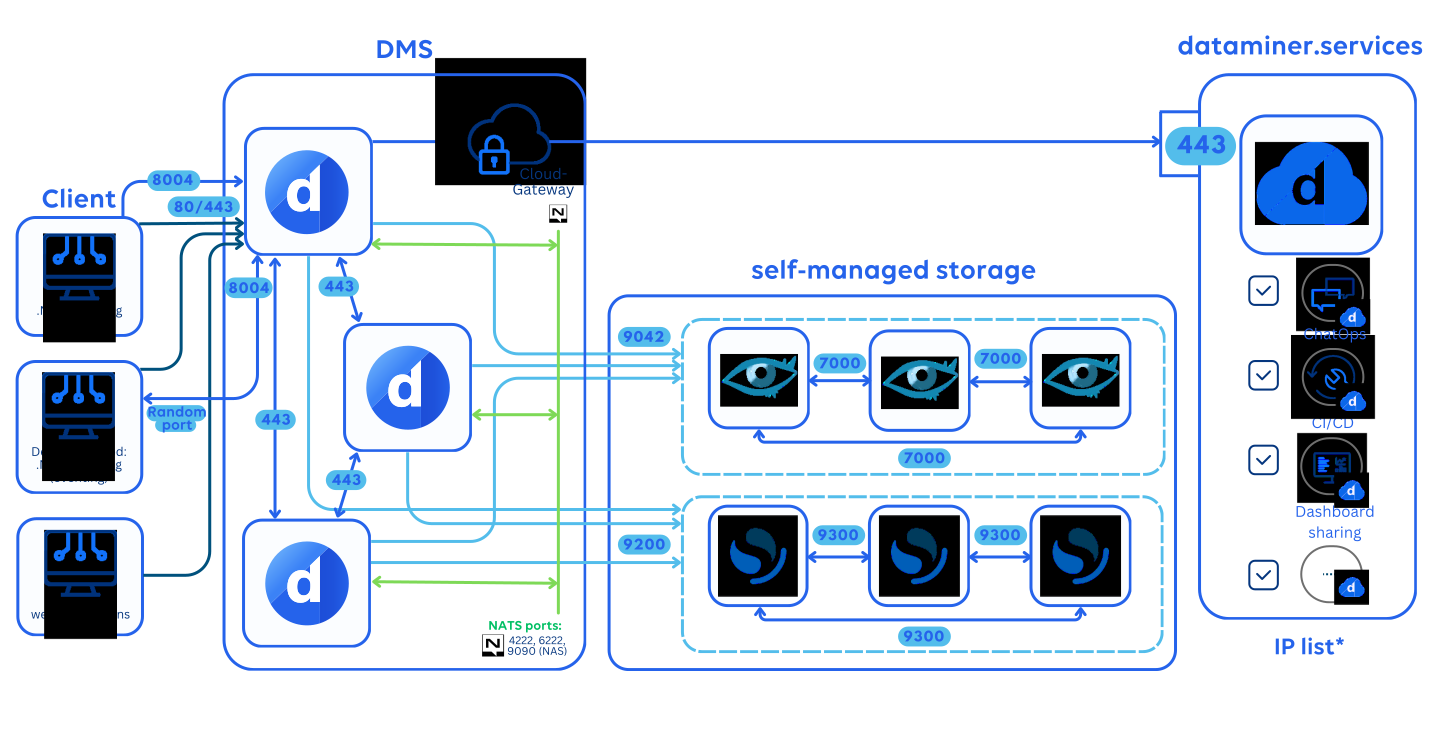
*IP list: A list of IP addresses that must be allowed through the firewall. See Connecting to dataminer.services.
Tip
See also:
Tip
To verify if your DataMiner cluster is working correctly, you can run the SLNet connections between the DataMiner Agents BPA test.