Alarm focus
The alarm focus feature works like a spam filter for your Alarm Console, helping you filter out alarms that may not be important, such as recurring or long-standing alarms.
Filtering on alarm focus
In the alarm bar, the focus icon is displayed when the Active alarms tab contains focus alarms. Clicking the icon will filter the active alarms so only focus alarms are shown. The number next to the focus icon indicates how many focus alarms are present in the tab.
In the example below, from the hundreds of alarms present, this will filter out the 23 alarms that need the operator's attention the most:
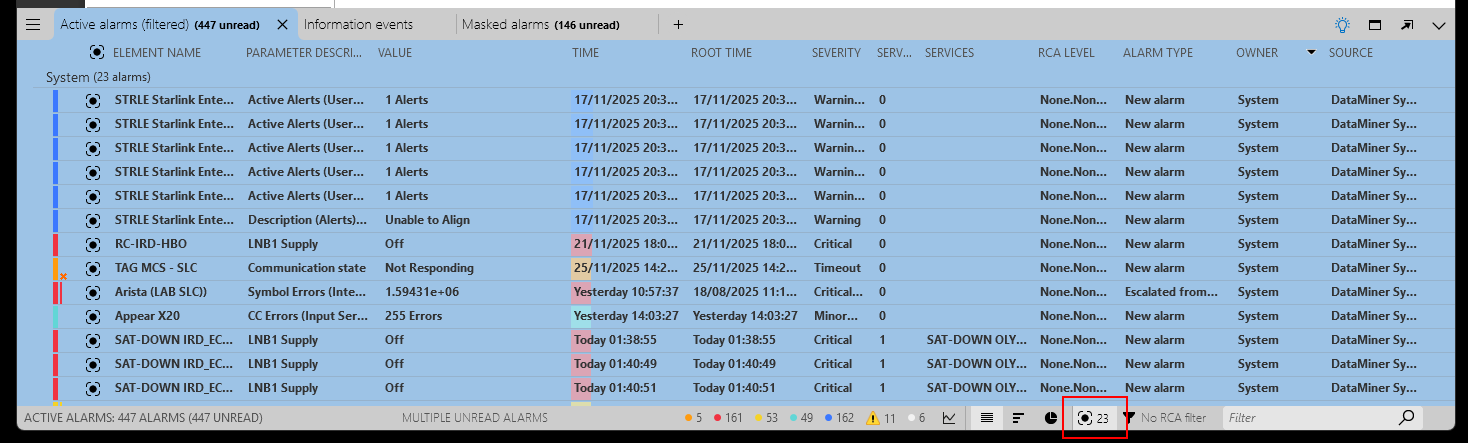
Alarm tab filtered on alarm focus in DataMiner 10.6.5
Alarm focus score analysis
The DataMiner Analytics software assigns an estimated likelihood or "alarm focus score" to each alarm, after analyzing the short-term history and current behavior of incoming alarms in real time. The alarm focus score is based on a combination of likelihood, frequency, and severity.
Likelihood scores are used to spot daily patterns. If an alarm occurs at the same time every day, it will be assigned a high likelihood value at that time.
Frequency scores are used to detect parameters that frequently go into and out of alarm, or alarms that persist over a long time.
Depending on the focus score, an alarm can be considered unexpected. In that case, this is indicated with the  icon in the Focus column.
Please note:
Likelihood scores are based on UTC time. As a result, when daylight saving time goes into or out of effect, patterns following local time might be off for approximately one week. In addition, currently no focus score is assigned to the following types of alarms: correlation alarms, external alarms, and information events.
If an alarm template changes, all alarms of the parameters for which a change was implemented in the alarm template will be treated as unexpected.
In case of an alarm storm, the update of focus scores of persistent alarms is postponed until after the alarm storm ends.
A model is created in DataMiner for every parameter that has had an alarm in the last two weeks, up to a limit of 100 000 models. This upper limit is rarely ever reached, but when it is, the notice "Alarm Focus has reached its maximum cache size" is displayed in the Alarm Console, and all alarms on parameters that have no model yet will be marked as unlikely. This notice will not influence any other part of the system and can be safely ignored. However, if you see this notice regularly, it can be a sign that your parameters are not spread optimally over your DataMiner System, or that one of your protocols is generating alarms on many different rows in a table.
Enabling or disabling alarm focus
To enable or disable the alarm focus feature:
In DataMiner Cube, go to System Center > System settings > analytics config.
Under Alarm focus, click the toggle button.
Important
If you disable alarm focus, automatic alarm grouping is automatically also disabled, and only manual alarm grouping can still be used.
Note
Alarm focus is only available if the DataMiner System uses Storage as a Service (recommended) or a self-managed Cassandra-compatible database.