Behavioral anomaly detection
DataMiner Analytics can detect the changes in the behavior of a trend, also known as "change points", and it will identify whether such change points are anomalous. Operators are alerted to these change points with a special indication in trend graphs and with suggestion events or alarms in the Alarm Console.
Watch the short video below for a quick overview of behavioral anomaly detection, or continue reading for detailed documentation.
Types of change points
The following kinds of change points can be detected:
Flatline: A fluctuating value suddenly remains constant. This type of change point can be detected from DataMiner 10.2.5/10.3.0 onwards.
Level shift: A value shifts upwards or downwards and then stays at that level, e.g., a value fluctuating around 0 that starts to fluctuate around 10.
Outlier: A value suddenly spikes upwards or downwards, but returns to its previous, normal behavior after a few points.
Trend change: A value suddenly starts to increase or decrease at an unusual rate. For example, a value fluctuating around 10 (i.e., a trend slope of 0) that suddenly starts to increase by 1 unit per second (i.e., a trend slope of 1).
Note that from DataMiner 10.3.0 [CU9]/10.3.12 onwards, a change in trend must maintain its altered state for at least an hour before it is labeled as a trend change.
Variance change: The variance of a value either increases or decreases. For example, a series like 0.5, 0.6, -0.5, -0.2, 1, …, 5, 8, 9, -5, -6, -2.1, … indicates a variance increase. The value is first fluctuating around 0 between 1 and -1 and then starts fluctuating around 0 between 10 and -10.
Unlabeled change: If a change point cannot be classified as one of the above-mentioned change points, it is considered an unlabeled change.
If a change point other than an outlier or unlabeled change is unexpected, it will be considered an anomaly. Level shifts that have a different direction than previous recent jumps or that jump to a previously unseen level will typically be labeled "anomalous". Similarly, trend or variance changes will be labeled "anomalous" when no earlier trend or variance changes in the same direction were detected during the last weeks. A flatline will be considered anomalous when no recent flatline change point of approximately the same length or longer is detected. From DataMiner 10.3.8/10.4.0 onwards, a change can also be considered anomalous if it has been seen before in the historical behavior of the parameter, but it does not fit in the usual periodic pattern.
Change points in trend graphs
On a trend graph, a change point is indicated by a bar below the graph. In addition, recent change points will be reflected by a parameter's trend icon.
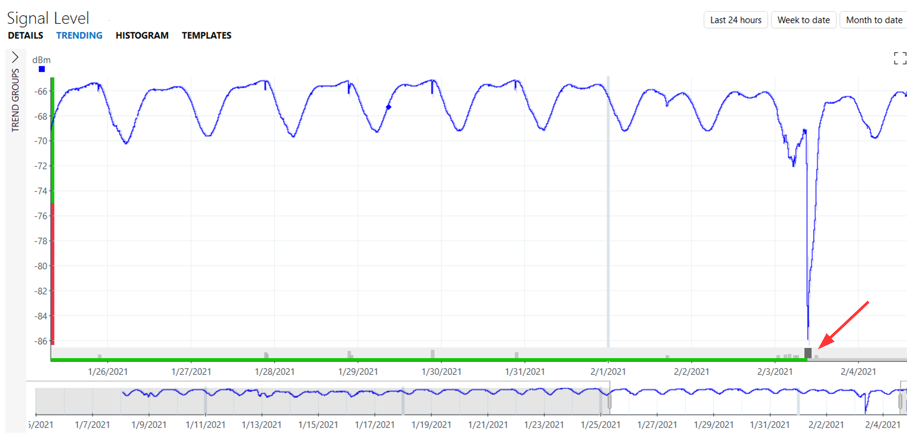
Trending: Anomaly detection in DataMiner 10.6.5
You can interpret this bar as follows:
The length of the bar indicates the approximate time frame in which the change started.
The height of the bar indicates the importance of the change
The color of the bar indicates the severity.
From DataMiner 10.4.1/10.5.0 onwards, the color is typically light gray, unless the change point was severe enough to trigger an event. Then, in case alarm monitoring is activated for change points, the color reflects the severity of the triggered alarm. In case alarm monitoring is not activated, the color is dark gray.
When you hover the mouse pointer over a change point bar, a semi-transparent ribbon will be displayed over the entire height of the trend graph, showing more information about the change point.
Note that labels of change points of type "trend change" will indicate the level of increase or decrease in seconds, minutes, hours or days depending on the value. If, for example, the value increases by 0.01 per second (i.e., 0.6 per minute, 36 per hour or 864 per day), the label will show an increase of 36 per hour as it is the smallest amount greater than 1.
Behavioral anomaly detection in the Alarm Console
Whenever behavioral anomaly detection finds an anomalous level shift, trend change, variance change, or flatline for a parameter, a suggestion event is generated in the Alarm Console.
These suggestion events can be viewed in a dedicated suggestion events tab, as alarms with severity "Information" and source "Suggestion Engine". To see suggestion events in the Alarm Console, open a new tab and select to see suggestion events. This is possible for active alarms, history alarms, and alarms in a sliding window.
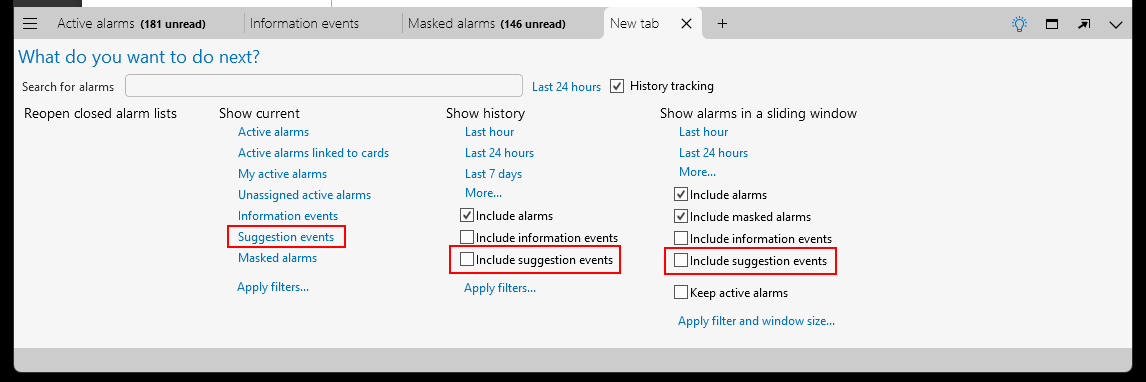
New Alarm Console tab in DataMiner 10.6.5
Here is an example of a suggestion events tab:
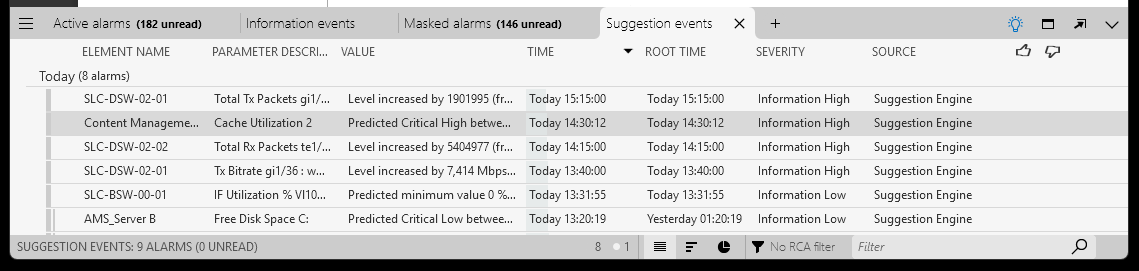
Suggestion events tab in DataMiner 10.6.5
Tip
See also: Adding and removing alarm tabs in the Alarm Console
You can also configure alarm templates to have full alarms generated instead of suggestion events, depending on the parameter and the type of anomaly. See Configuring Augmented Operations alarm settings.
Please note the following regarding suggestion events:
Currently, no suggestion events are generated for outliers and unlabeled change points.
Suggestion events generated to indicate a behavioral anomaly are automatically cleared two hours after their creation time or their last update time. From DataMiner 10.2.11/10.3.0 onwards, they are also cleared in case a new behavioral change is detected that ends the previous anomalous behavioral change. For example, when an alarm was created for an anomalous level increase at 1 PM, and a behavioral change point is detected at 2 PM when the level drops again, then the alarm created at 1 PM will be closed at 2 PM.
Suggestion events generated to indicate a behavioral anomaly for dynamic virtual elements are generated on the child element. However, from DataMiner 10.3.0 [CU18]/10.4.0 [CU6]/10.4.9 onwards, suggestion events for virtual functions are generated on the parent element. Prior to DataMiner 10.3.0 [CU18]/10.4.0 [CU6]/10.4.9, these suggestion events are generated on the child element as well.
Tip
From DataMiner 10.4.11/10.5.0 onwards, you can provide feedback on suggestion events and alarms generated by behavioral anomaly detection. Based on this feedback, DataMiner will gradually learn when to trigger a suggestion event or an alarm.
Behavioral anomaly detection configuration in System Center
In DataMiner Cube, you can configure this feature in System Center, via System Center > System settings > analytics config > Behavioral anomaly detection. The following settings are available there:
Enabled: Allows you to activate or deactivate this feature.
Run on trended parameters by default: Available from DataMiner 10.4.8/10.5.0 onwards. If this option is enabled (default setting), behavioral anomaly detection is enabled by default for trended numeric parameters that are not part of partial tables, but you can override this setting for specific parameters in a trend template. If this option is disabled, behavioral anomaly detection is disabled system-wide, except for trended parameters of which the Anomalies setting has explicitly been enabled in the trend template. See Configuring trend templates.
Suggestion limit: Available from DataMiner 10.5.0 [CU13]/10.6.0 [CU1]/10.6.4 onwards. Determines the maximum number of active suggestion events per behavioral change type (default: 50).
Note
If behavioral anomaly detection is not enabled for a parameter, that parameter will not be included in the trend graph insights generated by relation learning.
Limitations
Depending on the DataMiner version, different limitations are in place as to how many suggestion events can be generated for anomalous behavioral changes:
From DataMiner 10.4.0 [CU2]/10.4.5 onwards, at most 500 suggestion events related to behavioral anomaly detection can be shown in the active suggestion events tab of the Alarm Console.
From DataMiner 10.4.0 [CU1]/10.4.4 onwards, at most 50 new suggestion events per hour per type of anomaly (i.e., level shift, trend change, flatline, or variance change) can be generated per DataMiner Agent. There is no limit to the maximum number of anomaly alarm events, i.e., alarm events for parameters that have explicit anomaly alarm monitoring configured in the alarm template.
From DataMiner 10.2.11/10.3.0 onwards, suggestion events are only created for the most significant changes, and per hosting DataMiner Agent there can be at most 500 open suggestion events related to behavioral anomaly detection. Prior to DataMiner 10.2.11/10.3.0, suggestion events are created for all anomalous behavioral changes that do not have alarm monitoring enabled.
If a very high number of behavioral change points are detected in a short period, detection of behavioral anomalies is temporarily disabled to avoid unreliable results. This is indicated in the SLAnalytics logging. Prior to DataMiner 10.2.3/10.3.0, a notification is also displayed in the Alarm Console, which disappears again two hours after the change point flood has been resolved.
By default, anomaly detection is only available for numeric parameters that are not part of partial tables. It is also limited to at most 100,000 parameters per DMA. Prior to DataMiner 10.4.8/10.5.0, flatline detection is available for all numeric parameters, even if they are part of partial tables.
Anomaly detection is not available for discrete parameters.
Note also that behavioral anomaly detection is only available on systems using Storage as a Service (recommended) or a self-managed Cassandra-compatible database.