GQI DxM
The GQI DxM is a DataMiner Extension Module (DxM) that hosts the GQI core engine, enabling efficient data retrieval through GQI queries.
Running GQI as an extension module has several advantages:
- Independent updates: Using a web-only upgrade package, GQI can be updated independently from the main DataMiner core software, eliminating the need for a core software restart during updates.
- Load balancing: With the DxM, GQI operations can distribute system load more effectively across multiple DataMiner Agents within a DataMiner System (DMS).
- Resource visibility: Running each extension in a separate process provides greater insight into its resource consumption, allowing you to monitor every extension individually.
- Improved dependency resolving: Using the DxM simplifies and optimizes the resolution of DLL dependencies, preventing conflicts.
- Performance enhancements: The GQI DxM leverages the latest advancements in .NET 10 for improved speed and efficiency, uses proto-first communication, prevents SLNet throttling, etc.
Installation
The GQI DxM is supported from DataMiner 10.5.0 [CU1]/10.5.4 onwards, and automatically gets installed and updated by upgrade packages from that version onwards. It also gets updated when you install a web-only upgrade package. Earlier DataMiner versions starting from 10.5.0/10.5.2 also include a preview version of the GQI DxM, but this should only be used on staging systems.
Important
From DataMiner 10.5.0 [CU10]/10.6.0/10.6.1 onwards, the GQI DxM is enabled by default for DataMiner web applications. In earlier versions, the GQI DxM is disabled by default and instead the SLHelper process is used for GQI operations.
To explicitly opt in to or out of the GQI DxM, see Enabling or disabling the use of the GQI DxM.
Note
- Data Aggregator supports queries via the GQI DxM from version 3.1.0 onwards. See Using the GQI DxM for queries.
- From DataMiner 10.5.0 [CU11]/10.6.2 onwards, it is possible to use the GQI DxM on a Dashboard Gateway server. See Dashboard Gateway installation.
Enabling or disabling the use of the GQI DxM
From DataMiner 10.5.0 [CU10]/10.6.0/10.6.1 onwards the GQI DxM is enabled for DataMiner web apps by default. To disable the use of the GQI DxM, add the following configuration to the C:\Skyline DataMiner\Webpages\API\Web.config file:
<appSettings>
    <add key="gqi:useDxM" value="false" />
</appSettings>
Prior to DataMiner 10.5.0 [CU10]/10.6.0/10.6.1, the GQI DxM is disabled for DataMiner web apps by default. To enable the use of the GQI DxM, add the following configuration to the C:\Skyline DataMiner\Webpages\API\Web.config file:
<appSettings>
    <add key="gqi:useDxM" value="true" />
</appSettings>
The WebAPI process will automatically restart when you save the file. For web applications accessed through the configured server, the setting will be applied. For web applications accessed via other servers, the configuration of those servers will be used, which may be different.
From DataMiner 10.4.0 [CU12]/10.5.0/10.5.3 onwards, to verify that the GQI DxM is enabled for a web app, open the user menu in the upper-right corner and select About. If the version of the GQI DxM is displayed next to GQI, the web app is using the GQI DxM. If No DxM is displayed, the web app is still using the SLHelper process.
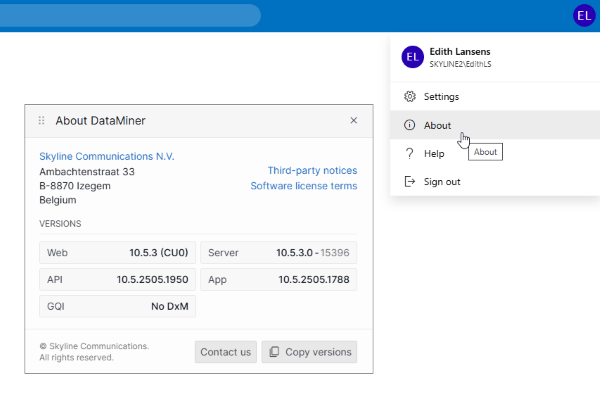
About DataMiner pop-up window in DataMiner 10.5.3
Note
If you encounter issues when trying to enable the GQI DxM, refer to GQI DxM repair.
Configuration
The GQI DxM can be configured via JSON configuration files. The default configuration can be found in C:\Program Files\Skyline Communications\DataMiner GQI\appsettings.json. Do not use this file to change settings, because it will be overwritten whenever a new version of the GQI DxM is installed.
To change configuration settings, use the configuration file named appsettings.custom.json in C:\Program Files\Skyline Communications\DataMiner GQI\appsettings.json. If this file does not exist yet, create it in the mentioned location.
Below you can find an overview of the settings that can be configured in this file.
Logging
See GQI logging and GQI extensions logging.
Termination of idle child processes
In the appsettings.custom.json file, you can specify when idle child processes should be terminated.
See the following example. Idle child processes will be terminated within the configured WorkerExpiration time (in this case 1 day) + 30 seconds.
{
  "GQIOptions": {
    "Extensions": {
      "WorkerExpiration": "1.00:00:00"
    }
  }
}
Message handler configuration
The MessageHandler manages requests from clients to the GQI DxM. Requests are placed in a queue, and a specified number of requests can be processed concurrently.
You can configure the following options in the MessageHandlerOptions in the appsettings.custom.json file:
- RequestTimeout: Maximum time a request can take before timing out (default: 15 minutes). This includes the time in the queue.
- MaxConcurrentRequests: Maximum number of requests that can be processed at the same time (default: 100). Note that prior to DataMiner 10.5.0 [CU8]/10.5.11, a lower default number of 20 is applied.
- MaxPendingRequests: Maximum number of requests allowed in the queue (default: 1000).
Example configuration:
{
  "MessageHandlerOptions": {
    "RequestTimeout": "00:15:00",
    "MaxConcurrentRequests": 100,
    "MaxPendingRequests": 1000
  }
}