Retrieving an earlier app version
When you make changes to an existing low-code app, the previous version will be kept in the system. Up to 15 versions of an app can be stored this way. When a new version is created, the oldest non-active version is automatically deleted.
To go back to a previous version of a low-code app:
Open the application from the DataMiner landing page.
Access the version history of the app:
From DataMiner 10.3.0 [CU18]/10.4.0 [CU6]/10.4.9 onwards, click the ellipsis button ("...") in the upper-right corner and select Versions.
Prior to DataMiner 10.3.0 [CU18]/10.4.0 [CU6]/10.4.9, click the user icon in the upper-right corner and select Versions.
This will show the version history of the app.
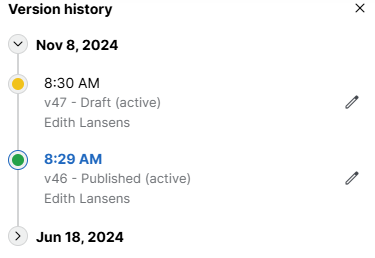
Low-Code App version history in DataMiner 10.4.12The currently published version, if any, is indicated with a green label.
The current draft is indicated with an orange label.
No label is displayed for old draft versions that were never published.
From DataMiner 10.3.0 [CU21]/10.4.0 [CU9]/10.4.12 onwards, version numbers are included in the version history as well.
Click the version you want to go back to. You can also click the pencil icon next to that version in the list to immediately start editing it.
Note
- There can only be one published version of a specific application at the same time. If you publish a different version, the previous version will no longer be published.
- When you roll back to a previous version of a low-code app, everything will revert to its state at the time of that version. This includes GQI queries, which are stored within the app version. Therefore, any changes you made to a GQI query or any new GQI queries created after that version will be lost if you revert.