Natural language to GQI
Starting from version 1.0.0, the DataMiner Assistant DxM will translate requests in human language into ready-to-execute GQI queries making use of an underlying Large Language Model (LLM).
You can use this feature when configuring queries in dashboards or low-code apps.
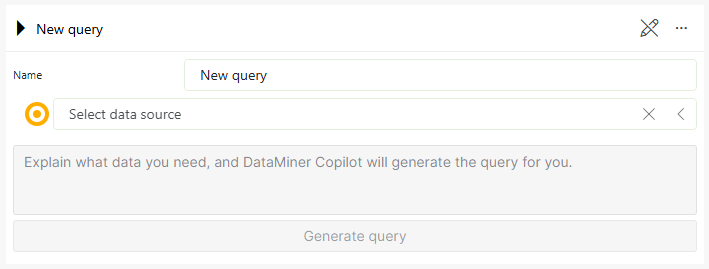
Natural language to GQI feature in DataMiner 10.6.1
Examples of such natural languages request could be:
- "Show me all the critical alarms from last week"
- "Sort elements by their name"
The result will be a GQI query that you can use to fetch the requested data.
Starting from DataMiner version 10.5.0 [CU11]/10.6.2, the option to let the DataMiner Assistant create a query is disabled by default. To enable the feature, create the file C:\Program Files\Skyline Communications\DataMiner Assistant\appsettings.custom.json with the following content:
{
  "NL2GQIOptions": {
    "ShowUserInterface": true
  }
}
This file needs to be created on every Agent in the DataMiner System where the DxM is installed.
Note
Prior to version 2.0.0, the DataMiner Assistant DxM is called "Copilot" instead.
Supported GQI operators
The following GQI operators are supported by DataMiner Assistant:
Note
At present, DataMiner Assistant does not provide any support for column manipulations and custom operators.
Supported GQI data sources
DataMiner Assistant is able to automatically detect all GQI data sources available in the system, including ad hoc data sources and object manager instances. However, data sources requiring the selection of a parameter are not supported. For example, it is not possible to use data sources like Get parameter table by ID, which requires the selection of an element ID.
Note
For performance reasons, DataMiner Assistant caches all the information about GQI data sources. This cache is refreshed once a day at a random time. Therefore, newly added data sources might be unavailable for a short time after creation.
Important
While DataMiner Assistant is able to enrich the underlying LLM with fundamental DataMiner context, it is important to keep in mind that the LLM has no information about the data actually contained in the many data sources. For this reason, it might have a hard time picking the perfect operator every time. You can usually overcome this by rephrasing your initial request with more specific instructions.