Implementing connection strings in a DataMiner System
Implementing connection strings in a DataMiner System can be required if there are restrictions on the authentication within a DMS cluster. These restrictions can be noted when strange behavior occurs, like desynchronization between DMAs, missing files, users losing their connection, elements not being displayed on one DMA, etc.
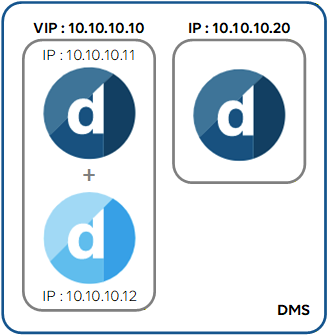
The procedure below illustrates how to configure connection strings in the following example setup, in case an Agent cannot connect to a Failover pair or to a single other Agent:
Tip
For more information on connection strings and how to identify an issue because of connection strings, refer to Connection strings.
Requirements
- Remote access to the system
- Credentials of a Windows user with Administrator privileges
- Access to SLNetClientTest tool
Procedure
Connection to a Failover pair
By default, the connection towards a Failover pair always uses its virtual IP. There is therefore no need to create two separate connection strings per Failover Agent IP, so that in the case of this example only one connection string is needed.
Connect to an Agent that is unable to connect to the Failover pair via SLNetClientTest tool.
In this case, this will be the single Agent.
Add a new connection string as detailed in the procedure Editing the connection string between two DataMiner Agents, using the following configuration:
- From: For this example, fill in the IP of single Agent. This box requires the IP of the Agent that is unable to access the destination Agent. If none of the Agents in the cluster can access it, the Update All Connections To This Agent checkbox can be used instead.
- To: The virtual IP of the Failover pair.
- Username and Password: The credentials of a Windows user with Administrator privileges towards the Failover pair.
Connection to a single Agent
To configure the connection string towards a single Agent, always use the primary IP.
In this example, a connection string will need to be created from each Agent in the Failover pair towards the single Agent.
Connect to an Agent that is unable to connect to the single Agent via SLNetClientTest tool.
In this case, this will be one of the Failover Agents.
Add a new connection string as detailed in the procedure Editing the connection string between two DataMiner Agents, using the following configuration:
- From: For this example, fill in the primary IP of the Failover Agent.
- To: The IP of the single Agent.
- Username and Password: The credentials of a Windows user with Administrator privileges towards the single agent.
Create another connection string, this time use the primary IP of the other Failover Agent in the From field.
Verification
After adding a connection string, wait a few minutes, and then go to Cube > System Center > Agents. You should notice that the connection towards the Agents has been established.
After adding a connection string, a new Redirects tag will also be present in the file C:\Skyline DataMiner\DMS.xml. Open DMS.xml on the server used in the From field, and check if you find a Redirects tag towards the IP specified in the To field.