DataMiner Cube Feature Release 10.6.10
This Feature Release of the DataMiner Cube client application contains the same new features, enhancements, and fixes as DataMiner Cube Main Release 10.6.0 [CU7].
Note
For known issues with this version, refer to Known issues.
Tip
- For release notes related to the general DataMiner release, see General Feature Release 10.6.10.
- For release notes related to the DataMiner web applications, see DataMiner web apps Feature Release 10.6.10.
Highlights
Automation: Credentials can now be added to automation scripts [ID 44282]
When adding or updating an automation script in DataMiner Cube, you can now add credentials just like you add dummies, parameters, or memory files.
If you open a script that contains credentials you are not allowed to use, the names of those credential will be replaced by <Not Allowed>. If you have permission to edit scripts, you will not be able to save the script until you replace those credentials with credentials you are allowed to use.
Note
- Even if you are not allowed to use a certain credential added to a script, you will be allowed to execute that script if you have permission to execute scripts.
- If you user permissions change while you are working in the Automation app, the changes will only take effect after you have re-opened the Automation app.
Important
This feature will only work in conjunction with DataMiner server version 10.6.10/10.7.0 or higher. See Automation: Credentials can now be added within the XML code of an automation script [ID 44282] [ID 46229].
Caution
In this version of DataMiner Cube, saving an automation script that uses credentials from the Credentials Library can clear the selected credential references. This issue is resolved in DataMiner Cube 10.6.11/10.7.0 (see Automation script editor: Enhanced way of selecting credentials [ID 46251]).
New features
System Center: Backup password can now be set for restoring credentials [ID 45704]
In the Backup section of System Center, you can now set a password for restoring credentials from a backup.
When you restore a backup on another DataMiner System, you will have to provide this password to be able to restore the credentials stored in that backup. All other data in the backup will be restored as usual.
When you restore a backup on the same DataMiner System, no password will be needed to restore the credentials.
Note
When you open the Credentials Library, a warning message will appear when this password has not yet been set.
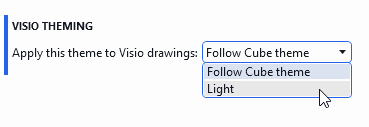
Visual Overview: Option to display Visio drawings in the light theme while Cube uses the dark theme [ID 45961]
A new global setting is now available via System Center > System settings > Visio drawing that allows you to force Visio drawings to use the light theme, even when Cube is using the dark theme.
The available options are Follow Cube theme (default) and Light. After changing the setting, click Apply theme and reopen any open Visio drawings to see the change.
Credentials Library: Warning indicator next to credentials that could not be decrypted [ID 45997]
When DataMiner Cube detects that a set of credentials in the Credentials Library can no longer be decrypted, a warning icon will now be displayed next to the name of the credentials, which will also be shown in a warning color.
When you hover over the warning icon, a tooltip will explain that the secret values of the credentials can no longer be decrypted and that you need to re-enter and save the values to resolve the issue.
Element wizard: Connector settings and run-on details [ID 46287]
When you create or edit an element in DataMiner Cube, the element wizard can now show new connector-driven sections:
- A Settings section where you can configure connector settings (including text fields, dropdown values, and credentials), with validation for required values.
- A Run details section for connectors with scripts, where you can select an Edge node and configure script intervals.
In addition, CSV export/import support has been updated with the relevant headers for protocol settings and edge scripts.
Changes
Enhancements
Credentials Library: Credential names can now contain all characters [ID 46083]
When you create a credential in the Credentials Library, its name can now contain all characters.
Spectrum Analysis: Shared last preset is now available in shared session mode [ID 46113]
If a spectrum analyzer is configured to work in shared session mode, a shared last session preset is now automatically kept. This means that when a user configures the spectrum analyzer and closes the card, the configuration is saved in a shared preset. When another user opens that spectrum analyzer, the same preset is loaded and all users will see the same configuration.
Communication: Remote logging failures are now logged at debug level [ID 46285]
Up to now, when Cube temporarily lost its connection and remote logging could not be sent, those expected failures were logged as errors.
From now on, these remote logging failures are logged at debug level instead, so error logs can focus on more actionable issues.
Fixes
Alarm templates: Absolute proactive thresholds showed percentages instead of delta values [ID 46049]
In alarm templates, proactive thresholds of type Absolute were displayed with a percentage sign in the Thresholds to take into account setting (e.g., Critical High (5000000 %)).
This has now been corrected. Absolute thresholds are now shown with a delta prefix and no percentage sign (e.g., Critical High (Δ 5000000)), consistent with the regular alarm template editor.
Upgrades: End time was not always set correctly in the Overview tab [ID 46100]
When you performed a DataMiner upgrade, it could occur that the end time in the Overview tab was not always set correctly. This issue has been resolved.
Spectrum Analysis: Measurement point cycle could be reset when the same spectrum element was opened in another component [ID 46111]
When you opened a spectrum element in one spectrum analysis component and then opened the same element in another component with measurement points selected, the measurement point cycle in the first component could be reset. This issue has been resolved.
Credentials Library: Credential limit warning would be partially hidden behind the Add and Delete buttons [ID 46198]
The credentials library can contain a maximum of 1000 sets of credentials. When this limit is reached, users who want to add a new set of credentials will receive a warning. However, up to now, that warning would be partially hidden behind the Add and Delete buttons.
Automation: Package name and version of automation scripts could no longer be displayed after restarting Cube or re-opening the Automation module [ID 46224]
When a Cube connected to a system using STaaS was restarted, or when, on a Cube connected to a system using STaaS, the Automation module was closed and re-opened, up to now, the package name and version of the automation scripts could no longer be displayed.