DataMiner Cube Feature Release 10.6.7
This Feature Release of the DataMiner Cube client application contains the same new features, enhancements, and fixes as DataMiner Cube Main Release 10.6.0 [CU4].
Note
For known issues with this version, refer to Known issues.
Tip
- For release notes related to the general DataMiner release, see General Feature Release 10.6.7.
- For release notes related to the DataMiner web applications, see DataMiner web apps Feature Release 10.6.7.
New features
Correlation : Alarm grouping [ID 44973]
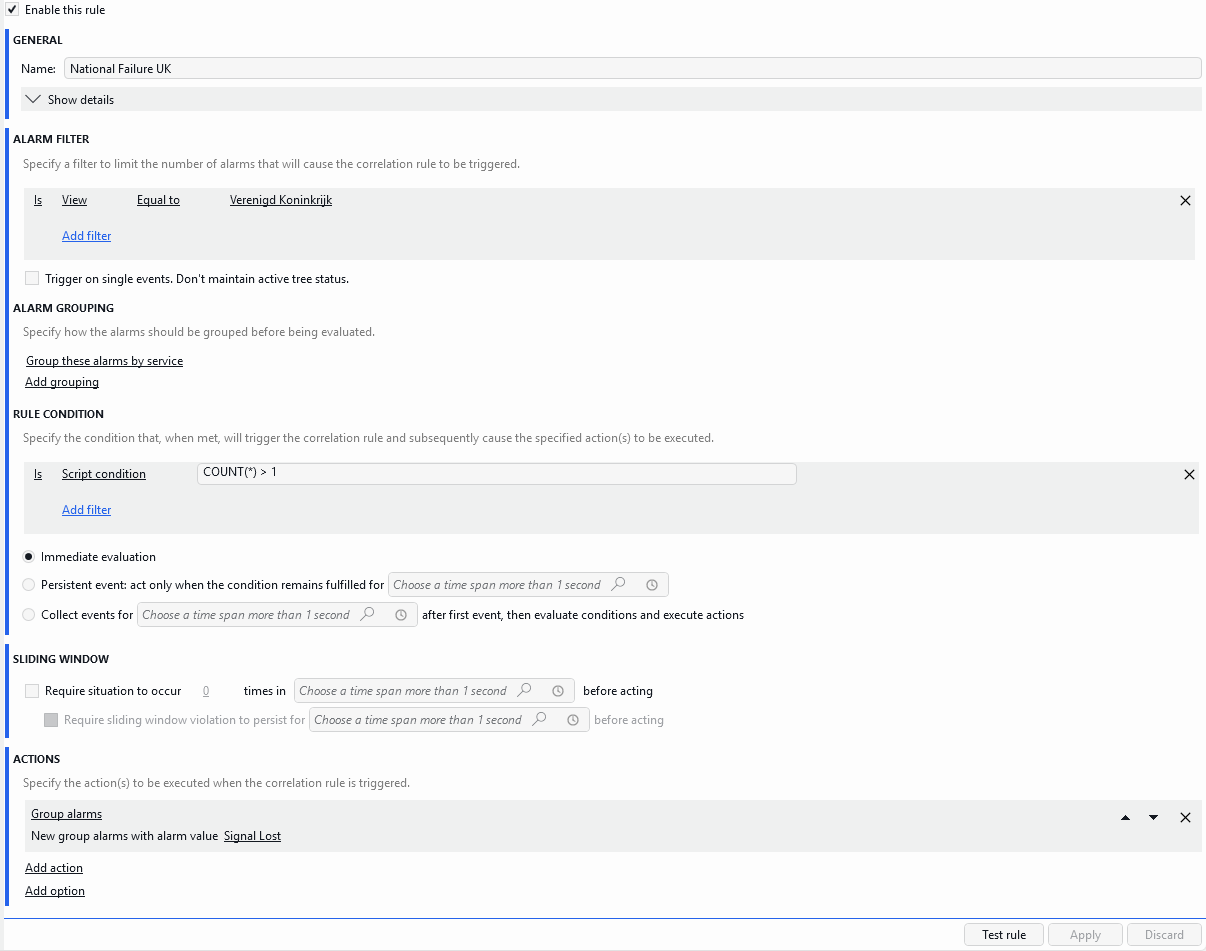
When configuring a correlation rule, it is now possible to specify that a Group alarms action has to be executed when that rule is triggered.
This action is similar to the New alarm action. When the rule is triggered, a new alarm will be generated, but in the case of the Group alarms action, the alarm will be linked to the DataMiner element. The value of the alarm can be set in the action itself.
When a group alarm appears in the Alarm Console, the following fields will be updated:
The severity will be set to the severity of the base alarm with the highest severity. This severity will be shown in the Severity column, and will also be indicated by the color of the alarm icon.
The parameter name will be set to the name of the correlation rule.
The element name will be changed according to the configuration of the correlation rule:
Correlate across DMAs option Alarm grouping Element name Selected Not defined Name of the cluster Selected Defined Name of the grouped object Not selected Not defined Name of the DataMiner Agent Not selected Defined Name of the DataMiner Agent + Name of the grouped object

When the alarms are filtered (either by means of the quick filter or by means of an alarm filter):
- If the group alarm matches the filter, the alarm and its sources will all be shown.
- If the group alarm does not match the filter but one of its sources does, the alarm and its sources will all be shown.
- If neither the group alarm nor any of its sources match the filter, neither the alarm nor its sources will be shown.
Note
The way in which the severity of an alarm group is shown has also been changed. Up to now, the alarm icon of an alarm group would show the severity of the base alarm with the highest severity, and the Severity column in the Alarm Console would show "Suggestion". From now on, the Severity column of an alarm group will also show the severity of the base alarm with the highest severity.
Changes
Enhancements
Settings: Increased responsiveness of the Search box [ID 44956]
Because of a number of enhancements made to the Settings window, the responsiveness of the Search box has increased.
System Center: Upgrade window now also lists the upgrade packages that are made available via the Orchestrator DxM [ID 45227]
From now on, the Upgrade window will also list the upgrade packages that are made available via the Orchestrator DxM, which is responsible for management and upgrades of DxMs through the Admin app.
Performing an upgrade with a package made available via the Orchestrator will avoid having to upload it from the client.
Protocols & Templates: Enhanced performance when retrieving protocol function icons [ID 45279]
Because of a number of enhancements, overall performance has increased when retrieving protocol function icons in the Protocols & Templates module.
Error message that appears when a connection issue occurs while setting up a replicated element has been updated [ID 45439]
When a connection issue occurs while you are setting up a replicated element, an error message will appear.
This message has now been updated. It will state more clearly that the client needs to have access to the DataMiner Agent that hosts the element that is about to be replicated.
accentLightColor changed in Dark theme [ID 45484]
In the Dark theme, the accentLightColor has been changed to provide more contrast.
Spectrum cards: Progress bar will now more clearly indicate the progress when playing a spectrum recording [ID 45492]
When you played in spectrum recording in a spectrum card, up to now, the progress bar at the bottom of the graph would not clearly indicate the progress of the playback.
From now on, playback progress will clearly be indicated by means of a colored bar.
Fixes
Alarm Console: Problem when detecting recursive loops in nested correlation alarms [ID 45372]
Because of a problem with the recursive loop detection mechanism, in some cases, a recursive loop in nested correlated alarms could still cause DataMiner Cube to stop working unexpectedly.
Services: Problem with element selector filter box [ID 45378]
When you are adding elements to a service using the element selector, a filter box allows you to narrow down the number of elements listed in that selector. Since the most recent redesign of the DataMiner Cube UI, part of that filter box would incorrectly be cut off.
This same issue would also occur when adding primary and backup elements to a redundancy group, when creating an alarm filter in the Alarm Console, and when assigning elements to a connector.
Correlation module: 'Add action' and 'Add option' controls got an incorrect color when clicked [ID 45382]
When, while configuring a correlation rule, you clicked Add action or Add option, the control got an incorrect, dark color.
From now on, when you click either of these controls, their color will be in line with that of all the other controls.
Router Control: Problem with crosspoint highlighting since Cube UI redesign in version 10.6.4 [ID 45412]
Since the Cube UI was redesigned in version 10.6.4, the crosspoint highlighting in the Router Control module would no longer work.
From now on, when you click a crosspoint, the following items will again be highlighted as before:
- the tabs containing the input and the output
- the I/O button
- the Lock/Unlock button when the crosspoint is locked
Automation module: Script actions would incorrectly load the script info of the parent script [ID 45415]
In the automation script editor, up to now, script actions would incorrectly load the script info of the parent script instead of the script that was being edited.
Selected items in a filtered list would incorrectly not be visible [ID 45427]
When you selected an item in a filtered list, up to now, the selected item would incorrectly get the same color as the background, making it invisible.
From now on, selected list items will get a color that is different from that of that background.
Problem when uploading element documents [ID 45448]
When you uploaded an element document, in some cases, the file contents could incorrectly get appended to previously uploaded data, resulting in a corrupted file.
Error 'We received a cleared alarm without previous alarm' would incorrectly get logged when properties of a closed correlation alarm were updated [ID 45555]
When a visual overview contains an AlarmSummary shape, a We received a cleared alarm without previous alarm error is logged whenever a cleared alarm is received without having received a previous alarm.
Up to now, this error would incorrectly also get logged when properties of a closed correlation alarm were updated.
From now on, when properties of a closed correlation alarm are updated, this will no longer be logged as an error. Instead, this will be logged as a debug line.