DataMiner web apps Feature Release 10.6.7
This Feature Release of the DataMiner web applications contains the same new features, enhancements, and fixes as DataMiner web apps Main Release 10.6.0 [CU4].
Note
For known issues with this version, refer to Known issues.
Tip
- For release notes related to the general DataMiner release, see General Feature Release 10.6.7.
- For release notes related to DataMiner Cube, see DataMiner Cube Feature Release 10.6.7.
Highlights
Dashboards/Low-Code Apps - Maps component: 'Google Maps' version pinned to 3.65 to prolong support for KML overlays [ID 45481]
In a recent announcement, Google informed the developer community that KML layers will be deprecated as from 30 April, 2026.
In order to prolong support for KML overlays, the version of the Google Maps provider has been pinned to version 3.65.
When using DataMiner Web version 10.5.0 CU16/10.6.0 CU4/10.6.7 or newer, KML overlays will be supported until May 2027. When using any other DataMiner Web version, KML overlays will no longer be supported from August 2026 onwards.
New features
GQI DxM - Extensions: Retrieving the Culture and Timezone from the Session object [ID 45348]
Within a GQI extension, it will now be possible to retrieve the Culture and Timezone from the Session object. When the IGQIOnInit interface is implemented, the Session object is a property of OnInitInputArgs.
Note
For this new feature to work, the extension needs to be created with the Skyline.DataMiner.Core.GQI.Extensions NuGet (version 1.1.0 or above). The feature is not supported when the extension is created using the SLAnalyticsTypes API.
Dashboards/Low-Code Apps - Node edge graph component: New 'Minimize metric' setting [ID 45538]
Node edge graph components now have a new Minimize metric setting, which will allow you to configure when edge metrics are minimized (per edge query).
| Mode | Description |
|---|---|
| Auto | Edge metrics are minimized automatically when edges are too close to each other (default behavior). |
| Always | Edge metrics are always minimized. |
| Never | Edge metrics are never minimized. |
When edge metrics are minimized because the mode is set to either "Auto" or "Always", hold Ctrl+Space to make the full edge metrics visible. When you then release both keys, the configured minimization behavior will be restored again.
Changes
Enhancements
Low-Code Apps: Enhanced performance when loading pages and panels [ID 45365]
Because of a number of enhancements, overall performance has increased when loading pages and panels of low-code apps.
DataMiner Web Services API v0 has now been removed [ID 45387]
The DataMiner Web Services API v0 was declared End of Life in DataMiner version 10.1.5. It has now been removed from the code base.
Important
It will no longer be possible to enable the v0 interface by setting the enableLegacyV0Interface key to true in the C:\Skyline DataMiner\Webpages\API\Web.config file.
Dashboards/Low-Code Apps: Spectrum analyzer component will now behave more like its counterpart in DataMiner Cube [ID 45401]
From now on, the Spectrum analyzer component will behave more like its counterpart in DataMiner Cube.
Up to now, when you selected a new measurement point, the maxHold value would incorrectly not be reset. From now on, selecting a new measurement point will reset the maxHold, minHold, and avgTrace values.
Dashboards/Low-Code Apps - Web component: 'Open in sandbox' setting renamed to 'Isolate' and now also available when 'Type' is set to 'Custom HTML' [ID 45422]
Up to now, when configuring a Web component, it would only be possible to enable or disable the Open in sandbox setting when Type was set to "Webpage".
From now on, it will also be possible to enable or disable this setting, which has now been renamed to Isolate, when Type is set to "Custom HTML".
Dashboards/Low-Code Apps: Spectrum sessions list can now be filtered by name [ID 45430]
When a List component uses the Spectrum sessions component data exposed by a Spectrum analyzer component in a dashboard or app, it displays a list of all spectrum sessions. You can now filter that list by name. To do so, link a data field of type string to the filter of the List component. This data field will then act as a filter box.
Dashboards/Low-Code Apps - Spectrum analyzer component: New 'Theme source' option [ID 45437]
The Spectrum analyzer component now has a Theme source option, which can be set to either "Preset" or "Custom".
When you set this option to "Preset":
- Trace color and line visibility are inherited from the loaded preset (legacy behavior).
When you set this option to "Custom":
- Trace, threshold, minimum, maximum, and average colors are inherited from the theme settings, and can be customized if necessary.
- Background, font, axis, and grid colors are all inherited from the component theme.
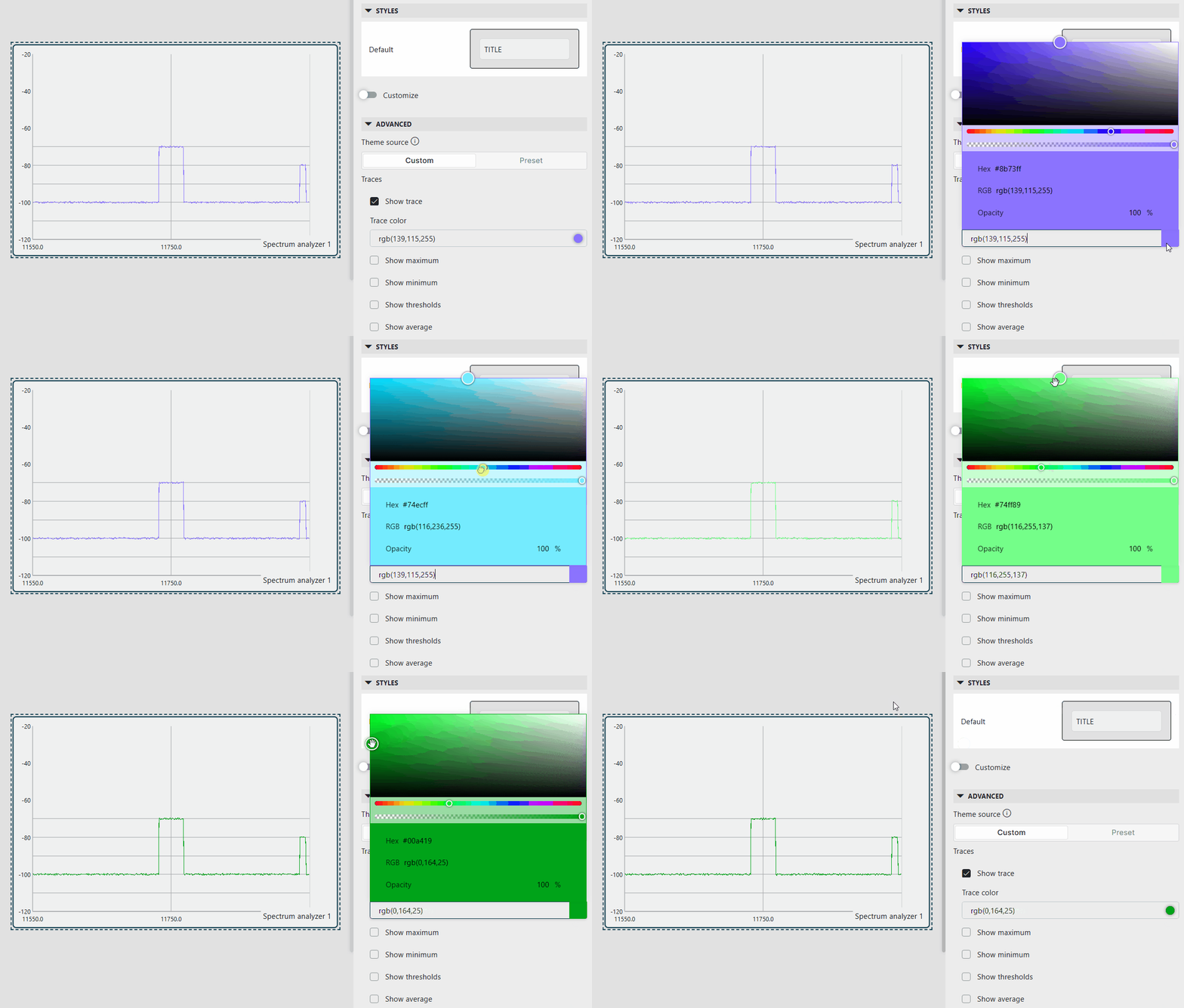
In both cases, measurement point trace colors are resolved via theme color indexing based on the measurement point key/name.
Dashboards/Low-Code Apps: Tree and List components now accept a string filter [ID 45485]
Tree and List components now accept a string filter. When string data is linked to the component, the content will be filtered by name.
Dashboards/Low-Code Apps - Maps component: Changing the look and feel of GeoJSON overlays [ID 45518]
The Maps component as well as the DataMiner Maps module now allow you to change the look and feel of GeoJSON overlays by defining the following properties on geometry objects:
| Property | Default value | Description |
|---|---|---|
| fill | #000000 | Defines the fill color of shapes. |
| fill-opacity | 0.3 | Defines the opacity of the fill color of shapes. |
| stroke | #000000 | Defines the stroke color of shapes and lines. |
| stroke-opacity | 1 | Defines the opacity of the stroke. |
| stroke-width | 3 | Defines the weight of the stroke. The higher the weight, the wider the stroke. |
Web apps: DataMiner Web Upgrade packages will now also include the DataMiner Maps module [ID 45521]
From now on, the DataMiner Maps add-on module will also be included in DataMiner Web Upgrade packages.
Fixes
Dashboards/Low-Code Apps - Interactive automation scripts: Redesigned controls would incorrectly not allow you to use the arrow keys to move the cursor [ID 45313]
When, in a dashboard or a low-code app, an interactive automation script was launched in a popup window, the redesigned controls would incorrectly not allow you to use the arrow keys to move the cursor.
For example, when you pressed the Up/Down arrow in a multi-line textbox, the cursor would incorrectly not move to the previous/next line.
Dashboards/Low-Code Apps: Problem with 'Data used in ...' sections [ID 45373]
When you open a dashboard or a low-code app, the Data used in dashboard/page/panel section of the Data pane will list all data items used in the dashboard or low-code app page or panel, such as data sources, filters, and more, and when you select a particular component, the Data used in component section of the Data pane will list all data items used in the currently selected component.
However, up to now, because of a filtering issue, in some cases, these sections would not list the correct data items.
Dashboards/Low-Code Apps: Conditions with unknown columns would incorrectly not be shown in the template editor [ID 45379]
In some cases, conditions with unknown columns would not be shown in the template editor. As a result, they could not be edited or removed.
This would often happen when a template from another component had been applied using the Browse templates window.
From now on, whenever an unknown column is detected, it will be marked as such, and the condition will be shown correctly in the template editor.
Dashboards/Low-Code Apps - Query builder: Problem when a 'Get resources' query was linked to data [ID 45390]
When a Get resources query filtered by resource pool ID or booking ID was linked to data, up to now, an error would be thrown when the data item was empty.
From now on, no error will be thrown anymore. Instead, an empty result will be shown.
Dashboards/Low-Code Apps - Query builder: Resolving the join columns of a query would fail when the URL included the 'showAdvancedSettings=true' option [ID 45397]
When you edited an existing query containing a join, up to now, resolving the join columns would fail when the URL included the showAdvancedSettings=true option.
The query builder would incorrectly consider non-mandatory options (e.g., Row by row and Prefetch) without a value as unresolved, causing the join node to remain expanded and preventing all downstream nodes from loading.
Dashboards/Low-Code Apps: Spectrum analyzer component would either show no trace or an incorrect trace [ID 45410]
When a Spectrum analyzer component in a dashboard or a low-code app loaded a spectrum preset when no measurement point had been selected, up to now, SLSpectrum would be unable to convert the display frequencies into device frequencies. As a result, the start/stop frequencies would appear out of range, no values would be sent to the connector, and either no trace or an incorrect trace would be displayed.
From now on, when no measurement point was selected, SLSpectrum will apply the measurement point stored in the preset before processing frequency values. This will ensure that the correct frequency offset context is available, and that display frequencies are properly converted into device frequencies.
Web apps opened via remote access would not be able to retrieve the manifest file [ID 45416]
Up to now, when a DataMiner web app was opened via remote access, it would fail to retrieve the manifest file. As a result, the app would not be considered a Progressive Web App (PWA) and would not be allowed to install locally.
Low-Code Apps: Changing the type of a variable without default value would incorrectly not be saved [ID 45417]
Up to now, when you changed the type of a variable that did not have a default value, the update would incorrectly not be saved.
Monitoring app: List of available pages in an element card would incorrectly include a 'Dashboards' page when the LegacyReportsAndDashboards option was disabled [ID 45420]
In the Monitoring app, up to now, the list of available pages in an element card would incorrectly include a Dashboards page when the LegacyReportsAndDashboards soft-launch option was disabled.
Web apps: Inconsistencies and missing properties in manifest files [ID 45424]
In the manifest files of the DataMiner web apps, a number of inconsistencies have been fixed and a number of missing properties have been added.
From now on, all web apps will use the same theme colors and the correct icons. Also, it will be possible to install all of them as Progressive Web Apps (PWAs).
Dashboards/Low-Code Apps - Query filter component: Problem when filtering numeric columns on discrete values [ID 45490]
On systems using the GQI DxM, in a Query filter component, it would no longer be possible to filter numeric columns on discrete values when filter assistance was enabled.
GQI DxM: Problem when loading a GQI extension of which the DLL file was locked [ID 45569]
When the GQI DxM tried to load a GQI extension of which the DLL file in C:\Skyline DataMiner\Scripts\Libraries was locked, up to now, loading the extension would fail and a warning similar to the following example would be added to the GQI DxM logging:
[2026-05-19 13:35:22.640][WRN][GQI.ExtensionsWorker.Automation.Automation.ExtensionLoader] Failed to load assembly from C:\Skyline DataMiner\Scripts\Libraries\ScriptName.LibraryName.xxxx_xx_xx__xx_xx_xx.R.dll
System.IO.IOException: The process cannot access the file 'C:\Skyline DataMiner\Scripts\Libraries\ScriptName.LibraryName.xxxx_xx_xx__xx_xx_xx.R.dll' because it is being used by another process.
In order to prevent problems when loading GQI extensions, from now on, the GQI DxM will always try to load the assembly bytes from disk with 5 retries.
Web apps - Interactive automation scripts: Error messages in FileSelector control would incorrectly show raw HTML code [ID 45572]
Up to now, when running an interactive automation script, error messages in the FileSelector control would incorrectly show raw HTML code.
When ValidationText was set to, for example, This is the <b>actual</b> error message., this text would incorrectly end up in the UI as <html><head></head><body>This is the <b>actual</b> error message.</body></html>.
Note
If, for some reason, you want an error message to contain actual HTML code, you will need to escape the HTML tags.