DataMiner Cube Feature Release 10.6.9
This Feature Release of the DataMiner Cube client application contains the same new features, enhancements, and fixes as DataMiner Cube Main Release 10.6.0 [CU6].
Note
For known issues with this version, refer to Known issues.
Tip
- For release notes related to the general DataMiner release, see General Feature Release 10.6.9.
- For release notes related to the DataMiner web applications, see DataMiner web apps Feature Release 10.6.9.
Highlights
System Center - User-Defined APIs: Viewing and configuring rate limits for API tokens [ID 45751]
In the User-Defined APIs section of System Center, you can now view and configure rate limits for user-defined API tokens.
When creating or editing a token, you can configure the following settings:
- Limit: Maximum number of requests allowed within the configured window (from 1 to 100).
- Window: Sliding time window during which the limit applies (from 1 second to 1 day).
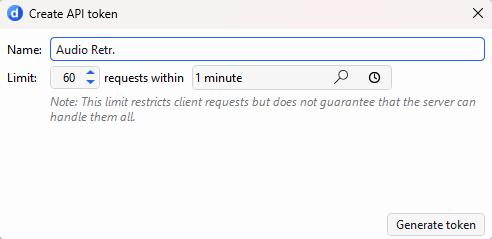
New tokens will be created with a default rate limit of 60 requests per minute.
The Tokens table includes a Rate limit column, showing the configured rate limit for each token.
Note
- A configured rate limit restricts the number of requests a client can make within a specified time window. However, it does not guarantee that the server can process all requests up to that limit. Actual throughput depends on several factors, including the execution time of the API script, the number of concurrently active tokens, and overall server load.
- This feature will only work when DataMiner Cube is connected to a DataMiner Agent running Main Release version 10.7.0, Feature Release 10.6.7, or above.
New features
Visual Overview - Spectrum analysis component: several new ComponentOptions [ID 45725] [ID 45947] [ID 46106]
When configuring a spectrum analysis component in Visual Overview, you can now use the following options:
| Option | Description |
|---|---|
| ShowSettingsPanel= | Determines whether the settings panel is shown when the component is initialized. - ShowSettingsPanel=True: The settings panel is shown.- ShowSettingsPanel=False: The settings panel is hidden.If this option is not specified, the settings panel is shown using its last saved state. |
| ShowInfoPanel= | Determines whether the information panel is shown when the component is initialized. - ShowInfoPanel=True: The info panel is shown.- ShowInfoPanel=False: The info panel is hidden.If this option is not specified, the visibility of the information panel is determined by the ribbon setting. |
| ShowRibbon= | Determines whether the ribbon is displayed in the Spectrum Analysis component. - ShowRibbon=True: The ribbon is shown.- ShowRibbon=False: The ribbon is hidden.In existing shapes, this option cannot be toggled dynamically. |
| SaveLastSessionPreset= | Controls whether the last session preset is saved when the shape is initialized. - SaveLastSessionPreset=True: The last session preset is saved (default behavior).- SaveLastSessionPreset=False: The last session preset is not saved. |
Note
- These options are only applied when the shape is initialized and cannot be toggled dynamically.
- If the
ShowSettingsPanel=orShowInfoPanel=options are used, these overrule other show/hide controls. - The
ShowRibbon=option was previously available in legacy DataMiner versions, but had been removed since DataMiner 9.5.11/9.6.0.
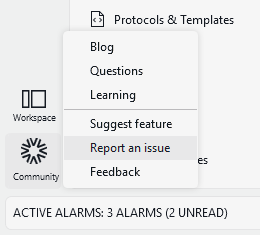
DataMiner Cube sidebar: New 'Report an issue' command added to 'Community' menu [ID 45741]
When, in the sidebar, you click the Community button, a menu will open. This menu now also includes a command that will allow you to report an issue.
Spectrum analyzer: Support added for reference traces and reference trace markers [ID 45843]
Support has now been added for reference traces and reference trace markers in spectrum analyzers.
Reference traces and their markers can now be used and saved in presets. You can now also update a reference trace by setting or resetting it from the ribbon.
In addition, this change includes the following fixes:
- Saving a reference trace no longer uses local culture formatting for numeric values.
- The Show reference ribbon setting is now saved correctly in the display settings.
- Special markers (Min, Max, and Avg) are now saved correctly when they are not locked to a trace.
Changes
Enhancements
Credentials library: Token credentials added and credentials library enhancements [ID 45670] [ID 46071] [ID 46092]
In the credentials library, you can now add token credentials, i.e., credentials that consist only of a single token.
Also, all credential fields now have a maximum length of 5120 bytes (5 KB), and the following fields can be left empty:
| Type of credentials | Field |
|---|---|
| Token credentials | Access token |
| Username and password credentials | Authentication password |
Note
The credentials library can contain a maximum of 1000 sets of credentials. When this limit is reached, users who want to add a new set of credentials will receive a warning.
SLNetTypes: gRPC connections that go through the Azure Cloud Relay service will now buffer event messages [ID 45672]
From now on, gRPC connections that go through the Azure Cloud Relay service will buffer event messages until DataMiner Cube confirms they have been received.
This will allow those connections to survive a temporary outage of the Azure Cloud Relay service, for example when restarting or deploying a new version.
Spectrum cards: Popups showing 'The requested trace requires a sweep time of X s.' will now open on top of the spectrum component in question [ID 45899]
Up to now, in DataMiner Cube, popups showing The requested trace requires a sweep time of X s. would be general popups appearing on top of the DataMiner Cube UI. In order to prevent several of those popups to appear when multiple spectrum components are open, these popups will now open on top of the spectrum component in question.
Also, these popups will now be ignored when a spectrum component is in zero-span mode.
System Center - User-Defined APIs: Enhanced validation of dynamic routes [ID 46007]
When you create or edit a user-defined API in System Center or via the Configure API automation script action, dynamic routes are now validated more thoroughly.
This updated validation now checks, among other things, whether:
- A route is not empty.
- A route does not start or end with
/. - A route does not contain empty path segments.
- Parameter placeholders are well-formed.
- Parameter names do not contain invalid route syntax characters.
- A parameter name is not used more than once in the same route.
- A route template is unique across API definitions.
Fixes
Problem when logging out right after having logged in [ID 45756] [ID 45761]
When you logged out of DataMiner Cube immediately after you had logged in, in some cases, an exception could be thrown related to either the Alarm Console light bulb feature or the Correlation feature.
Visual Overview: Service alarm statistics would not always be updated correctly [ID 45795]
When a visual overview displayed alarm statistics for a service, in some cases, those statistics would not be updated correctly after alarm changes.
Up to now, only alarms with Service impact changed were taken into account. As a result, when service membership, alarm properties, etc. changed without such an alarm being generated, the displayed statistics could be incorrect.
From now on, service alarm statistics will be updated correctly in those cases as well.
Spectrum analysis: Long measurement point names without spaces were not wrapped [ID 45892]
In the Measurement points tab of a spectrum analyzer card, up to now, long measurement point names without spaces would not wrapped correctly.
From now on, these names will be wrapped, so they are fully visible.
Spectrum cards: 'measurements/s' label in the card footer would incorrectly get trimmed when showing a high value [ID 45907]
In the footer of spectrum cards, in some cases, the measurements/s label would incorrectly get trimmed when it showed a high value.
Progress events only scroll when at the bottom [ID 45962]
During an upgrade, or when importing or exporting, progress events come in continuously.
Up to now, when you scrolled up to check other events, the window would automatically scroll back to the bottom, making it impossible to view earlier events.
From now on, the window will only automatically scroll to the bottom when you are already at the bottom. If you manually scroll up to check other events, the window will remain at that position, while new events continue to arrive (as indicated by the scroll bar on the right).
Spectrum analyzers: Newly saved preset in current session could load the default preset [ID 45989]
When you saved a preset in a spectrum analyzer and then loaded it immediately in the same DataMiner Cube session, in some cases, the default preset would be loaded instead.
From now on, newly saved presets are loaded correctly in the current session.
Visual Overview - Spectrum analysis component: Restarting a spectrum element would cause a null reference exception to be thrown [ID 45994]
When you restarted a spectrum element while working in DataMiner Cube, in some cases, a null reference exception could be thrown, causing problems in the spectrum UI.
Alarm Console: Problem when updating the values in the 'Alarm duration' column [ID 46103]
In the Alarm Console, in some cases, the timer that keeps the values in the Alarm duration column up to date could incorrectly get activated multiple times, causing updates to be performed more than once.