DataMiner web apps Feature Release 10.6.9
This Feature Release of the DataMiner web applications contains the same new features, enhancements, and fixes as DataMiner web apps Main Release 10.6.0 [CU6].
Note
For known issues with this version, refer to Known issues.
Tip
- For release notes related to the general DataMiner release, see General Feature Release 10.6.9.
- For release notes related to DataMiner Cube, see DataMiner Cube Feature Release 10.6.9.
Highlights
DOM security: Group access editor overhauled [ID 45886]
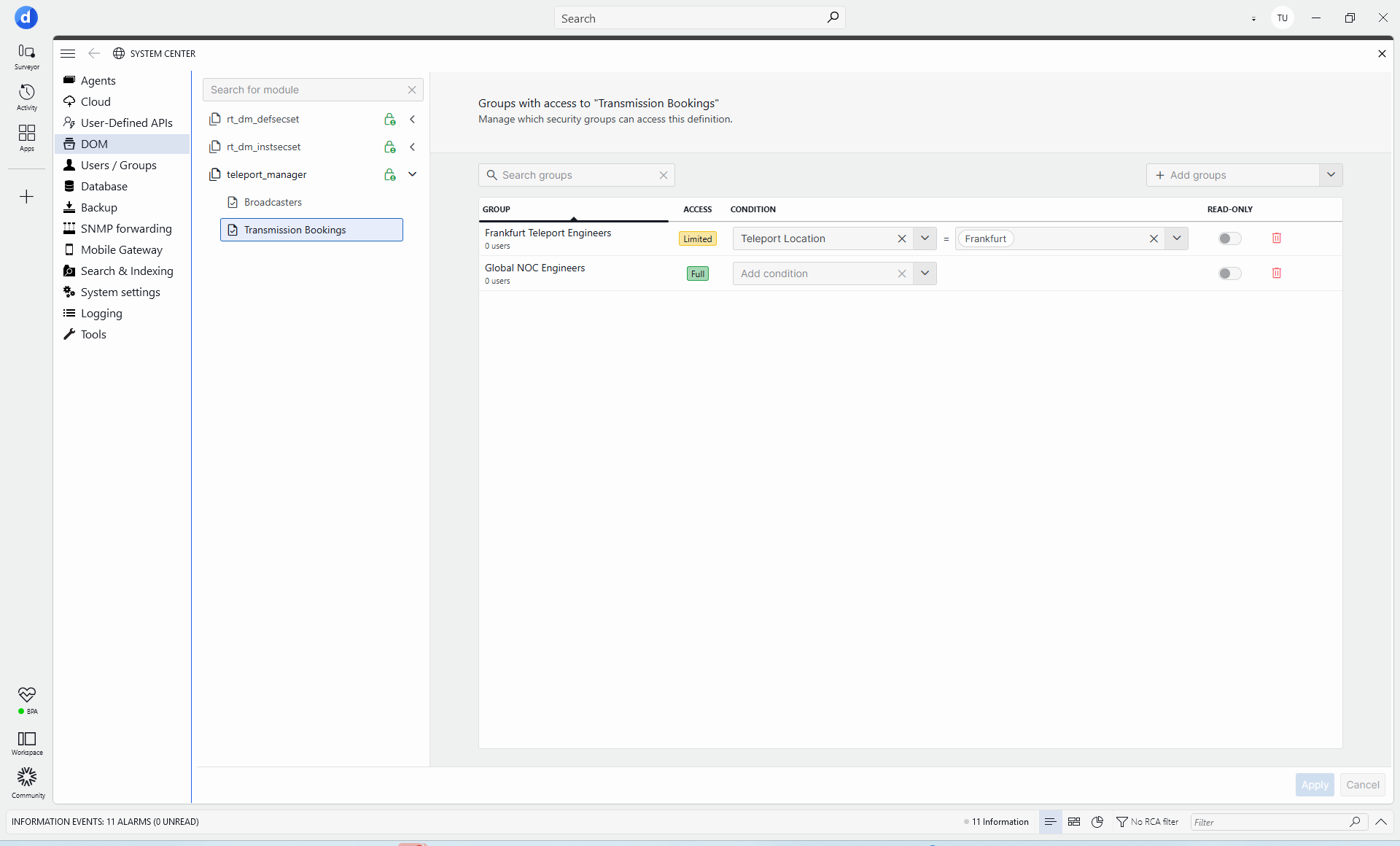
The group access editor in the DOM security web UI has been overhauled to make group access settings easier to review and manage. The updated editor includes the following changes:
- Groups are shown in a table instead of a list.
- Read-only toggle buttons now allow you to configure read-only access for groups.
- Groups that do not have access are no longer shown.
Note
- To be able to view and edit read-only access, you need to be connected to a DataMiner Agent running DataMiner 10.6.6/10.7.0 or above.
- Previously, read-only access rules were not supported in the UI, and updating the access settings for a group via the UI could cause read-only flags to be reset.
New features
GQI - Extensions: Persistent scoped services [ID 45635]
When using the GQI DxM, extension developers can now define persistent services: reusable, injectable dependencies that live beyond a single query execution. This allows extensions to keep expensive setup work, cached data, helper clients, and shared state alive for the right scope instead of rebuilding everything every time a query runs.
Services are registered by annotating a class with a scope attribute:
[GQIWorkerService]: one shared instance per extension worker process.[GQISecurityService]: one shared instance per unique security context.[GQIUserService]: one shared instance per user.
Services can optionally configure IdleExpirationMinutes. When a service has been idle for that duration, it is automatically disposed. This helps reduce memory usage while still allowing frequently used services to stay warm.
Services and extensions can now receive dependencies directly through their constructors. Extension developers no longer need to manually create or look up common dependencies during lifecycle methods. Constructor parameters can include:
- Other registered services, resolved automatically by type or registered service contract.
GQILazy<T>for dependencies that should only be created when first used.IConnectionandIGQIDMSInterfacefor DataMiner access.IGQILogger,IGQIOnInitInputArgs, and other standard GQI types.
Changes
Enhancements
GQI components / Web API: Discrete column values will now be objects containing possible values and an 'IsStrict' flag [ID 45388] [ID 45835]
From now on, discrete column values in a GQI query result will no longer be arrays of possible values. Instead, they will be objects containing possible values and an IsStrict flag.
This change will only have a functional impact when columns are requested for parameter trend data of discrete parameters using GQI via SLHelper. In that case, discrete columns containing discrete values that do not match the column type will no longer be available in the client.
Note
The IsStrict flag will be applied by default where discrete column values can be selected: template overrides, conditional coloring, table column filters, and the Query filter component. Discrete values that are strict will only show checkbox inputs. In case of a string column, no text input will be shown, and in case of a number/date column, no range input will be shown.
Web apps: Redesigned datetime controls now fully support custom time zones set by the client [ID 45687]
Because of a number of enhancements, the redesigned datetime controls will now fully support any custom time zones set by the client.
This also means that these controls will now be better able to deal with transitions to and from daylight saving time.
GQI DxM - 'Get parameters for elements where': Possible to select either a full table or a subset of columns [ID 45692]
Up to now, when you selected the parameter(s) for the Get parameters for elements where data source, it would only be possible to select standalone parameters and table parameters. It was not possible to select specific columns of a table.
From now on, when selecting a table parameter, it will be possible to select either the full table or a subset of columns.
Note
It is not possible to mix columns from different tables or to combine a table with standalone parameters.
Dashboards/Low-Code Apps: New inputs implemented in components [ID 45693]
New input components have been implemented in dashboards and low-code apps, replacing the previous input implementations:
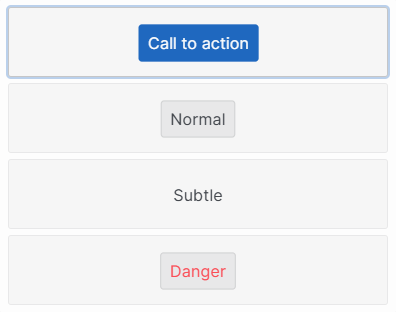
Button component: Now includes a new Type setting that allows you to choose between call to action, subtle, normal, or danger styles:
Dropdown component: Now includes a new Placeholder setting.
Text input, Search input, and Numeric input components: Typing is now from left to right instead of the previous right-to-left behavior.
The Numeric input component now also supports scientific notation.
Note
- When a large number is fed to a numeric input, scientific notation is used (e.g., 1000000000000000000000 becomes 1e+21).
- When a number does not fit within the min and max values of the receiving component, the default value is used instead.
Web apps: About box will now also show the version of the DataMiner Assistant DxM [ID 45833]
From now on, the About box will also show the version of the DataMiner Assistant DxM.
If this DxM is not installed or not enabled, "Not installed" will be displayed instead of the version.
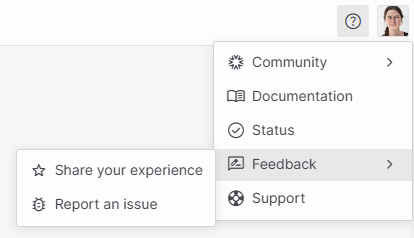
Web apps - Help menu: Feedback option replaced by a feedback submenu [ID 45853]
In the help menu of the web apps, the Feedback option now shows a submenu with the following two commands:
GQI DxM: Improved performance when all DOM data is requested [ID 45866]
When GQI requests DOM data, it now checks whether all data is required instead of relying on the client-requested page size.
When all data is required, e.g., for prefetch join operations or when Filter assistance is enabled on a query filter, GQI now requests data with a larger page size. This reduces request overhead and improves performance.
GQI DxM: Query column retrieval no longer prepares the full data-fetching pipeline [ID 46018]
GQI can now return query column information without preparing the full data-fetching pipeline.
As a result, column-only operations, such as building queries or retrieving columns without statistics, are now more lightweight while full query execution behavior remains unchanged.
Dashboards/Low-Code Apps: No longer possible to link the Select query operator to data [ID 45991]
From now on, it is no longer possible to link the Select query operator to data.
DOM: Web API and front-end web code now support FieldDescriptors of type List<string> [ID 46053]
The web API and the front-end web code will now be able to handle DOM configuration and DOM instances that use FieldDescriptors of type List<string>.
See also: DOM: Server-side support for string list FieldDescriptors [ID 46051]
Note
The UI will not show the generic list of string fields. If a form is shown for a definition that contains such a field, it will not be displayed and no value will be provided. If a form is shown for a DOM instance that has a value for such a field, it will not be displayed and the value will be maintained if the DOM instance would be updated.
Fixes
GQI DxM could become unrecoverable when the initial DataMiner state subscription failed [ID 45830]
When the GQI DxM established an SLNet connection but failed to set up the initial DataMiner state subscription, it could remain in an unrecoverable state.
Now, the subscription step is treated as part of connection establishment. If that step fails, the connection is considered failed and is retried.
Low-Code Apps - Line chart: Hovered data point could be incorrect after position changes [ID 45905]
In some cases, a GQI line chart in a low-code app could highlight the wrong data point when you hovered over the chart after its position changed.
This issue mainly occurred when the chart was in a movable panel that had been dragged to a different location.
Now, the hovered position correctly maps to the expected data point after position changes.
Dashboards/Low-Code Apps: Code blocks no longer rendered correctly in the rich text editor and Web component [ID 45946]
In dashboards and low-code apps, in some cases, code blocks would be displayed incorrectly after a recent UI update. Inline code would appear as a separate box, and block codes would no longer take the full display width.
From now on, code blocks will again render with the intended styling in the rich text editor and Web component.
Dashboards/Low-Code Apps: Filters for numeric columns with strict discrete values could incorrectly stay disabled [ID 45992]
In the Query filter component, and in conditional coloring and template conditions, the filters for numeric columns with strict discrete values could incorrect stay disabled.
From now on, it will again be possible to use these filters.
Web API would leak memory when a user logged out [ID 46020]
The web API could leak memory when a user logged out. The user settings stored in memory would not be cleaned up properly.
Dashboards/Low-Code Apps - Dropdown component: Deleted row could incorrectly remain selected [ID 46021]
Up to now, when a realtime delete update from GQI removed the selected row in a Dropdown component, in some cases, a runtime error could be thrown. As a result, the data would not be cleared correctly, and the deleted row could remain selected.
GQI DxM: GQI data retrieval could fail when parameters had malformed discrete or exception values [ID 46039]
Up to now, when a protocol contained malformed discrete or exception values (e.g., string values on a numeric parameter), some GQI data retrieval requests could fail.
From now on, malformed values are ignored and a warning is logged, while valid values remain available.
Web API: GQI error was thrown when discrete options contained exceptional values [ID 46101]
When discrete options contained exceptional values (i.e., Negative Infinity, Positive Infinity, or NaN), a GQI query would show an An unknown error occurred (status: 200) error in the web apps.
From now on, these exceptional values will be set to null so that they can be properly serialized in the client, following the same strategy as with cell values.