Ticketing 2.0.4
Important
This version of the Ticketing Solution can only be used on a DataMiner System using Storage as a Service (with self-managed DataMiner nodes or DaaS). Systems with self-managed data storage are not supported.
Prerequisites
DataMiner 10.5.9/10.6.0 or higher must be installed.
Standard Data Model Registration 2.0.x or higher must be installed.
The user installing Ticketing needs the following user permissions:
Any users who will use the Ticketing Solution (including the user installing the solution) will need to have write access to the root view and the Ticketing Lock Manager element under the root view (via Permissions > Views; see Configuring a user group).
Installing the following apps alongside the Ticketing Solution will provide access to additional functionality:
- MediaOps.Plan 1.4.x or higher: Required to be able to assign people to tickets.
- InfraOps: Required to be able to link assets to tickets.
Enhancements
Text improvements in General Info and Additional Info editing form [ID 45247]
The following text has been adjusted in the General Info and Additional Info editing form:
- "Edit Ticket" has been changed to "Edit Ticket Fields".
- "Edit Fields" has been changed to "Edit Ticket Type Fields".
- The message "This ticket currently has no ticket type fields that can be edited." has been changed to "No fields defined for the selected Ticket Type."
Contacts sorted alphabetically [ID 45248]
In the dropdown that can be used to assign a contact to a ticket, the contacts from the People and Organizations app are now sorted alphabetically. The "No Assignee" option will continue to be shown at the top when applicable (i.e., for a ticket that has not yet been set to "In Progress", because making such a ticket unassigned again is not possible).
Improved messages on Ticket Information page [ID 45257]
In several places on the Ticket Information page, the "Nothing to show" messages have been removed or replaced with more meaningful messages:
- In case a ticket is closed, canceled, or rejected, it can no longer be transitioned to another state, and no transition buttons are displayed. The previously displayed message "Nothing to show" is no longer shown.
- In the Additional Info section, "Nothing to show" has been replaced with "No fields defined for the selected Ticket Type".
- In the Linked Items section, "Nothing to show" has been replaced with "Ticket has no Linked Items".
- In the External Ticketing section, "Nothing to show" has been replaced with "Ticket has no External Ticketing".
GQI DxM no longer restarted during Ticketing installation [ID 45292]
During installation of the Ticketing app, the GQI DxM is no longer restarted. As the Dev Packs used by the solution are now installed by SDM registration, this restart is no longer needed.
GQI DxM behavior adjustment taken into account [ID 45318]
The Ticketing solution has been adjusted to take into account possible GQI behavior changes such as those introduced in DataMiner 10.6.0 [CU1]/10.6.4 (44714), which, when a filter in a query is linked to data, cause the data to only be considered empty when nothing is selected in the component. This has been addressed using a custom operator.
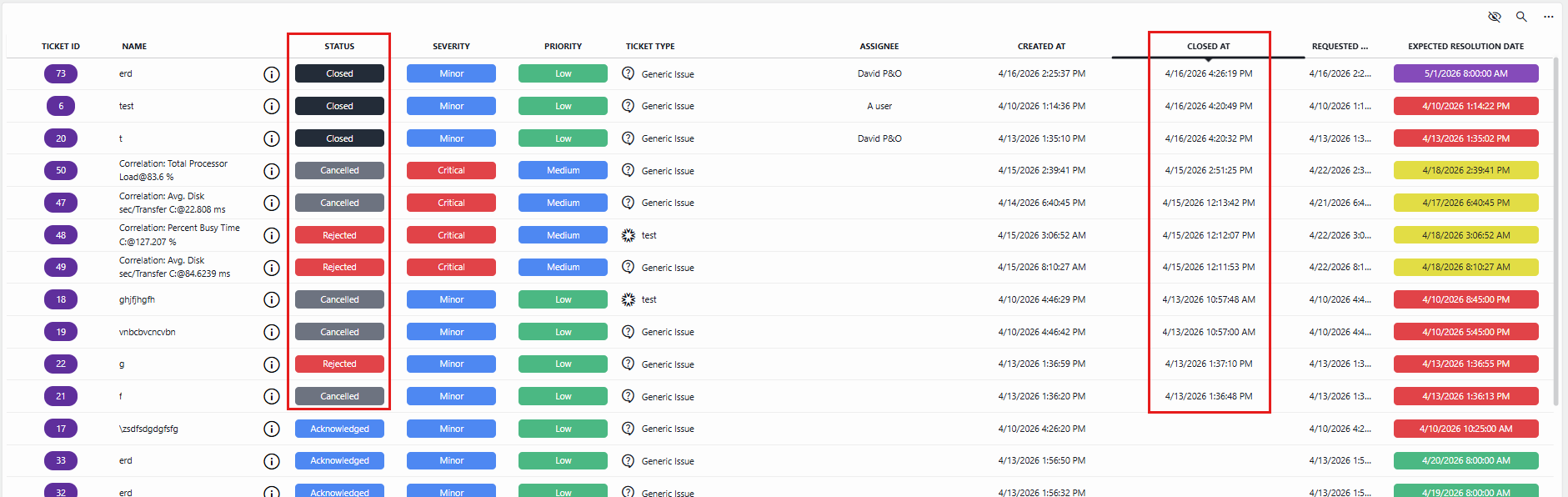
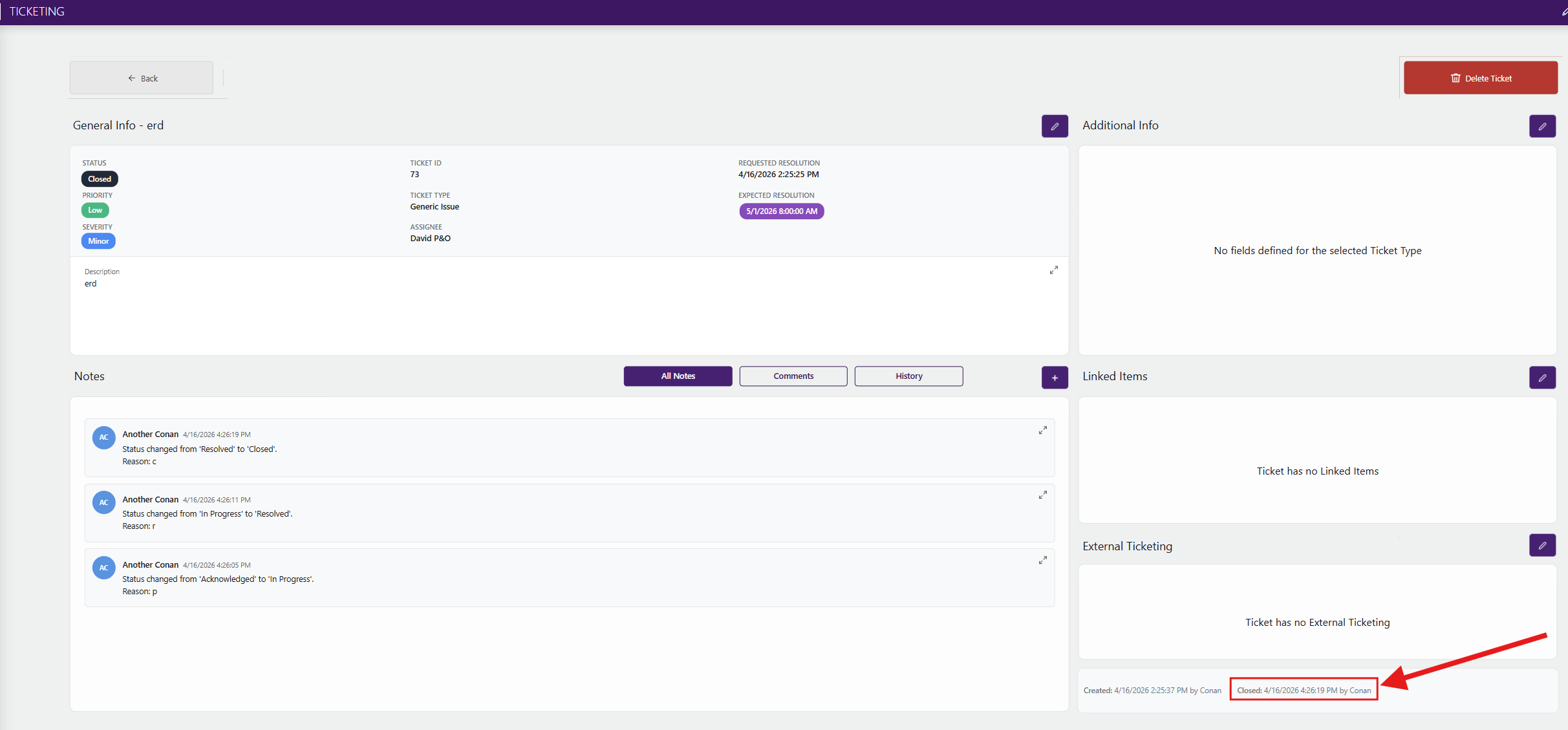
Date and time when tickets were closed now shown in Tickets table and on ticket info page [ID 45320]
For closed, canceled, and rejected tickets, the date and time when these were closed is now displayed in the Tickets table:
In addition, this is now also indicated in the lower-right corner of the ticket info page, instead of the "Last modified" date and time:
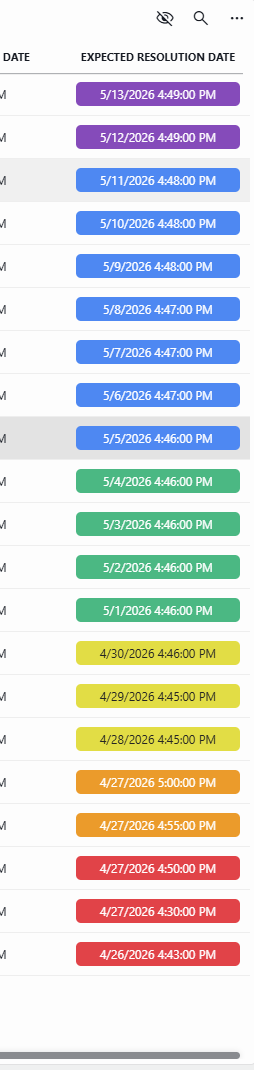
Color coding of expected resolution date [ID 45398]
In the Ticket table and on the ticket information page, the expected resolution date is now indicated with a color depending on when the ticket is expected to be resolved:
- Red: The ticket is overdue (i.e., taking into account the current time, the due date is in the past).
- Orange: The ticket is due to be resolved today (i.e., between the current time and midnight).
- Yellow: The ticket is due to be resolved in 1 to 3 days (i.e., 1 to 3 days after the current day).
- Green: The ticket is due to be resolved in 4 to 7 days (i.e., 4 to 7 days after the current day).
- Blue: The ticket is due to be resolved in 1 to 2 weeks (i.e., 8 to 14 days after the current day).
- Purple: The ticket is due to be resolved in more than 2 weeks (i.e., 15 or more days after the current day).
Example:
Fixes
Large description cannot be fully viewed in expanded view [ID 45245]
If a ticket had a very large description (e.g., over 60 lines), the expanded view of the ticket did not show the complete description even though this should actually be the case. This issue has been resolved, so that you can now scroll down to see the complete description.
Additional info fields could be edited for rejected, canceled, and closed tickets [ID 45246]
If a ticket was rejected, canceled, or closed, it was possible to edit the Additional Info fields on the information page, even though this should not be the case.
Enum default value for ticket type kept reverting to first defined Enum field [ID 45249]
When a ticket type field of data type Enum was defined, the configured default value kept incorrectly reverting to the Enum field that has been defined first.
Not possible to select 'No Assignee' for a ticket [ID 45291]
When a ticket was configured, it could occur that it was not possible to select the No Assignee value in the Assignee drop-down list. This made it impossible to create a ticket and not immediately assign it to someone, even though typically a ticket will only be assigned when it is set to In Progress.
Ticket and ticket type creation not possible because of dependency conflict [ID 45332]
It could occur that multiple versions of Skyline.DataMiner.Core.DataMinerSystem.Common were detected in the Ticketing Solution, causing creation of tickets and ticket types to fail. All DLLs have now been consolidated to prevent this issue from occurring again.
Note that Skyline Lock Manager has also been upgraded from version 1.0.3.2 to 1.0.3.4 because of this change.