DataMiner web apps Feature Release 10.6.2
This Feature Release of the DataMiner web applications contains the same new features, enhancements, and fixes as DataMiner web apps Main Release 10.5.0 [CU11].
Note
For known issues with this version, refer to Known issues.
Tip
- For release notes related to the general DataMiner release, see General Feature Release 10.6.2.
- For release notes related to DataMiner Cube, see DataMiner Cube Feature Release 10.6.2.
Highlights
Dashboards app: Updated user interface [ID 44222] [ID 44297]
In the Dashboards app, the sidebar and home page have been redesigned to improve usability and make managing dashboard folders and dashboards more efficient.
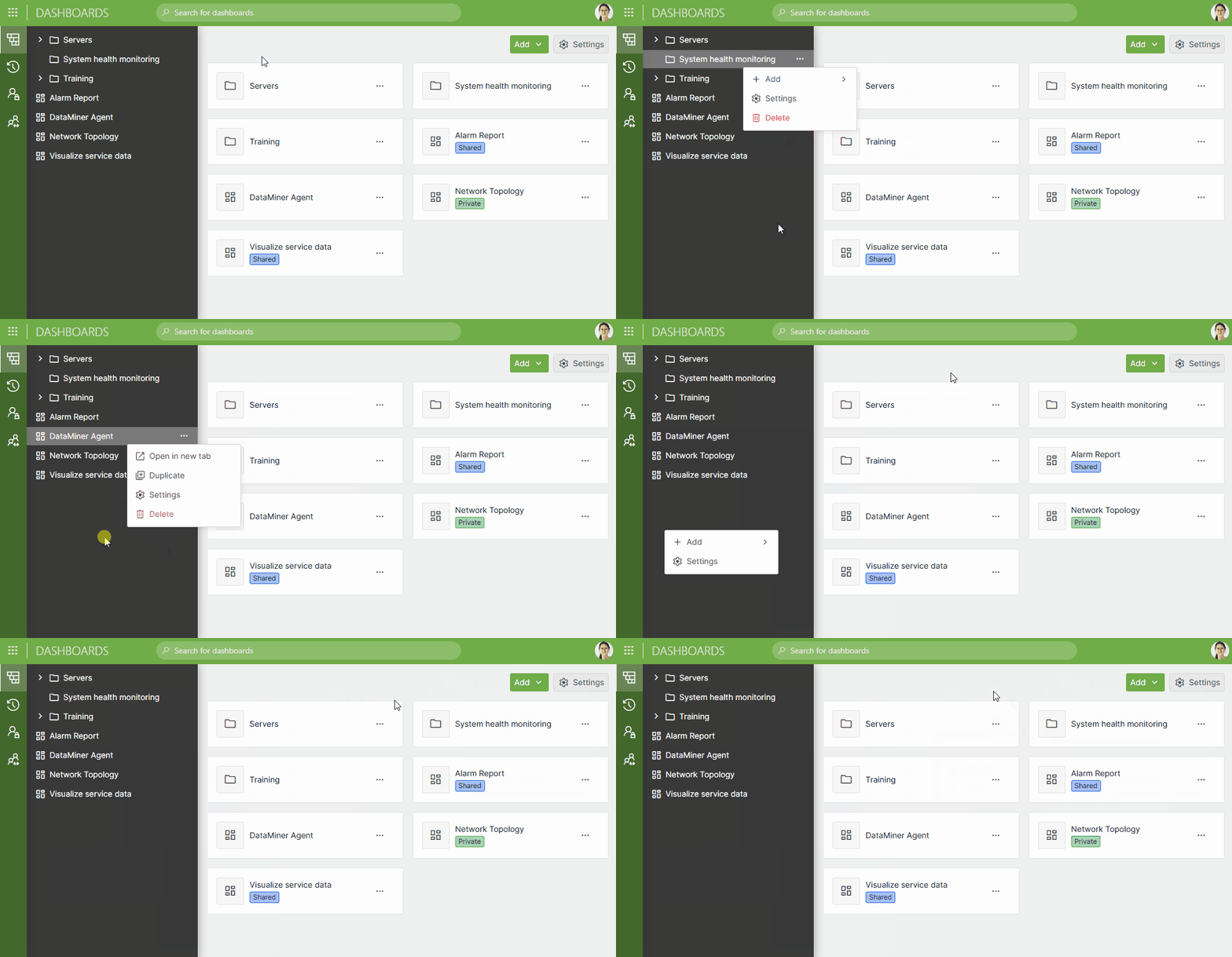
The home page of the Dashboards app, which is shown when no dashboards or folders are selected in the sidebar, now contains a dropdown menu at the top that allows you to add a dashboard or folder. In addition, the page shows an overview of all folders and dashboards, where you can directly delete a folder, add a folder or dashboard, or import a dashboard either locally or from the Catalog.
In the sidebar, the ellipsis button ("...") in the upper-right corner has been replaced with a right-click menu. Right-clicking the background of the sidebar will show the following commands:
- Add > Dashboard
- Add > Folder
- Add > From Import
- Add > From Catalog
- Settings
When you right-click a folder or click the ellipsis button of a folder, a menu with the following commands will open:
- Add > Dashboard
- Add > Folder
- Add > From Import
- Add > From Catalog
- Settings
- Delete
When you right-click a dashboard or click the ellipsis button of a dashboard, a menu with the following commands will open:
- Open in new tab
- Duplicate
- Settings
- Delete
The sidebar now also supports keyboard navigation and automatically adapts to the viewport width.
Dashboards/Low-Code Apps - Templates: More preset templates and redesigned 'Browse templates' window [ID 44174] [ID 44176]
Ready-made preset templates are now available for all template-supported components (i.e., grids, maps, timelines, and tables), directly in the Browse templates window. These presets let you take full advantage of template customization options while saving time and reducing repetitive work when configuring components.
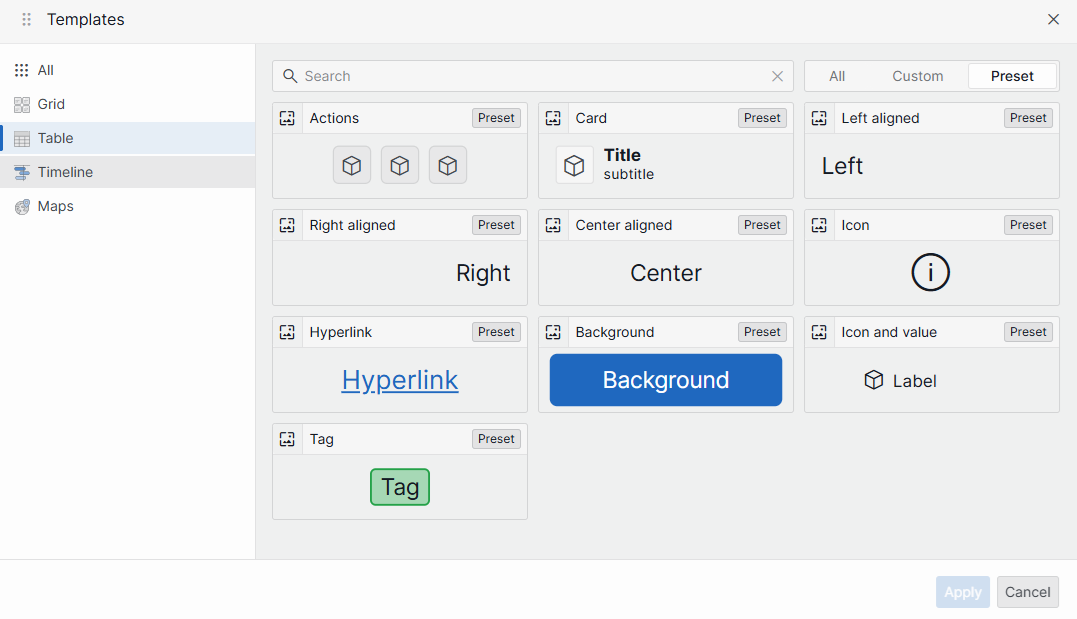
All default templates now appear as presets, alongside a number of additional preset options. Template previews are rendered in the same way for all components, so you have a clear view of each template before applying it.
The Browse templates window has also been redesigned for faster, more intuitive navigation. You can now:
Search templates by name.
Filter the list to show preset templates, custom templates, or both.
Narrow down the overview by visualization type.
Ticketing app End of Life [ID 44371]
The Ticketing app has been declared End of Life.
On systems running DataMiner main server version 10.6.0 or higher as well as on all systems using STaaS, it will no longer be shown on the DataMiner landing page.
Changes
Enhancements
Dashboards/Low-Code Apps: Enhanced performance when rendering a large number of template previews [ID 44156]
Because of a number of enhancements, performance has increased when rendering a large number of template previews in e.g., the Browse templates window.
Dashboards/Low-Code Apps - Node edge graph component: Label enhancements [ID 44218]
Up to now, the label data of nodes and edges was always linked to the conditional coloring of the underlying column.
From now on, it will be possible to display node and edge labels in three different ways:
| Option | Description |
|---|---|
| None | The label will not be shown, even if the selected column has conditional coloring. |
| From coloring | This is the legacy behavior. The label visibility is fully determined by the conditional coloring settings. |
| Custom | Allows you to select a specific field to be displayed as node or edge label. This means that, even if the node/edge does not have conditional coloring, the label field will still be shown. |
If you choose Custom:
The first column of the query will be selected by default.
The background color of edges will be determined as follows:
- If the selected column has conditional coloring, then this color will be used as background color.
- If the selected column does not have conditional coloring, but the edge has, then this color will be used as background color.
- If neither the selected column nor the edge have conditional coloring, the default background color of the node edge graph component will be used as background color.
The above-mentioned label configuration can be set per node query, per edge query, and can also be overridden by means of node and edge overrides.
GQI extensions: Filtering enhancements [ID 44230] [ID 44235]
New IGQIFilter property added to IGQIFilterOperator interface
In SLAnalyticsTypes, the IGQIFilterOperator interface in the GQI extensions API now has a new read-only property:
IGQIFilter Filter: The filter applied by the filter operator
Caution
The introduction of this new property breaks compatibility for existing interface implementations. Although the IGQIFilterOperator interface will in practice only be implemented by the GQI framework and is not intended to be implemented by external code on production systems, existing test setups may get broken when upgrading to the new SLAnalyticsTypes version.
Additionally, the following new types have been defined:
Interface IGQIFilterCommon interface for all possible filters.
Interface IGQIValueFilter : IGQIFilterFilter on a specific column with a specific constant value.
With the following read-only properties:
IGQIColumn Column: The column to filter on.GQIFilterMethod Method: The method to use for filtering.object Value: The value to filter with.
Interface IGQIAndFilter : IGQIFilterConjunction of multiple filters.
With the following read-only property:
IReadOnlyList<IGQIFilter> Filters: Filters to be combined.
Interface IGQIOrFilter : IGQIFilterDisjunction of multiple filters.
With the following read-only property:
IReadOnlyList<IGQIFilter> Filters: Filters to be combined.
Enum GQIFilterMethodRepresents the way a value can be used to filter a column.
With the following values:
- Contains
- DoesNotContain
- DoesNotEqual
- DoesNotMatchRegex
- Equals
- IsGreaterThan
- IsGreaterThanOrEquals
- IsLessThan
- IsLessThanOrEquals
- MatchesRegex
- None
New API for IGQIFilterOperator in SLAnalyticsTypes
A new API has been implemented for the IGQIFilterOperator in SLAnalyticsTypes. This API can be used to optimize a filter operator by implementing the IGQIOptimizableDataSource or IGQIOptimizableOperator interface for a GQI extension.
Possible types for the IGQIFilterOperator.Filter property:
IGQIValueFilterIGQIAndFilter(for future use)
Possible types for the IGQIValueFilter.Value property (i.e., the types for which a GQI extension can create a column):
- bool
- DateTime
- double
- int
- string
- TimeSpan
Important
- Filters on other column types can also be inspected, but they will throw a
NotSupportedExceptionwith the following message when trying to retrieve the Value property: "Accessing a filter value for this column type is not supported." - Currently, it is not yet possible to partially optimize a filter in a GQI extension. This means that either the entire filter in the filter operator needs to be optimized, or that the filter operator cannot be optimized.
- When this feature is used after a web-only upgrade in conjunction with an older server version that uses an older
SLAnalyticsTypes, the GQI extension library will not compile when installed via a package created from a DataMiner Solution because the new SLAnalyticsTypes dependency will not be included. In this case, the version inC:\Skyline DataMiner\Fileswill be used instead.
Automation scripts: Updated user permissions [ID 44232]
Up to now, the Interactive automation script component would only visualize an automation script when the user had both the Modules > Automation > UI available and the Modules > Automation > Execute permissions. From now on, the Interactive automation script component will be able to visualize an automation script when the user has the Modules > Automation > Execute permission.
With regard to the Web Services API, up to now, users needed to have both the Modules > Automation > UI available permission and the Modules > Automation > Execute permission to be allowed to use the GetAutomationScript, ExecuteAutomationScript, or ExecuteAutomationScriptWithOutput methods.
From now on, they will need the following permissions:
- For the
GetAutomationScriptmethod: Modules > Automation > UI available permission and/or Modules > Automation > Execute permission - For the
ExecuteAutomationScriptandExecuteAutomationScriptWithOutputmethods: Modules > Automation > Execute permission
Enhanced error logging when deleting DOM instances fails [ID 44263]
In a dashboard, a low-code app, or another DataMiner web app, each time an error occurs when you try to delete a DOM instance, from now on, all exceptions will be logged, and a message will appear in the UI.
Dashboards app - Grid component: Enhanced rendering of PDF reports in stacked mode [ID 44266]
Because of a number of enhancements, the behavior of the Grid component has improved when rendered on a PDF report in stacked mode.
From now on, the grid will try to grow or shrink vertically in order to avoid a vertical scrollbar and show as many items as possible with regard to its settings.
Note
A PDF report containing a Grid component can still show scrollbars and/or clipped content when the grid is set to show a fixed amount of row and a fixed amount of columns (without Stretch to fit option).
GQI DxM: Partition join strategy for DOM data [ID 44275] [ID 44327]
In order to enhance overall performance of the GQI join operator, a so-called "partition join strategy" (i.e., a page-by-page join strategy) will now be used.
Conditions that need to be met
This new join strategy will only be applied to join operations in the following scenario:
The row-by-row option is disabled for the join operator
The prefetch option is disabled for the join operator
- This new prefetch option is disabled by default, and will only be visible in the query builder when the
showAdvancedSettings=trueargument is added to the URL of the dashboard or low-code app. - When the row-by-row option is enabled, the prefetch option will be ignored.
- This new prefetch option is disabled by default, and will only be visible in the query builder when the
Real-time updates are not enabled.
There is only a single join condition.
The join type is one of the following:
- Inner, when at least the order on the left or right query does not need to be preserved.
- Left, when the order on the right query does not need to be preserved.
- Right, when the order on the left query does not need to be preserved.
The query to partition (determined by join type and order preservation) supports partition filters.
A query currently supports partition filters when it only contains one of the following:
- A DOM data source
- Filters
- Column selectors
- Column manipulations on columns other than the join condition column
- Aggregations (when grouped by the join condition column)
Join strategy concept
When all above-mentioned conditions are met, the partition join is executed as follows:
The source and destination column to join on are extracted from the join conditions.
The rows are fetched page by page from the source query (which can be either a left or right query depending or sorting and join type).
- The page size is the minimum page size configured in the
DataFetchConfigandPartitionFilterLimitvalues found inPartitionOptions.
- The page size is the minimum page size configured in the
For each source page, the following is done:
- A partition filter is constructed using unique source column values that were not requested yet (using a join operator cache).
- A new query is created by applying the partition filter to the destination query.
- The new query is executed, and all rows are fetched.
- The resulting records are added to the join operator cache using the value of the destination column.
- The joined records are then created by looping over all records in the page and finding matches in the join cache.
Important
Although the partition join strategy will enhance performance in most common scenarios that require the fastest possible query executions, this strategy can be up to twice as slow when the join has low selectivity. For these uncommon scenarios, we recommended manually enabling the prefetch option on the relevant join operator.
DataMiner upgrade: DataMiner Assistant DxM will now be included in the DataMiner web upgrade packages [ID 44291]
In order to upgrade the DataMiner Assistant DxM, up to now, you had to install a full DataMiner server upgrade package (main release or feature release).
From now on, the DataMiner Assistant DxM will be included in the DataMiner web upgrade packages instead.
Note
The DataMiner Assistant DxM will only be upgraded when an older version is found on the DataMiner Agent. If no older version is found, it will not be installed.
Support for GQI DxM on Dashboard Gateway [ID 44344]
The GQI DxM can now also be used on a Dashboard Gateway server. However, this requires some additional manual configuration in order to ensure that the gateway can communicate using MessageBroker within the DataMiner cluster.
On the Dashboard Gateway server, you will need to edit the web.config in the API folder, and specify the following settings:
If the system uses BrokerGateway:
- nats:credsUrl: The API endpoint of BrokerGateway, for example:
https://dma/BrokerGateway/api/natsconnection/getnatsconnectiondetails. - nats:apiKeyPath: The file path to the appsettings.runtime.json file containing the private key, for example:
C:\webgateway\brokergateway\appsettings.runtime.json. This file has to be copied from the DMA and can be found here:C:\Program Files\Skyline Communications\DataMiner BrokerGateway\appsettings.runtime.json.
- nats:credsUrl: The API endpoint of BrokerGateway, for example:
If the system does not use BrokerGateway yet (only possible on 10.5.x systems):
- nats:credsFile: The path to the .creds file containing the authentication information. On a DataMiner Agent, you can typically find this here:
C:\Skyline DataMiner\NATS\nsc\.nkeys\creds\DataMinerOperator\DataMinerAccount\DataMinerUser.creds. - nats:uri: A string array containing the NATS endpoints. Every DMA in the DMS can be specified here.
- nats:credsFile: The path to the .creds file containing the authentication information. On a DataMiner Agent, you can typically find this here:
Note that if a local file path is used, you will need to replace the appsettings.runtime.json or the .creds file whenever the IP address of one or more DataMiner Agents in the cluster changes or one or more DataMiner Agents is added to or removed from the cluster.
Web apps: New Web folder synced across the DataMiner System [ID 44396]
A new folder, C:\Skyline DataMiner\Web, has been added and is now synced across the DataMiner System.
This folder will be used to store user-generated configuration and files that can be shared across dashboards and low-code apps, such as images and themes.
The C:\Skyline DataMiner\Generic Interface folder has been removed, as it was no longer used.
Fixes
Dashboards app: Exporting trend chart data to CSV could cause an error when data was still loading [ID 44064]
Up to now, when users triggered a CSV export on a trend chart before all data had fully loaded, an error pop-up message could appear.
This issue has now been resolved. The CSV export process has been made asynchronous, so the download will only start once all required data has been fully loaded, even if the export button is clicked before that.
Dashboards app: Problem when generating a PDF report of a dashboard containing a Time range component [ID 44168]
When you had generated a PDF report of a dashboard that contained a Time range component of which the Edit using option was set to "Keyboard & calendar", up to now, the date would incorrectly not be displayed.
Problem when importing a web app [ID 44202]
When you imported a web app, e.g., from the DataMiner Catalog onto the DataMiner landing page, in some cases, not all associated files would get synchronization across the DataMiner System.
Data Aggregator would not be able to execute a converted GQI query that contained a regular expression [ID 44258]
When a GQI query was converted to JSON in order to have it executed by the Data Aggregator, up to now, on systems where Data Aggregator executed GQI queries using CoreGateway and SLHelper instead of the GQI DxM, it would incorrectly not be possible for the Data Aggregator to execute that query if it contained a regular expression.
The following error would be logged:
A unknown exception occurred in CoreGateway: Error trapped: Skyline.DataMiner.Net.SLConfiguration.SLValue`1[System.String] could not be converted to System.Text.RegularExpressions.Regex.
Parameter name: value
Dashboards/Low-Code Apps: Problem when entering decimal values that start with a decimal point [ID 44260]
When you entered a decimal value that started with a decimal point (e.g., ".05"), up to now, the decimal point would incorrectly be removed. For example, ".05" would incorrectly be changed to "05".
Note
In some cases, this issue can still occur when entering a decimal value in a dialog box of an interactive automation script that uses legacy UI components.
Dashboards/Low-Code Apps - Timeline component: Problem when zooming or panning while linked components trigger viewport changes [ID 44280]
When a Timeline component and a Time range component were linked in both directions, up to now, the Timeline component would not be able to properly perform viewport actions (e.g., zooming or panning).
From now on, a Timeline component will no longer adapt its viewport when instructed to do so by incoming events (from e.g., a Time range component) while a user is zooming or panning.
Note that the following actions will only affect the viewport after the user interaction has finished:
- Selecting a range by dragging the right mouse button.
- Selecting a segment on top of the timeline.
Because these two actions will only affect the viewport after the user interaction has finished, the Timeline component will also receive an incoming viewport change request from the Time range component after the user interaction has finished. That way, the latter request will overrule the viewport changes that were made initially.
Low-Code Apps - Timeline component: Undesired layout shifting while you were moving items between groups [ID 44307]
In a low-code app, a Timeline component would cause undesired layout shifting while you were moving items between groups. This could lead to you dropping the items in the wrong group.
Also, it would not be possible to pan the timeline when starting on a timeline item.
Web apps: Problems with context menus [ID 44309]
In the DataMiner web apps, the following context menu issues have been solved:
When you right-clicked a context menu, it would not immediately close when you left-clicked the same element you right-clicked to open it. The menu would only close when you left-clicked a second time.
A context menu with a submenu, or any context menu with a horizontal positioning in relation to its parent, could be out of the viewport when opened at the bottom of the screen.
In some cases, when a context menu had been opened by pressing the space bar, it could act erratically. It would not close when you clicked outside of it, and if it had a submenu, that submenu would open on top of the existing menu.
Interactive automation scripts: Subsequent user actions could get ignored when a component lost focus [ID 44315]
When you started an interactive automation script in a web app, up to now, the moment a component lost focus, subsequent user actions could incorrectly be ignored.
Web Services API: GetClientDefaultTimeZone and GetRegionalSettings would incorrectly not be able to read the regional settings of the DMA on systems using a Dashboard Gateway [ID 44317]
On systems where dashboards and low-code apps were accessed through a Dashboard Gateway, up to now, the web methods GetClientDefaultTimeZone and GetRegionalSettings would incorrectly not be able to read the regional settings of the DataMiner Agent. From now on, the requests will be forwarded correctly.
Login could fail when using a dashboard gateway with a DMA where gRPC is enabled [ID 44364]
When a dashboard gateway was used in combination with a DataMiner Agent where gRPC was enabled, up to now, logging in could fail with the following error:
Failed to authenticate over GRPC: Status(StatusCode="Internal", Detail="Error starting gRPC call. MissingMethodException: Method not found: 'System.Buffers.IBufferWriter`1<Byte> Grpc.Core.SerializationContext.GetBufferWriter()'.", DebugException="System.MissingMethodException: Method not found: 'System.Buffers.IBufferWriter`1<Byte> Grpc.Core.SerializationContext.GetBufferWriter()'.")
This issue has now been resolved, and authentication over gRPC will work correctly in this scenario.
Dashboards app: Folder named '_Images' would incorrectly appear in the navigation pane after you had deployed a Catalog package [ID 44374]
After you had deployed a package from the DataMiner Catalog, in some cases, a folder named _Images would incorrectly appear in the navigation pane on the left.