DataMiner web apps Feature Release 10.6.6
This Feature Release of the DataMiner web applications contains the same new features, enhancements, and fixes as DataMiner web apps Main Release 10.6.0 [CU3].
Note
For known issues with this version, refer to Known issues.
Tip
- For release notes related to the general DataMiner release, see General Feature Release 10.6.6.
- For release notes related to DataMiner Cube, see DataMiner Cube Feature Release 10.6.6.
Highlights
Dashboards/Low-Code Apps: New 'Rich text input' component [ID 45097] [ID 45180]
A new rich text input component is now available for dashboards and low-code apps, allowing you to enter and edit formatted text with ease. This makes it possible to add structured notes, comments, or instructions, and highlight important information using a wide range of formatting options. The entered content is then exposed as HTML.
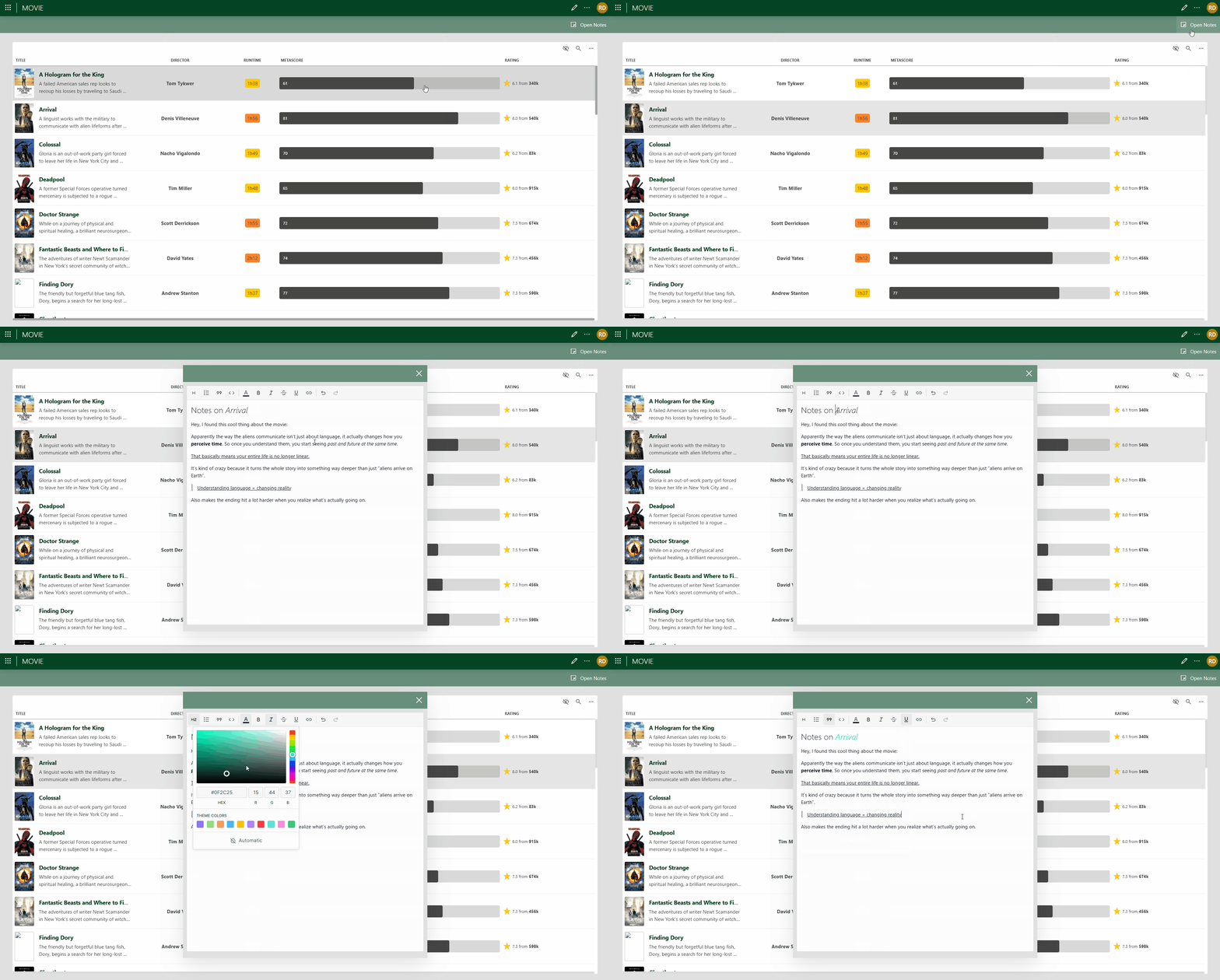
The toolbar of the new control offers the following formatting options:
- Headings: Levels 1 to 4
- Lists: Bulleted list and Numbered list
- Blockquote
- Code block
- Font color
- Inline text formatting: Bold (Ctrl+B), Italic (Ctrl+I), Underline (Ctrl+U), and Strikethrough
- Hyperlinks: Insert, Edit, and Remove
- History: Undo (Ctrl+Z) and Redo (Ctrl+Y)
In the Settings pane for this component, you can configure the following settings:
| Section | Option | Description |
|---|---|---|
| General | Emit value on | Determine when the value in the box becomes available as data. This can be when the focus is no longer on the box ("Focus lost"), or when the value in the box changes ("Value change"). If you select Focus lost, the value will also become available when the user presses Enter. |
| General | Default value | Specify the default value that will be entered into the input box when the dashboard or low-code app is opened. |
The control is available under the basic controls. Like other basic controls, it also supports the Set Value component action, which sets the current value of the component to either a static or a dynamic value.
New features
GQI DxM: Extensions can now be created using the Skyline.DataMiner.Core.GQI.Extensions NuGet [ID 44760] [ID 45341]
From now on, the Skyline.DataMiner.Core.GQI.Extensions NuGet can be used to create GQI extensions without depending on the SLAnalyticsTypes API.
Up to now, when new GQI features were added in the SLAnalyticsTypes API, extensions could only use these new features if DataMiner itself also used the latest C:\Skyline DataMiner\Files\SLAnalyticsTypes.dll file.
Notes:
GQI extensions can now be created with either the
SLAnalyticsTypesAPI or theSkyline.DataMiner.Core.GQI.ExtensionsNuGet.Though an extension library may contain extensions for both APIs, an individual extension must stick to one specific API.
Functional backward compatibility is guaranteed for existing extensions using the
SLAnalyticsTypesAPI.Extensions that use the
SLAnalyticsTypesAPI will at runtime be adapted to the newSkyline.DataMiner.Core.GQI.ExtensionsNuGet API. This may introduce some additional overhead.Extensions that use the
Skyline.DataMiner.Core.GQI.ExtensionsNuGet API will have no additional overhead.The
Skyline.DataMiner.Core.GQI.ExtensionsNuGet contains the exact same API as theSLAnalyticsTypesAPI, but in a different namespace:SLAnalyticsTypesAPI:Skyline.DataMiner.Analytics.GenericInterfaceSkyline.DataMiner.Core.GQI.ExtensionsNuGet:Skyline.DataMiner.Core.GQI.Extensions
To convert existing extensions and extension libraries, just add the NuGet dependency and change the namespace.
Changing the API used by an extension does not change the extension ID and will therefore remain backward compatible with existing queries.
If an extension implements both APIs, the new NuGet API will get priority. This could be useful in cases where you want to use the new NuGet API without overhead, but still need the exact same extension to work on older versions of the GQI DxM with SLHelper.
Dashboards/Low-Code Apps - Query builder: 'Is one of' and 'Is none of' comparisons [ID 45164]
On systems using the GQI DxM, two new filter methods will be available in the query builder:
| Filter method | Description |
|---|---|
| Is one of | Matches when at least one item in a list of values is equal to the target value. |
| Is none of | Matches when none of the items in a list of values are equal to the target value. |
Internally, the Is one of comparison will be translated to an OR filter with a number of equals comparisons (e.g., Column X equals A OR equals B OR equals C), and the Is none of comparison will be translated to an AND filter with a number of not equals comparisons (e.g., Column X not equals A AND not equals B AND not equals C).
See also: GQI DxM: In/NotIn comparisons [ID 45255]
Web apps: A custom time zone can now be specified on user level [ID 45170]
In all web apps, it is now possible to specify a custom time zone in the user menu (which can be opened by clicking the user icon in the header bar).
If you do so, the custom time zone you specify will override the local time of the client machine on user level.
Note that, when a time zone is enforced for all users, this user-level setting will be disabled.
GQI DxM: In/NotIn comparisons [ID 45255]
Clients can now use the following new filter methods when applying a filter operator:
| Filter method | Description |
|---|---|
| In | Matches when at least one item in the filter value list is equal to the target cell value. |
| NotIn | Matches when none of the items in the filter value list are equal to the target cell value. |
Note
- These filter methods are only applicable when the filter value is a list of values. The type of the items in the filter value should be comparable to the column type on which the filter is applied.
- These filter methods will not be provided by GQI via the filter operator capabilities. It is up to the client to provide these as an option.
- Internally, the In comparison will be translated to an OR filter with a number of Equals comparisons, and the NotIn comparison will be translated to an AND filter with a number of NotEquals comparisons.
- For information on how this was integrated into the query builder, see Dashboards/Low-Code Apps - Query builder: 'Is one of' and 'Is none of' comparisons [ID 45164].
In addition, the following enhancements have been made:
- When the greater than, greater than or equal to, less than, and less than or equal to filter methods are applied on multiple numeric filter values, the internal filters will now be simplified to only compare to the minimum or maximum filter value respectively instead of using a large OR filter.
- Up to now, when the NotEquals, NotContains, and NotRegex filter methods were used in combination with multiple filter values, they would internally be translated to an OR filter. From now on, they will be translated to an AND filter. As a result, NotEquals with multiple filter values will now be equivalent to the new NotIn filter method, and Equals with multiple filter values will now be equivalent to the new In filter method.
Changes
Enhancements
Monitoring app: 'HTTP 404' page replaced by an embedded visual [ID 45027]
From now on, when you try to open a non-existing page, you will no longer be redirected to a separate "HTTP 404" page. Instead, a visual will now appear inside the Monitoring app.
Clicking the Go to overview button in that visual will redirect you back to the home page of the app.
GQI DxM: Custom property columns will now be referenced by their name instead of by their ID [ID 45085] [ID 45287]
Custom property columns will now be referenced by their name instead of by their ID. This will ensure that, if certain objects are moved from one DataMiner System to another (e.g., by means of a DELT export), and a query that references a custom property linked to those objects is also moved to that other system, the query will still work.
Previously these queries would break when moved to another system because, in some cases, the custom properties would be assigned another ID on that other system.
The "by ID" columns will remain on the data sources for backward compatibility to make sure that existing queries are not affected. These columns will now be marked as IsHidden and "(Legacy)" will be added to their name. Client applications can then use this information to hide these columns and only show them in case they were already selected. On newly created queries, these legacy columns will never be visible.
These changes will affect the following data sources:
- Get alarms
- Get elements
- Get services
- Get views
Note
The IsHidden flag mentioned above is already supported by the query builder.
Web apps: All 'HTTP 404' pages have now been replaced by embedded visuals [ID 45152]
From now on, when you try to open a non-existing page in either of the DataMiner web apps, you will no longer be redirected to a separate "HTTP 404" page. Instead, a visual will now appear inside the app.
Clicking the button in that visual will redirect you to the landing page or to the home page or another valid page of the app.
Dashboards/Low-Code Apps: Default theme of basic controls has been changed to 'Transparent' [ID 45198]
The default theme of the following basic controls has been changed to Transparent:
- Button
- Dropdown
- Numeric input
- Rich text editor
- Search input
- Text input
- Time range
- Toggle
Web apps: Web version in 'About DataMiner' window will now be retrieved by means of a GetDataMinerVersionInfo message [ID 45256]
From now on, the Web version displayed in the About DataMiner window of a DataMiner web app will be retrieved by means of a GetDataMinerVersionInfo message.
Web apps: DOM error 'NoPermission' will now include a more detailed error message [ID 45295]
When the DOM instance error NoPermission is thrown in a web app, from now on, it will include a full error message that provides more details on the action the user was not allowed to perform.
GQI DxM will no longer send log entries to the console [ID 45302]
Up to now, the GQI DxM would send its log entries to both the log file and the console. From now on, it will only send its log entries to the log file.
Dashboards/Low-Code Apps: Enhanced storage of dashboards and low-code apps [ID 45340]
Up to now, the size of a dashboard or low-code app could rapidly increase due to redundant information being saved, especially when queries had been configured.
From now on, no more redundant information will be saved. As a result, dashboards and low-code apps will require less memory and disk space, the overall performance of dashboards and low-code apps will increase, and web upgrades will be executed faster.
Low-Code Apps: Enhanced performance when editing app pages [ID 45357]
Because of a number of enhancements, overall performance has increased when editing app pages.
Dashboards/Low-Code Apps - Maps component: Enhanced performance when loading maps [ID 45377]
Because of a number of enhancements, overall performance has increased when loading maps into a Maps component.
Fixes
Dashboards app: Problem when trying to open a dashboard that was not present in the cache [ID 44989]
When you tried to open a dashboard that was not present in the cache, up to now, a This dashboard does not exist error would appear.
From now on, when you try to open a dashboard that is not present in the cache, it will be fetched from the file system instead.
Dashboards/Low-Code Apps: Problem when themes were being migrated when the DMA was offline [ID 45020]
When themes were being migrated, in some cases, an exception could be thrown when the DataMiner Agent was offline.
GQI DxM unavailable because of missing Newtonsoft.Json assembly [ID 45146]
After an upgrade from DataMiner web 10.5.0 CU0, 10.5.2, or 10.5.3 to a higher version, the GQI DxM would be unavailable in the DataMiner web apps. Also, the GQI logging would contain a message stating Could not load file or assembly 'Newtonsoft.Json'.
Low-Code Apps: Problem when editing an app [ID 45193]
Up to now, in some cases, editing an app could result in a draft being created from an outdated version. If a new version had been published in another tab since the page was loaded, the draft would be based on the stale version visible in the UI, and the newer changes would be silently discarded.
From now on, when you click the Edit button, a draft will now always be created based on the latest published version.
This will also apply when duplicating an app. The latest published version will be duplicated.
Note
Editing a specific version via the version history panel will function as before. In that case, a draft will always be created based on the selected version.
Web Services API: Compatibility manager would incorrectly not be initialized [ID 45203]
When a DataMiner Agent restarted, or when IIS restarted, in some cases, the Web Services API compatibility manager would incorrectly not be initialized, causing an error to be thrown.
Dashboards app: Grid lines would incorrectly stay visible after you had exited edit mode [ID 45205]
When you had clicked the Show grid button in the header bar of a dashboard, up to now, the grid lines would incorrectly also be visible after you had exited edit mode.
Monitoring app: Surveyor tree items would not be indented correctly [ID 45219]
In some cases, Surveyor tree items would not be indented correctly.
Dashboards/Low-Code Apps - Time range component: Problem when component was made smaller [ID 45221]
Up to now, when a Time range component was made smaller, in some cases, the separators would get ellipsed, and the picker button would disappear.
Low-Code Apps: Duplicated panels would incorrectly not be available in the action editor [ID 45224]
Up to now, when you had duplicated a panel, it would incorrectly not be available in the action editor.
Low-Code Apps: Problem when a 'Change variable' action was executed in parallel with an 'Open a page' action in draft preview [ID 45234]
Up to now, when a draft version of an app was previewed, in some cases, a Change variable action could fail to apply its value when executed in parallel with an Open a page action.
Dashboards/Low-Code Apps - Alarm table component: Messages appearing on top of the component would take up too much space [ID 45244]
Up to now, messages appearing on top of the Alarm table component would take up too much space.
Dashboard Gateway would use an incorrect URL to retrieve data from the DMA [ID 45270]
In some cases, a Dashboard Gateway would use an incorrect URL to retrieve data from the DataMiner Agent, especially when, after a restart of the Web Services API, the Dashboard Gateway received an API request before its persistent SLNet connection was fully initialized.
Low-Code Apps: Form component would incorrectly not wait until all loading had finished before executing any Update or Delete actions [ID 45328]
Up to now, a Form component would incorrectly already execute its actions before a newly-selected instance had finished loading. As a result, old instances could get updated or deleted.
From now on, a Form component will wait until all loading has finished before executing any Update or Delete actions.
Dashboards/Low-Code Apps - Query builder: Problem when linking a query option to component data [ID 45335]
When, while configuring a query with a custom data source, you link a query option to component data, the data link would silently be discarded when the static value of the query option matched the value provided by the component data.
No save operation would get triggered as no change was detected. After you had reloaded the dashboard or the low-code app, the query option would revert to its static value with no data link attached.
Dashboards/Low-Code Apps - Image component: Vertical scrollbar would incorrectly appear when vertical padding was less than 5px [ID 45337]
When an Image component had its vertical padding set to a value less than 5px, up to now, a vertical scrollbar would incorrectly appear.
Web apps: Search bar would not show any results on a mobile device [ID 45350]
When certain DataMiner web apps (e.g., Dashboards, Monitoring, etc.) were used on a mobile device, up to now, the search bar at the top of the screen would incorrectly never show any results.
Dashboards/Low-Code Apps - State timeline component: Problem when dragging a parameter index onto the component to act as a filter [ID 45351]
When a table parameter index or column parameter index was dragged onto a State timeline component to act as a filter, up to now, the TableDisplayIndex of the underlying data would be modified to match the index name. This would unintentionally affect all other components that were using that same data.
From now on, the TableDisplayIndex will only be updated when you explicitly drag an index onto the dashboard as data. When an index is dragged onto a State timeline component as a filter, the original data will remain unchanged, and a copied instance will be used exclusively by the State timeline component.
Dashboards/Low-Code Apps - Line & area chart component: Problems when changing the 'Trend points', 'Show average', 'Show minimum', and 'Show maximum' options [ID 45363]
When, while configuring a Line & area chart component, you disabled the Show average option, and then set the Trend points option to "Real-time", the chart would not include any data in exported CSV files. From now on, CSV files will include all data visible in the chart.
Also, when you changed the Trend points option from "Real-time" to "Average", and then enabled or disabled the Show average, Show minimum, or Show maximum options, in some cases, the trend lines and the highlighted trend data points were only updated when the chart was reloaded. From now on, the lines and the data points will get updated immediately.