Configuring automatic ticket creation via Correlation
You can have DataMiner create tickets automatically based on a correlation rule. The correlation rule can detect specific alarm conditions and then trigger ticket creation without any user interaction.
The tickets will be automatically linked to the relevant alarms, elements, and/or services. If the Asset Manager app is installed, they will also be linked to the relevant assets.
In the Correlation module in DataMiner Cube, create a correlation rule.
Configure the rule to be triggered based on the needs of your use case.
For example, you can filter on alarms with critical severity:
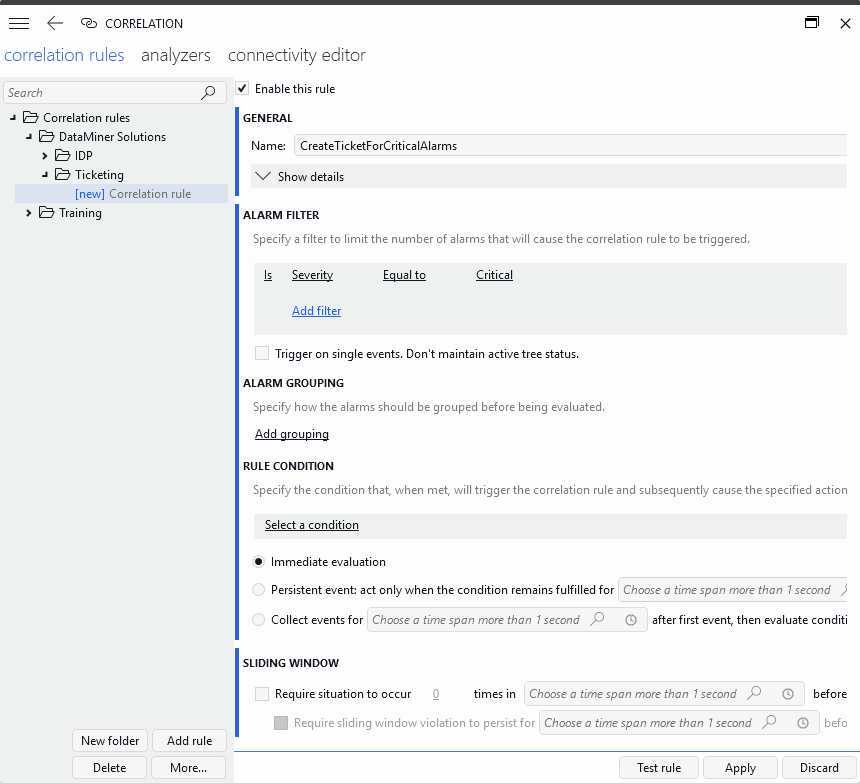
Example correlation rule configuration in DataMiner 10.6.7Select the action Run script and select the script SLC-AutoCreateTicket, which is included in the Ticketing Solution for this purpose.
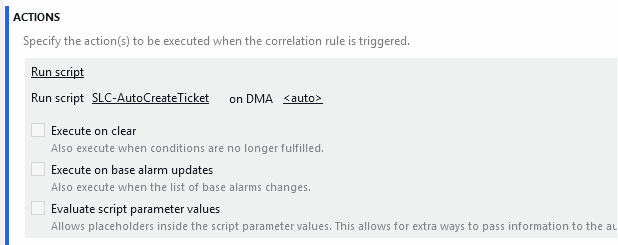
Example correlation rule configuration in DataMiner 10.6.7Make sure your rule is enabled via the Enable this rule checkbox at the top.
Click Apply to save and apply the rule.
When an alarm is generated that triggers the rule, a ticket will be created immediately, linked to the alarm and related objects, and the ticket ID will be added to the alarms Ticket ID property.