Ticketing architecture
The Ticketing Standard Solution consists of two main building blocks:
These blocks work together to provide ticket lifecycle management, integration with other DataMiner components, and user interaction.
Below you can see a more detailed overview of the solution's architecture and how it interacts with other components.
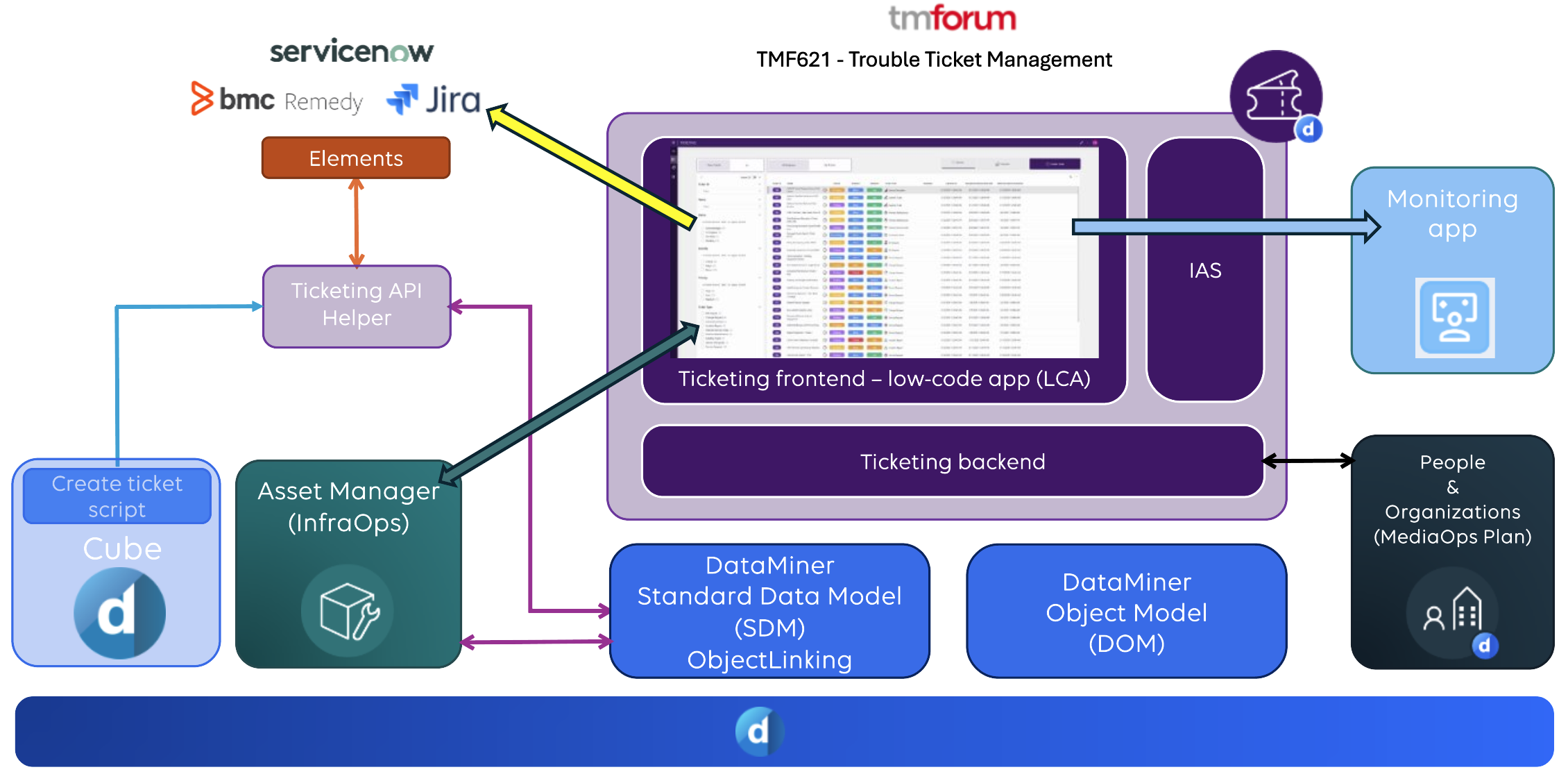
Ticketing backend
The Ticketing backend implements the core logic of the Ticketing app and is built on top of the DataMiner Standard Data Model (SDM). This allows the Ticketing Solution to expose a Ticketing API Helper that can be used by other DataMiner components, such as:
- Automation scripts
- DataMiner connectors/elements
- Other Standard Solutions
The Ticketing backend uses SDM relationships (formerly known as "SDM Object Linking") to associate tickets with other DataMiner objects or objects from other applications, including:
- Alarms
- Elements
- Services
- Assets from the InfraOps Asset Manager app
This SDM relationships layer can be consulted by other DataMiner applications to determine which tickets are linked to which objects.
Ticketing frontend
The Ticketing frontend is the user interface of the solution, which is implemented as a low-code app.
All tickets, fields, and related values are stored in DOM (DataMiner Object Models).
The user interaction is handled through forms. The logic for these is implemented using interactive automation scripts. The scripts are responsible for:
- Input validation
- Business logic checks
- Ticket processing actions
The Ticketing app can be used as a standalone app or via its API Helper. Both methods support full ticket lifecycle management, from creation to resolution.
Interaction with other apps
Built-in navigation to other apps
Interaction with other apps is built into the solution. For example, on the Ticket Information page of the Ticketing app, linked items are displayed, with direct links to, for example, alarms and elements in the Monitoring app or in DataMiner Cube, or assets in the Asset Manager app.
For details, refer to Linked Items section.
People & Organizations interaction
The Ticketing Solution can also optionally interact with the MediaOps.Plan People & Organizations app to manage the ownership and assignment of tickets. Ownership ensures that it is always clear who is responsible for progressing a ticket towards closure. Tickets can be assigned to a contact or a team as defined in the People & Organizations app.
While technically Ticketing can operate without the People & Organizations app, tickets cannot be assigned in that case, which means you lose the benefit of structured ticket ownership. We therefore strongly recommend using the Ticketing application together with the MediaOps.Plan Solution.
Tip
To make optimal use of this functionality, make sure that DataMiner user accounts are mapped to People & Organizations contacts.
Asset Manager interaction
The DataMiner Ticketing Solution supports linking tickets to assets through the Standard Data Model (SDM) Relationships layer. This enables visibility of ticket information directly within Asset Manager, allowing users to identify which assets are affected by tickets.
In Asset Manager, there is a visual indication when an asset has a linked ticket, which can be clicked to open the Ticketing app filtered for the selected asset. If multiple tickets are created for alarms on the same element, and that element is linked to an asset, all those tickets will be visible when the Ticketing app is filtered on that asset.
This way, you can easily view all tickets affecting a specific asset, identify recurring issues on the same asset, and correlate alarms, elements, and tickets through shared asset relationships.
Tip
To make optimal use of this functionality, ensure that elements are correctly linked to assets in Asset Manager. That way, when a ticket is created from an alarm, both the originating element and the linked asset will automatically be linked to the ticket.
DataMiner Cube alarm properties
When the DataMiner Ticketing solution is installed, it automatically creates the following custom alarm properties:
- Ticket ID: Contains the identifier of the ticket created from the alarm. This property is automatically populated when a ticket is created, allowing internal tracking within DataMiner.
- Incident Status: Displays the current status of the associated ticket, reflecting any updates made during the ticket lifecycle.
- Incident Number: Contains a reference to an external ticket (if any). This is used when integration with external systems (for example, ServiceNow or Jira) is configured to allow synchronization of DataMiner tickets and external incidents.
These properties allow ticket information to be visible directly in the Alarm Console. They support both internal ticket tracking and integration with external ticketing systems.

Tip
Make sure to add the columns with these properties to the Alarm Console so users can monitor the progress of tickets directly from the Alarm Console. By assigning user settings to a user group, you can even make the Alarm Console layout with these columns the default layout for an entire group of users.