Billing & metering
Organization
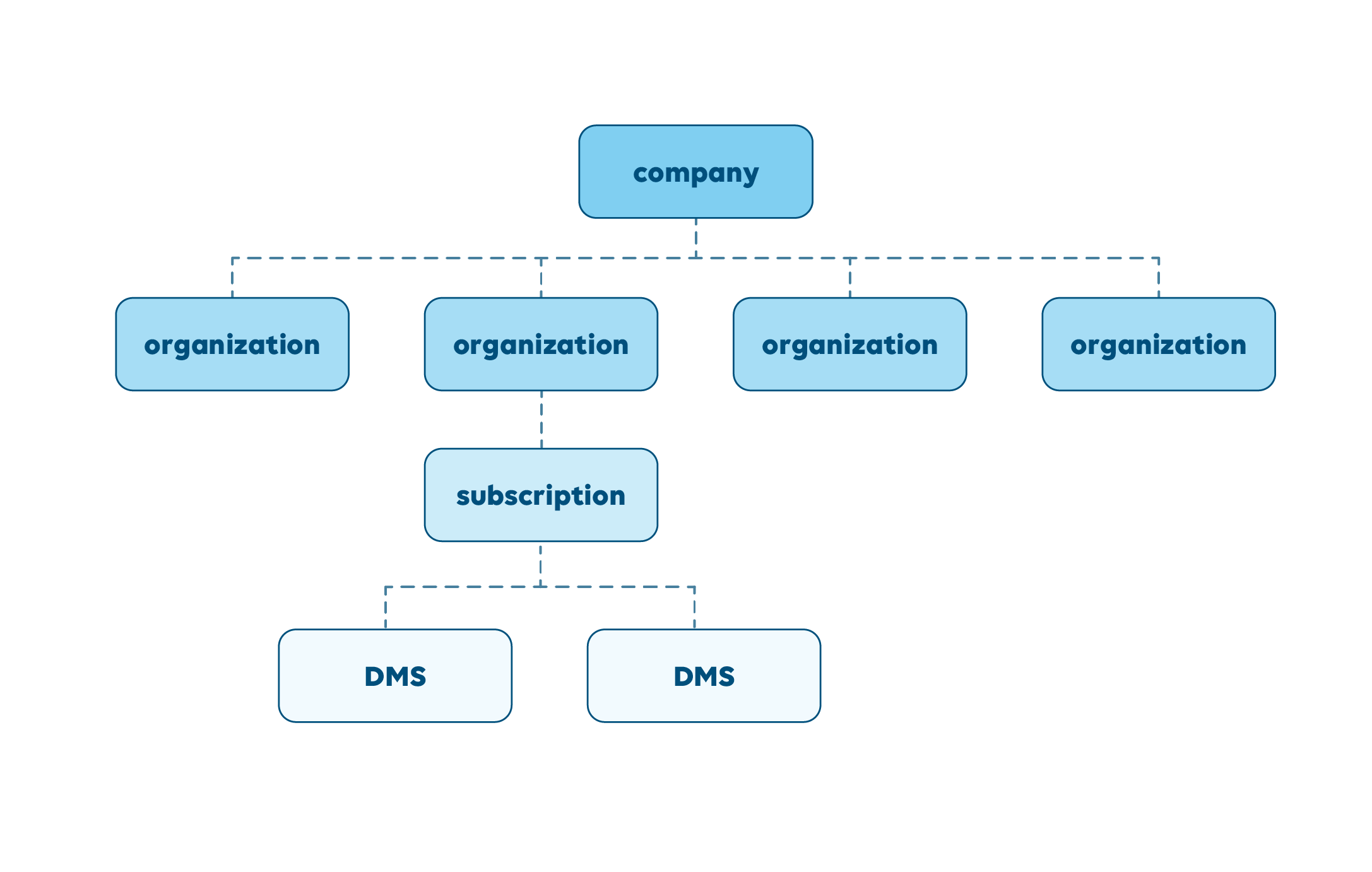
An "organization" is the billing entity and the highest level in the hierarchy in dataminer.services. It is where a company manages its settings, subscriptions, and billing preferences.
- Multiple DataMiner Systems (DMS) can exist in the same organization, but a DMS can only be associated with one organization.
- DMSs in separate organizations are fully isolated from each other.
- Metering is done on organization level and is the sum of the usage across all DMSs within the organization.
By default, subscriptions apply to the aggregated usage of the organization.
Optionally, a subscription can be scoped to a specific DataMiner System to reserve the subscribed quantities for that system. This is typically used to control or guarantee system‑level budgets. When a subscription is scoped to a DMS, any unused subscription capacity is not shared with other systems in the organization and remains unconsumed, with one important exception: connector usage is shared across the organization and is not restricted by system‑assigned subscriptions.
Note
Though we recommend having one organization per company, there is no limit to the number of organizations that can be created under the same company. This might be useful to isolate test or development systems, or for large companies with an Enterprise Agreement with multiple billing entities.
Metering requirements
Metering and billing require an active connection to dataminer.services to ensure accurate usage reporting. In the event of a short-term connection loss (e.g., a few days), usage data is not lost.
For offline or air-gapped environments, local usage logging is supported through the following options:
Monthly manual export: Usage data is logged locally and must be securely exported by the end user within 5 calendar days following the end of each month (e.g., via file transfer, physical media, or email relay).
Quarterly auditing (exceptional cases): A scheduled audit session (remote or on-site) to verify usage directly on the system. Please contact your Account Manager to discuss eligibility and setup.
Usage terms
| Term | Definition |
|---|---|
| DataMiner credits | A flexible form of currency you can use to subscribe to DataMiner software and hosting services. Credits will be deducted automatically when you consume usage-based services. Credits are owned by an organization, and can be consumed among the DataMiner Systems of that organization. The credit balance of an organization is displayed in the Admin app. |
| Start Date | The date when the system comes online. |
| Duration | An organization can select a 12-month, 24-month, or 36-month subscription. |
| Renewal Date | Subscription date + duration. At the Renewal Date, subscriptions renew automatically for 12 months at the then current credit rates, unless agreed otherwise. |
| MUA | Monthly Utilization Allowance. The fixed number of credits available per month under the subscription for each service. The organization MUA is the sum of credits subscribed per service. |
| Credit Rate | The credit rate depends on the region and is protected for the duration of the contract, i.e., 24-month or 36-month subscriptions protect against potential yearly price adjustments. |
Invoicing
| Duration | Invoicing |
|---|---|
| 12 months | Start date: 100% |
| 24 months | Start date: 60% Start date + 12 months: 40% |
| 36 months | Start date: 60% Start date + 12 months: 20% Start date + 24 months: 20% |
At the Renewal Date, the subscription will be invoiced yearly, unless replaced by a new contract.
Consumption above the contracted Monthly Utilization Allowance (MUA) is possible, with the additional consumed credits being invoiced monthly, at the then current Pay-per-Use Credit Rate.
Services
| Category | Service | Definition |
|---|---|---|
| Data Plane | Standard Managed Objects | Endpoints directly or indirectly interfaced by DataMiner with 200 or more metrics. |
| Data Plane | Light Managed Objects | Endpoints with less than 200 metrics. |
| Data Plane | Unmanaged Objects | Unmanaged Object instances available in the system (see DataMiner Object Models). |
| Data Sources | Connector Services | Use of Skyline-developed connectors made available through the Catalog. Connectors developed by the user or a third party are not counted. |
| Automation | Automation Actions | Automation script runs and new Unmanaged Object instances added to the DataMiner Object Models. |
| Collaboration Services | Dashboard Sharing | Sharing dashboards with real-time data and controls with internal or external organization users. |
| Storage as a Service (STaaS) | Alarm Updates | New alarm updates written to the storage service. |
| Storage as a Service (STaaS) | Information Events | New information events written to the storage service. |
| Storage as a Service (STaaS) | Trend Data Points | New data point updates from trended metrics written to the storage service. |
| Storage as a Service (STaaS) | Element Data | Metrics from Managed Objects written to the storage service. |
| DataMiner as Service (DaaS) | Hosted Managed Objects | Managed Objects hosted as a service, metered as the total sum of their metrics. |
| DataMiner as Service (DaaS) | Hosted Nodes | Additional hosted DataMiner nodes provisioned to increase resiliency or availability beyond the default hosted setup. |
| DataMiner Assistant | Document Intelligence | Document processing operations executed via the Document Intelligence tool in DataMiner Automation. |
Tip
For detailed information on these services and how to size these, refer to the sizing guide.
Metering Period
Metering works in monthly cycles, starting on the first day of each month. The units above reflect the base credit rates per month; metering is pro-rated per day.
Example:
- March 1 through 7, the maximum number of concurrent connectors used each day is 5.
- For the rest of the month, the maximum number of concurrent connectors used each day is always 4.
The number of credits consumed for Connector Services is calculated as the maximum number of concurrent connectors used per day, times the monthly credit rate, divided by the number of days in the month (31 days for March):
Pay-Per-Use (PPU): All usage is billed proportionally based on actual daily peaks.
Monthly Service Consumption = 5 connectors x 7 days x 8 credits / 31 + 4 connectors x 24 days x 8 credits / 31 days
Subscription: A subscription includes a fixed baseline capacity (e.g., 4 connectors). Usage above this level is billed as overage using the above-mentioned pro-rated logic.
Overage Consumption = (5 − 4) connectors × 7 days × 8 credits / 31
Cancellation
Subscriptions can be canceled up to 30 days before the Renewal Date. The subscription will remain active until the Renewal Date. The amount paid is not refundable.
Changing subscription
The subscribed MUA level can be changed at any time without altering the Renewal Date.
When the MUA level is increased, the additional credits are charged at the then current Credit Rate for a minimum 12-month duration. The new MUA can be used immediately.
When the MUA level is decreased, the original MUA will be in effect until the Renewal Date. At Renewal Date the subscription will be renewed with the new MUA.
Example of a billing schedule of which the subscribed MUA level is increased:
Initial MUA: 200 credits
Start Date: November 1, 2022
Renewal Date: November 1, 2023
MUA increased to 250 credits on August 1, 2023
- Billing on August 1, 2023: 50 credits x original credit rate x 12 months (i.e., paid until August 1, 2024)
- Billing on November 1, 2023 (i.e., Renewal Date): 200 credits x current credit rate x 12 months + 50 credits x current credit rate x 3 months
Overage
No penalties: Service overage usage is charged at the standard pay-per-use fees, using the current credit rate.
No throttling: Your service performance will not be throttled or degraded because of overage.
Monthly billing: Overage charges will be included in your bill at the end of the month. If you have pay-per-use credits available, they will be deducted to cover the overage at the end of the month. If you do not have sufficient credits, the additional costs will be invoiced at the end of the month.
Service suspension: If overage fees are not settled by the due date, service may be temporarily suspended until payment is received.
Notification: You will receive alerts when you are approaching your usage limit and once you have exceeded it.
Avoid overages: Although you are not penalized, the cost of overage is at the service's pay-per-use credit rate, which may be higher than the subscription rate. If you expect this overage to be continuous, you may want to review your subscriptions to benefit from more favorable pricing.
Non-production environments
We recommend setting up a dedicated sandbox organization for non-production environments (staging, dev, lab), to keep a clear technical separation from production. This also ensures that non-production usage is not handled in the same way as production from a commercial and operational perspective, while keeping costs cleanly separated for better cost tracking.
Requirements
To qualify for non-production billing, an organization must meet the following conditions:
- No live, revenue-generating, or customer-facing workloads.
- No production data sources or active integrations in use operationally.
- Registered and designated as non-production at the time of onboarding.
Important
Skyline reserves the right to review non-production organization usage. Systems found running production workloads under a non-production organization will be reclassified and billed at standard rates.