QAOps configurations
Important
This section contains information that is only applicable to Skyline employees.
For each project, one or more QAOps configurations should be created.
When you create a configuration, you take ownership of the testing activities included in it and the way they are configured. This means that you will be expected to maintain the configuration, and you are responsible for selecting who can use it and with which test suites.
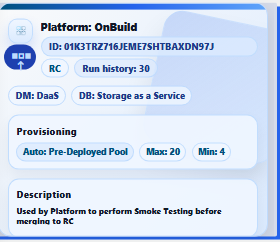
A configuration can include multiple test suites.
When you create or edit a configuration in the QAOps Operator app, you can adjust the following settings:
Configuration Type: Determines who provides the DataMiner servers that run the tests:
QAOps-hosted: QAOps deploys and manages DaaS servers for this configuration. This is the most common choice. See the provisioning settings below.
Self-hosted: You connect your own DataMiner servers (a single DataMiner Agent or a DataMiner cluster) to QAOps with the Configure Self-Hosted DataMiners wizard. See Adding self-hosted DataMiner servers.
Important
Changing the type of an existing configuration is an impactful operation. Switching away from QAOps-hosted undeploys its hosted servers, and switching away from Self-hosted removes its registered self-hosted servers.
Name and Description: A human-readable name and a description that tells other operators what the configuration is used for.
Test Suites: The test suites that are allowed to execute on this configuration, selected with checkboxes. Use the Filter Test Suites box to find a suite by name.
Important
Removing a test suite from a configuration completely clears the current test run history for that configuration from process memory.
Test Runs To Keep: Determines how many test runs and their results are kept in memory for fast access, with a maximum of 499. Set this to the lowest number you need to validate your quality gates and debug issues. Currently, QAOps does not provide long-term storage. This feature is planned for Q3 of 2026.
Important
- Reducing this number completely clears the current test run history for this configuration from process memory.
- Keep the product of the number of test suites and the number of test runs to keep below 500. For example, if you keep 50 test runs, you should have fewer than 10 test suites in a single configuration.
Global Categories: Categories selected with checkboxes (managed on the Global Categories page in the Operator app). This allows you to use the buttons in the header bar of the QAOps apps to filter out your configuration. This setting is optional but recommended if you want to use this filtering feature.
Provisioning settings (QAOps-hosted only)
For a QAOps-hosted configuration, the QAOps-Hosted Provisioning section determines how many servers are made available for running tests:
Provisioning Type:
Disabled: No servers are automatically deployed. You can still manually deploy a server using the deploy button on the configuration card in the Operator app.
On Test Deployment: Servers are automatically deployed when a new test run request is received. This is a good setting for daily CI/CD pipelines or configurations that only occasionally need to run test suites.
Pre-Deployed Pool: This configuration always attempts to have a specified number (see Minimum Servers) of servers available. As soon as a server is used, a new one is deployed in the background. This is useful for setups that require fast feedback and frequent test runs throughout the day.
Maximum Servers: The total number of running servers for this configuration will never exceed this value, regardless of how you attempt to provision them.
Minimum Servers: The number of active servers a configuration with Pre-Deployed Pool provisioning will try to keep available. This setting is ignored for other provisioning types.
DataMiner Version Type: The DataMiner version deployed on the servers. The following options are available:
RC: The latest known, relatively stable release candidate of the DataMiner platform. Using this version carries some risk of instability, but it allows you to detect and address issues before a new DataMiner version is released. If you suspect that DataMiner code changes are causing test failures, you may contact the Platform Quality Coaches for follow-up.
Feature: The latest known feature release of DataMiner. This version is recommended for stable testing, allowing you to focus on new modules, connectors, libraries, DxMs, and other components installed on top of the DataMiner feature release.
Main: The latest released version of DataMiner. Use this for checks against the current production-grade DataMiner version.
RC (DaaS Candidate): The release candidate of the DataMiner platform that has not passed initial DaaS health tests. Use of this version is not recommended and is primarily intended for the DaaS team.
Feature (DaaS Candidate): The feature release of the DataMiner platform that has not passed initial DaaS health tests. Use of this version is not recommended and is primarily intended for the DaaS team.
Experimental DaaS: A special version of DataMiner that may contain breaking features under test by the DaaS team. Use of this version is not recommended and is primarily intended for the DaaS team.
Internal Feature (DaaS Candidate): The latest known internal DataMiner version before passing initial DaaS health tests. Use of this version is not recommended and is primarily intended for the DaaS team.
For QAOps-hosted configurations, the DataMiner type is currently always set to DaaS and the database type is set to Storage as a Service.
Note
If you want to fully remove a configuration, contact a QAOps Administrator. The QAOps Operator app does not allow you to do this.