DataMiner web apps Feature Release 10.6.8
This Feature Release of the DataMiner web applications contains the same new features, enhancements, and fixes as DataMiner web apps Main Release 10.6.0 [CU5].
Note
For known issues with this version, refer to Known issues.
Tip
- For release notes related to the general DataMiner release, see General Feature Release 10.6.8.
- For release notes related to DataMiner Cube, see DataMiner Cube Feature Release 10.6.8.
Highlights
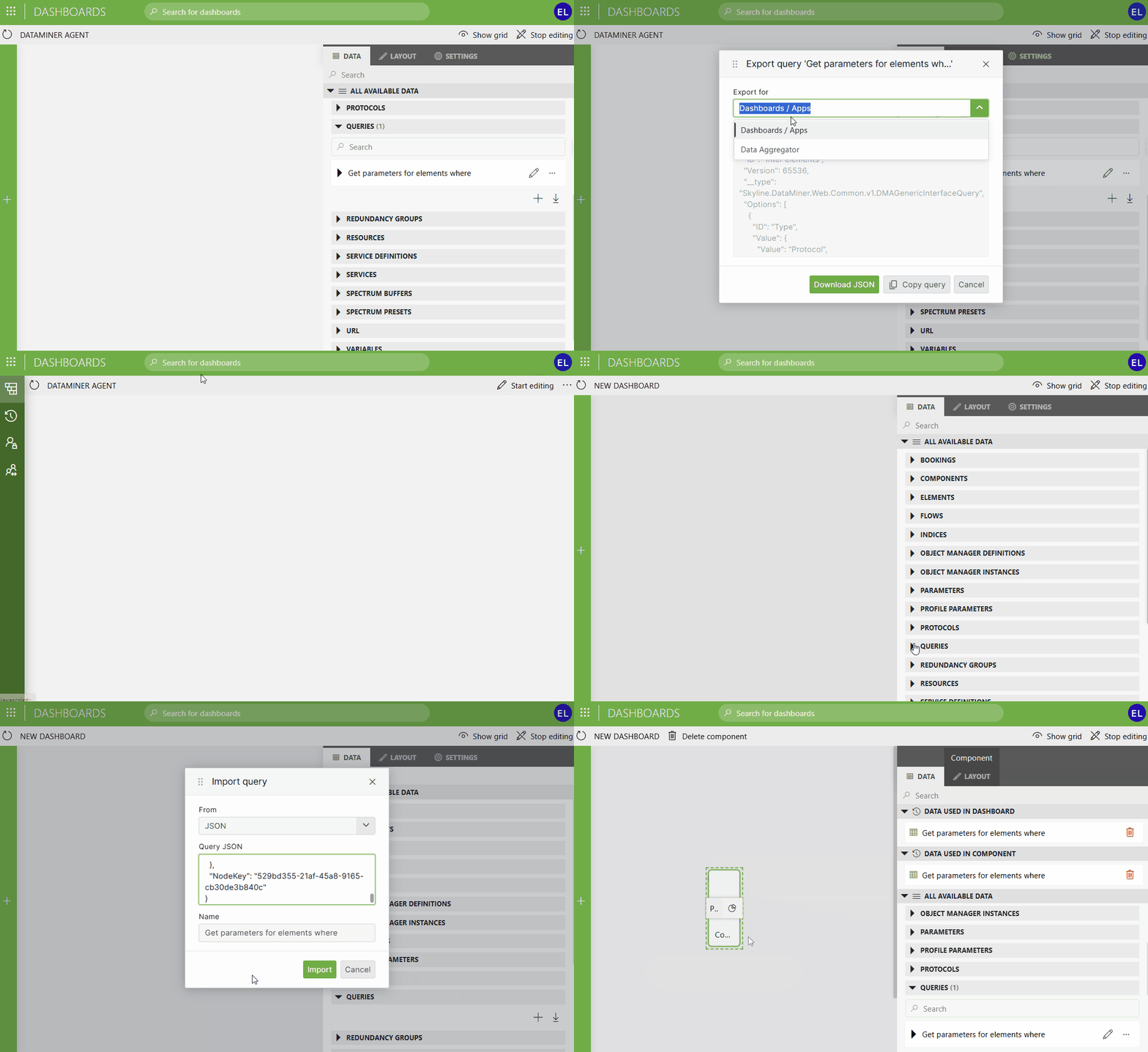
Dashboards/Low-Code Apps: Exporting and importing GQI queries to and from raw JSON format [ID 45630]
In dashboards and low-code apps, GQI queries can now be exported as raw JSON using a new Dashboards / Apps export option. In addition, a new import option allows you to create a query by pasting previously exported JSON, making it possible to reuse and share queries across dashboards and apps.
New features
GQI DxM: Defining discrete column values when building a custom ad hoc data source [ID 45380]
When building a custom ad hoc data source using the Skyline.DataMiner.Core.GQI.Extensions NuGet as API reference, you can now define a set of discrete values for any column. For example, a Status column can have the values "Active", "Inactive", and "Pending", each with a user-friendly display name.
This can be useful in the following scenarios:
Columns with a fixed set of values: When a column only ever contains values from a known list (e.g. a status or category), marking the discrete values as strict will present users with a convenient dropdown-style filter instead of a free-text input in the query filter.
Columns with exception values: When a column holds a continuous range (e.g. a measurement from 0 to 100), but also has special values with a specific meaning (e.g. -1 meaning "Error"), you can define those exception values as non-strict discrete values. Users will see these special values as quick filter options while still being able to filter on the full numeric range.
Each discrete value can have a display name that differs from the underlying value, making filters and UI elements more readable for end users.
GQI DxM: Metadata will now be exposed for numeric columns [ID 45593]
When the GQI DxM is being used, from now on, GQI will expose the following metadata for a numeric column (when configured):
- Unit (e.g., Mbps, %, dB)
- Decimals (i.e., number of decimal places)
- Min/Max (i.e., value range boundaries)
- Step (i.e., the step size)
This metadata will be available for numeric columns across all parameter-based data sources.
Changes
Breaking changes
Dashboards/Low-Code Apps: State timeline component will now use the primary key when requesting timeline data [ID 45600]
When a dashboard or a low-code app is connected to a DataMiner Agent running version 10.5.0 [CU17]/10.6.0 [CU5]/10.6.8, State timeline components will now refer to display column tables using the primary key when requesting timeline data using a GetReportTimeLineDataMessage.
When a dashboard or a low-code app is connected to a DataMiner Agent running an older version, for compatibility reasons, State timeline components will continue now refer to display column tables using the display key.
Important
Before you request timeline data using the GetAlarmStateTimelineForParameter web method, from now on, first send the IsFeatureAvailable web method with featureName set to "DKForReport" to check whether the DataMiner Agent requires you to send the display key or the primary key. If the method returns true, send the display key. If it returns false, send the primary key.
Enhancements
Enhanced performance when returning GQI query results [ID 45559]
Because of a number of optimizations made with regard to JSON serialization, overall performance has increased when returning GQI query results.
GQI DxM: Enhanced performance when executing a GQI query against the 'Get parameters for elements where' data source in a cluster [ID 45676]
Because of a number of enhancements, overall performance has increased when executing a GQI query against the Get parameters for elements where data source in a cluster.
Fixes
GQI DxM: Problem when querying a mediation protocol with standalone parameters using the 'Parameters for elements where' data source [ID 45494]
When you queried a mediation protocol with standalone parameters using the Parameters for elements where data source, up to now, the query would fail if one of the underlying protocols linked to the mediation protocol did not implement all of the mediated parameters.
From now on, standalone parameters that are not present in an element's underlying protocol will no longer cause a query to fail. Instead, they will correctly show "Not initialized".
Note
Table parameters are not affected as these are not supported by the Parameters for elements where data source.
Low-Code Apps: No longer possible to scroll down to the last page and add new pages [ID 45563]
Up to now, when a low-code app contained a large number of pages, you would incorrectly no longer be able to scroll down and add new pages.
From now on, you can again scroll down to the last page and add new pages.
Dashboards/Low-Code Apps: Problem when retrieving dashboards after expired items were cleared from the cache [ID 45565]
Because of a locking issue that occurred while clearing expired items from the dashboard cache, up to now, an Index was outside the bounds of the array error would be thrown each time an attempt was made to retrieve a dashboard from the cache.
Dashboards/Low-Code Apps: Problem when renaming an item [ID 45623]
When, while renaming a page or a panel of a low-code app, a layer of a map, or a table column name in the table editor, you clicked Save immediately after entering the last characters of the new name, in some cases, the new name would not contain the last characters you had typed.
Dashboards/Low-Code Apps - Parameter table component: Problem with values becoming outdated [ID 45624]
Up to now, when a Parameter table component contained multiple columns, of which one had values that depended on values in another column, those values were fetched only once. As a result, when a value in the other column changed, the values that depended on that value could become outdated.
From now on, because of a number of enhancements with regard to caching, values depending on values in other columns will be refreshed more frequently, preventing values from getting outdated.
Dashboards app: Problem when a GQI query was executed in a shared dashboard [ID 45662]
When a GQI query was executed in a shared dashboard, in some cases, that query would throw a No connection exception, causing the dashboard to redirect to the page listing all shared dashboards.
Dashboards app: Only people with 'Admin tools' permission would incorrectly be allowed to share dashboards and update shared dashboards [ID 45665]
Since DataMiner Web version 10.4.0 [CU20]/10.5.0 [CU8]/10.5.11, dashboards could incorrectly only be shared by users who had been granted the Modules > System configuration > Tools > Admin tools permission. Additionally, people also incorrectly needed that permission to update dashboards that had been shared earlier.
Dashboards app: Problem when sharing a dashboard that included GQI components of which the queries contained nodes that could be linked to data [ID 45667]
When you shared a dashboard that included GQI components of which the queries contained nodes that could be linked to data, up to now, the GQI components would incorrectly show Not authorized errors.
Dashboards app: Header and subheader of a shared dashboard would include unnecessary UI elements [ID 45669]
In some cases, the header and subheader of a shared dashboard would incorrectly include unnecessary UI elements like a dashboard search box, a user icon, an edit button, and a share indicator. From now on, a shared dashboard will no longer include these UI elements.
Also, in some cases, the reload button of a shared dashboard would not work.
Dashboards/Low-Code Apps - Node edge graph component: Problem with icon shape dimensions [ID 45686]
When an icon shape in a node template of a Node edge graph component did not have its width locked, up to now, it would not correctly apply the width when you zoomed in or out in the graph.
Also, in some cases, when the width of an icon shape was locked, up to now, the icon would jump around when you panned inside a graph.
Web apps: Exceptions thrown while serializing a WebSocket message would not properly end up in the UI [ID 45714]
When, in a DataMiner web app, an exception was thrown while a WebSocket message was being serialized, up to now, that exception would not properly end up in the UI.
Monitoring app: Problem when configuring a custom time zone [ID 45719]
Up to now, it would incorrectly not be possible to configure a custom time zone in the Monitoring app.
Low-Code Apps: Problem when clicking 'Browse templates' [ID 45731]
In some cases, an error could be thrown when you clicked Browse templates in the template editor.