Provisioning endpoints and virtual signal groups for a Generic Matrix element using code
In this tutorial, you will learn how to use the MediaOps Live API to provision endpoints and virtual signal groups for the Generic Matrix connector. These endpoints are needed to visualize and manage the connections of the Generic Matrix connector in MediaOps Live.
There are three ways to create endpoints and VSGs:
- Through an automation script, using the MediaOps Live API, as explained in the current tutorial.
- Manually, using the Virtual Signal Groups low-code app.
- Using the CSV import functionality in the Virtual Signal Groups app.
Expected duration: 60 minutes
Note
The content and screenshots of this tutorial were created using DataMiner 10.6.4 and MediaOps Live 1.0.0.
Prerequisites
- Range 1.0.1.x of the Generic Matrix connector is installed on the DMA, and an element has been created using this connector.
- MediaOps Live is installed on the DMA.
- Visual Studio is installed on your machine.
- The DIS extension is installed in Visual Studio.
Overview
- Step 1: Create a new automation script
- Step 2: Add NuGet packages and using statements
- Step 3: Create level and transport type
- Step 4: Provision source endpoints and VSGs
- Step 5: Provision destination endpoints and VSGs
- Step 6: Publish and run the script
Step 1: Create a new automation script
Create a new automation script in Visual Studio, using DIS. For details, refer to the DIS documentation.
You can give the script any name of your choice that is meaningful and fits within your project or solution.
Step 2: Add NuGet packages and using statements
- Add the following NuGet packages to your project:
Skyline.DataMiner.Dev.Utils.Solutions.MediaOps.LiveSkyline.DataMiner.Dev.Utils.Solutions.MediaOps.Live.AutomationSkyline.DataMiner.Dev.AutomationSkyline.DataMiner.Core.DataMinerSystem.Automation
Add the following using statements to your script:
using Skyline.DataMiner.Solutions.MediaOps.Live.API;
using Skyline.DataMiner.Solutions.MediaOps.Live.Automation;
Use the
GetMediaOpsLiveApiextension method on theEngineobject to get an instance of the MediaOps Live API in your script.var api = engine.GetMediaOpsLiveApi();
Step 3: Create level and transport type
Before you can create endpoints and virtual signal groups, you need to ensure that the required level and transport type exist in MediaOps Live. In this tutorial, the Video level is used with the SDI transport type. If this is already configured in your system, you can skip this step.
Open the Virtual Signal Groups app.
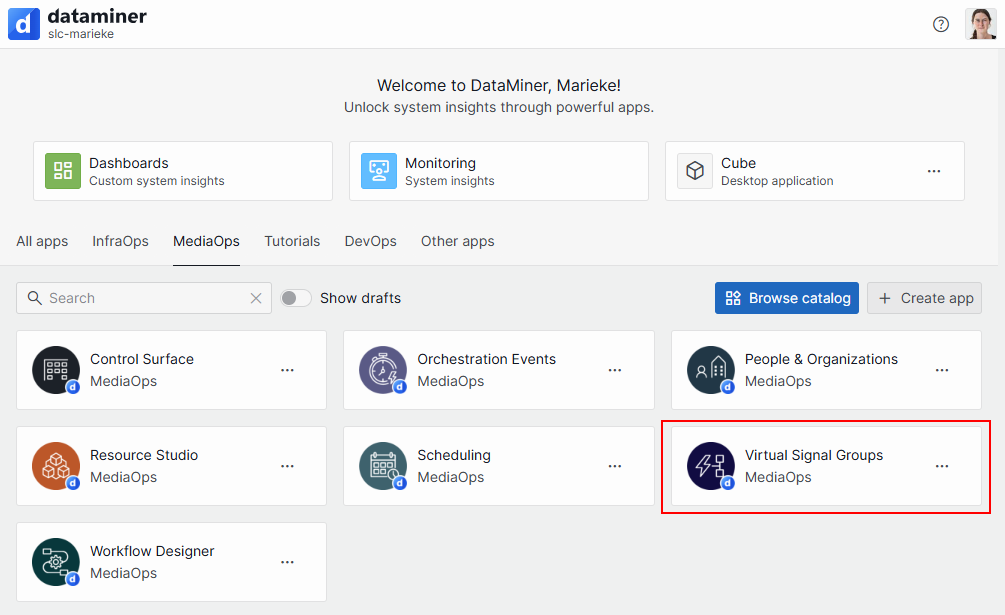
Go to the Levels page, and click the Transport Types button in the header bar.
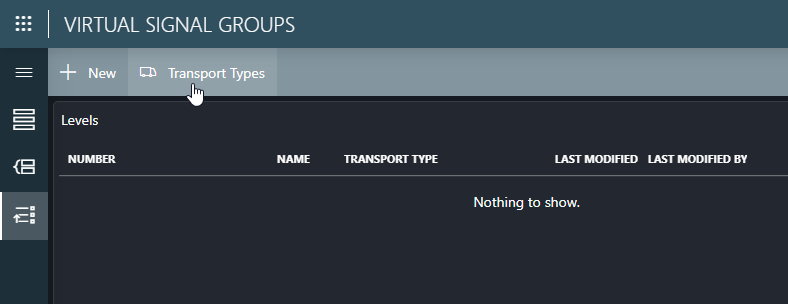
If the
SDItransport type does not exist yet, create it by clicking the New button and specifying this transport type name.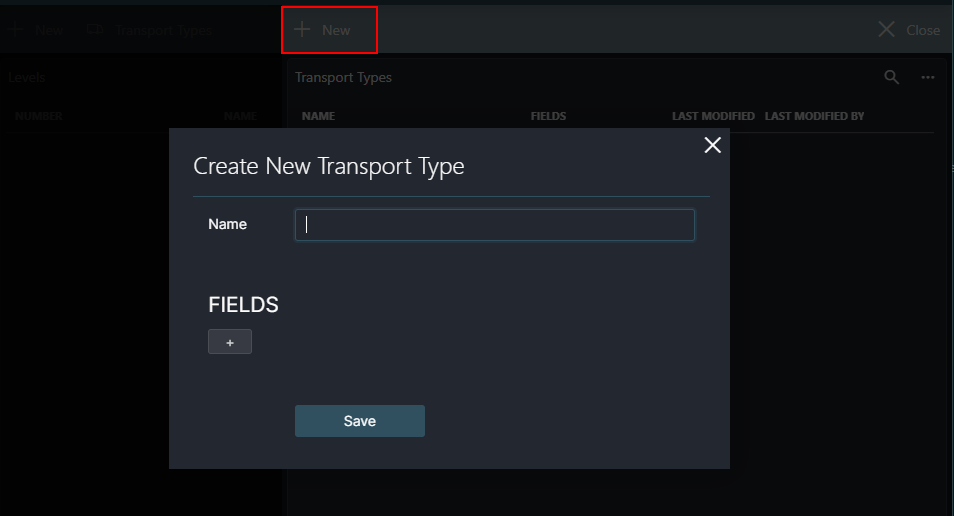
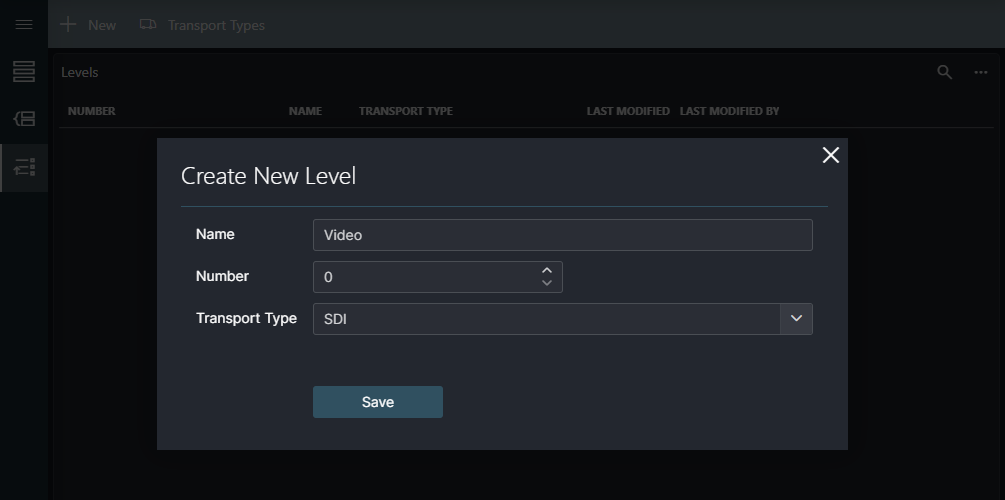
Back on the Levels page, if the
Videolevel does not exist yet, create it by clicking the New button and specifying the following information:- Name:
Video - Number:
0(or the next available number) - Transport Type:
SDI
- Name:
Note
If needed, you can also create levels and transport types using the API (api.Levels.CreateOrUpdate() and api.TransportTypes.CreateOrUpdate() methods).
Step 4: Provision source endpoints and VSGs
The code snippet below shows how to read the rows of the input table and create the corresponding endpoints and virtual signal groups (VSGs). Already existing endpoints and VSGs will be updated.
Based on this code snippet, update your script so it will create the source endpoints and VSGs in MediaOps using the API, based on the tables present in the Generic Matrix element.
This method should be called from the Run or RunSafe method of your script.
Important
Endpoint and virtual signal group names must be unique across your entire MediaOps Live system. The script uses naming patterns like "Matrix Input {key}" and "Matrix Output {key}". If these names already exist from previous tutorials or other configurations, modify the naming logic in the script to ensure uniqueness.
private void ProvisionSources(IEngine engine, Element element, IEngineMediaOpsLiveApi api)
{
    var elementId = new DmsElementId(element.DmaId, element.ElementId);

    // Get the video level and SDI transport type. They will assigned to the endpoints and virtual signal groups.
    var videoLevel = api.Levels.ReadSingle("Video");
    var sdiTransportType = api.TransportTypes.ReadSingle("SDI");

    // Get existing endpoints and virtual signal groups for the element.
    var existingEndpoints = api.Endpoints.Query()
        .Where(x => x.Role == EndpointRole.Source && x.Element == elementId)
        .SafeToDictionary(x => (x.Element, x.Identifier));

    var existingVirtualSignalGroups = api.VirtualSignalGroups
        .GetByEndpointIds(existingEndpoints.Values.Select(x => x.ID))
        .SafeToDictionary(x => x.Name);

    engine.GenerateInformation($"Found {existingEndpoints.Count} existing endpoints and {existingVirtualSignalGroups.Count} existing virtual signal groups for matrix inputs.");

    // Prepare lists to hold the new or updated endpoints and virtual signal groups.
    var newEndpoints = new List<Endpoint>();
    var newVirtualSignalGroups = new List<VirtualSignalGroup>();

    foreach (var key in element.GetTablePrimaryKeys("Router Control Inputs"))
    {
        var name = $"Matrix Input {key}";

        // Create the endpoint if it does not exist yet.
        if (!existingEndpoints.TryGetValue((elementId, key), out var endpoint))
        {
            endpoint = new Endpoint();
        }

        endpoint.Name = name;
        endpoint.Role = EndpointRole.Source;
        endpoint.Element = elementId;
        endpoint.Identifier = key;
        endpoint.TransportType = sdiTransportType;

        newEndpoints.Add(endpoint);

        // Create the virtual signal group if it does not exist yet.
        if (!existingVirtualSignalGroups.TryGetValue(name, out var vsg))
        {
            vsg = new VirtualSignalGroup();
        }

        vsg.Name = name;
        vsg.Role = EndpointRole.Source;
        vsg.AssignEndpointToLevel(videoLevel, endpoint);

        newVirtualSignalGroups.Add(vsg);
    }

    // Create or update the endpoints and virtual signal groups via the API.
    api.Endpoints.CreateOrUpdate(newEndpoints);
    api.VirtualSignalGroups.CreateOrUpdate(newVirtualSignalGroups);
}
Step 5: Provision destination endpoints and VSGs
Update your script based on the code snippet below to create the destination endpoints and virtual signal groups.
This method should be called from the Run or RunSafe method of your script.
private void ProvisionDestinations(IEngine engine, Element element, IEngineMediaOpsLiveApi api)
{
    var elementId = new DmsElementId(element.DmaId, element.ElementId);

    var videoLevel = api.Levels.ReadSingle("Video");
    var sdiTransportType = api.TransportTypes.ReadSingle("SDI");

    var existingEndpoints = api.Endpoints.Query()
        .Where(x => x.Role == EndpointRole.Destination && x.Element == elementId)
        .SafeToDictionary(x => (x.Element, x.Identifier));

    var existingVirtualSignalGroups = api.VirtualSignalGroups
        .GetByEndpointIds(existingEndpoints.Values.Select(x => x.ID))
        .SafeToDictionary(x => x.Name);

    engine.GenerateInformation($"Found {existingEndpoints.Count} existing endpoints and {existingVirtualSignalGroups.Count} existing virtual signal groups for matrix outputs.");

    var newEndpoints = new List<Endpoint>();
    var newVirtualSignalGroups = new List<VirtualSignalGroup>();

    foreach (var key in element.GetTablePrimaryKeys("Router Control Outputs"))
    {
        var name = $"Matrix Output {key}";

        // Create the endpoint if it does not exist yet.
        if (!existingEndpoints.TryGetValue((elementId, key), out var endpoint))
        {
            endpoint = new Endpoint();
        }

        endpoint.Name = name;
        endpoint.Role = EndpointRole.Destination;
        endpoint.Element = elementId;
        endpoint.Identifier = key;
        endpoint.TransportType = sdiTransportType;

        newEndpoints.Add(endpoint);

        // Create the virtual signal group if it does not exist yet.
        if (!existingVirtualSignalGroups.TryGetValue(name, out var vsg))
        {
            vsg = new VirtualSignalGroup();
        }

        vsg.Name = name;
        vsg.Role = EndpointRole.Destination;
        vsg.AssignEndpointToLevel(videoLevel, endpoint);

        newVirtualSignalGroups.Add(vsg);
    }

    api.Endpoints.CreateOrUpdate(newEndpoints);
    api.VirtualSignalGroups.CreateOrUpdate(newVirtualSignalGroups);
}
Step 6: Publish and run the script
Publish the script with DIS and run it on the DMA.
After running the script, you should see the newly created endpoints and virtual signal groups in the Virtual Signal Groups app.
Tip
The SLC-AS-MediaOps.LIVE-Tutorial-GenericMatrix repository on GitHub contains the complete script that you can use as a reference.
Up next
When you have finished this tutorial, you can continue with creating a connection handler script. This script will use the endpoints and virtual signal groups that you have created in this tutorial to visualize and manage connections.