Ticketing concepts
The Ticketing Solution provides a structured approach to incident management within DataMiner.
Key concepts include:
- A well-defined ticket lifecycle with controlled states.
- Flexible ticket types with custom fields.
- Dynamic linking to DataMiner objects and assets.
- Support for external ticketing system integration.
These concepts ensure consistent ticket handling while allowing integration with existing operational processes.
The Ticketing Solution is inspired by the TM Forum TMF 621 Trouble Ticket Management specification. The concepts described below follow this specification where applicable, while remaining aligned with DataMiner standards.
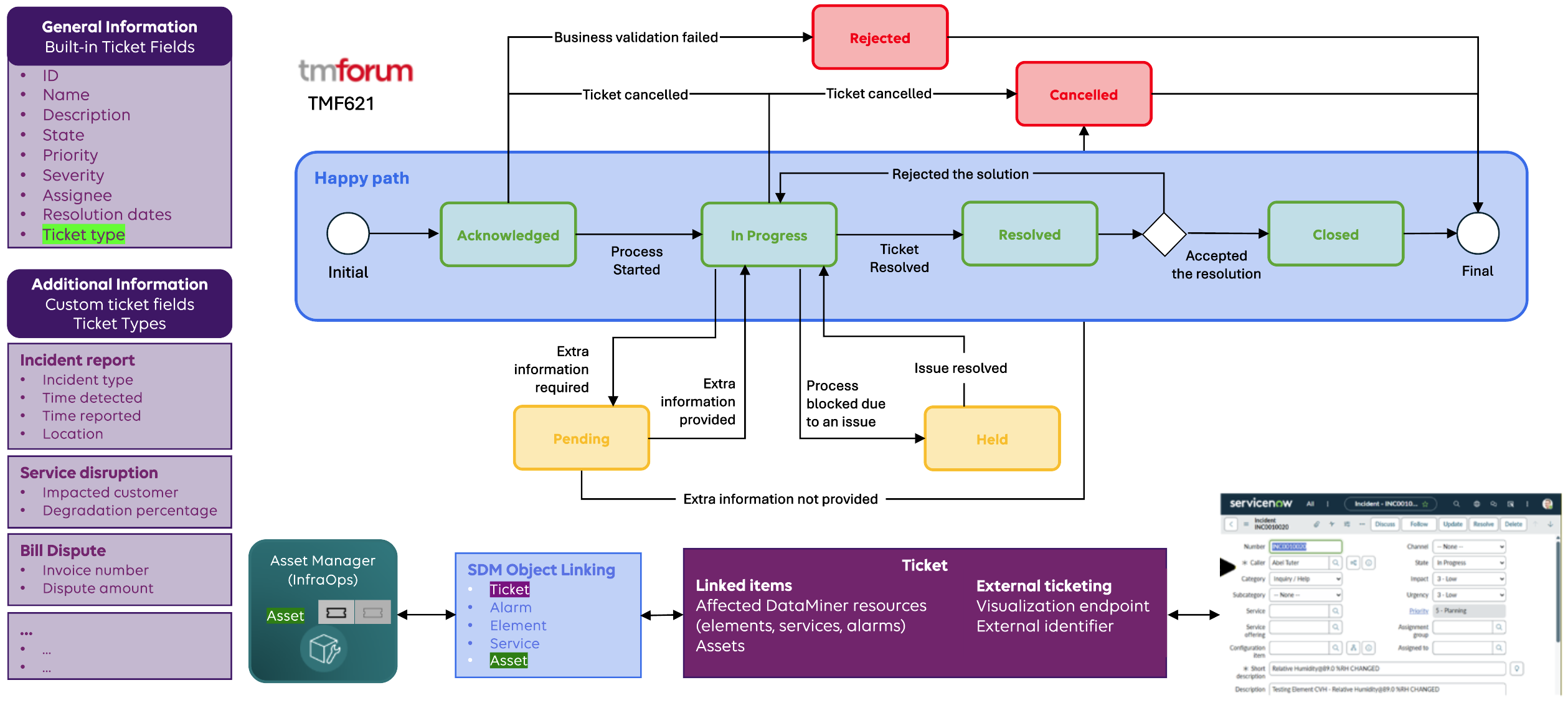
Ticket lifecycle
Ticket state model
The Ticketing solution uses a predefined state model to reflect the lifecycle of a ticket. The standard lifecycle, also referred to as the happy path, consists of the following states:
- Acknowledged
- In Progress
- Resolved
- Closed
A ticket is typically created in the Acknowledged state. It can then be set to In Progress when someone has been assigned to it. After resolution, the ticket moves to Resolved, and finally it gets Closed.
Additional states
In addition to the standard lifecycle states, tickets can also be moved to the following states:
- On Hold / Pending, when work is temporarily paused.
- Rejected, when a ticket is considered invalid.
- Cancelled, when a ticket is no longer required.
These states allow flexible handling of exceptional situations.
State transitions
When tickets are managed through the Ticketing app:
- Only transitions defined by the state model are allowed.
- Tickets must follow the predefined progression rules.
When tickets are updated through the Ticketing API Helper:
- Tickets can transition from any state to any other state.
- Intermediate states are not required.
This approach supports integration with external ticketing systems that use different state models.
Ticket structure
Each ticket contains a set of built-in fields that are present for all ticket types:
- Ticket identifier
- Name
- Description
- State
- Priority
- Severity
- Assignee
- Resolution-related dates
These fields represent the common information required to manage a ticket.
Ticket types
Ticket types allow tickets to be categorized based on the nature of the issue. Each ticket type extends the built-in ticket fields with additional, type-specific fields.
Custom fields
For each ticket type, custom fields can be defined to model a specific kind of incident. Each custom field has a defined data type and purpose.
For example, below a number of ticket types are listed with the corresponding custom fields:
Incident Report
- Incident category
- Detection time
- Reporting time
- Location
Service Disruption
- Impact
- Affected customer
- Service degradation percentage
Billing Dispute
- Invoice number
- Disputed amount
How ticket types are used
When a ticket is created:
- A ticket type is selected.
- The related custom fields automatically become available.
Ticket types can also be used to:
- Filter tickets.
- Categorize incidents.
- Support reporting and analysis.
Tip
See also: Ticket Types page
Linked items and affected resources
Tickets can be linked to DataMiner objects, referred to as affected resources, such as alarms, elements, and services. These links provide context about what is impacted by the ticket.
Tickets can also be linked to assets managed through the Asset Manager, which is part of the InfraOps Solution.
All relationships are implemented using the Standard Data Model (SDM) relationship layer. This allows the following functionality:
- Other DataMiner applications can query ticket relationships.
- In applications such as the Asset Manager, linked tickets can be indicated. For example, Asset Manager can show whether an asset has active tickets linked to it.
Tip
See also: Linked Items section
External ticketing integration
The Ticketing solution can be integrated with external ticketing systems, such as ServiceNow. This allows tickets in DataMiner to be linked to incidents managed outside the DataMiner platform.
When a ticket or incident is created in an external system:
- An external identifier is returned.
- This identifier is stored in the DataMiner ticket.
- A visualization endpoint for the external system is configured.
Tip
For details, see External ticketing system integration.