Relational anomaly detection
About relational anomaly detection
From DataMiner 10.5.3/10.6.0 onwards, you can use relational anomaly detection (RAD) to detect when a group of parameters, also known as a "relational anomaly group", deviates from its normal behavior.
Relational anomaly detection is self-learning. Rather than relying on predefined rules or fixed thresholds (for example, "alert if traffic drops below X"), it learns the normal behavior and relationships between the parameters in a group from historical trend data. For each new data point, it compares the observed values against what is expected based on that learned behavior, and produces an anomaly score.
The RAD functionality works in three different steps:
First you need to configure one or more groups of parameters that should be monitored together, e.g., a main bit rate and backup bit rate.
The algorithm will then learn the relations between the parameters, e.g., learn that main and backup are typically equal. This is done automatically by the system, but you can manually specify a training range.
Whenever a detected relation is broken, e.g., the main is no longer equal to the backup, RAD will generate suggestion events in the Alarm Console.

About the anomaly score
Every five minutes, RAD calculates an anomaly score for each configured relational anomaly group. This score answers the question "How large is the current prediction error compared to the error that is expected for this group, based on history?"
The anomaly score is based on the average value of each parameter in the group over the last five minutes. A high anomaly score indicates that the relationships between the parameters are broken, whereas a low anomaly score means the relationships remain intact. Historical anomaly scores can be visualized in the RAD Manager app.
The score is relative: a value around 1 means "normal" (i.e., the current deviation is similar to the historically normal deviation), and a value around 6 means the deviation is roughly six times larger than what is typical for that group. By default, this value of 6 is considered the anomaly threshold, and anomalies will get flagged when they rise above this threshold.
Prerequisites
RAD uses average trending to detect anomalies. As such, it requires numeric parameters with at least one week of five-minute average trend data. If at least one parameter has less than a week of trend data available, monitoring will only start after one week of data has been collected.
This means that the following prerequisites apply:
- Average trending has to be enabled for each parameter used in a RAD group.
- The TTL for five-minute average trend data has to be set to more than one week (recommended setting: 1 month).
Use cases
By way of example, here are a few of the possible use cases for relational anomaly detection:
Main and backup transcoders (Xcoders): Monitor the output bit rate differences between main and backup transcoders to make sure that your backup remains synced with the main.
Bonded Interfaces: Spot differences in bit rates across bonded interfaces. This can provide early warnings for failures in the load balancing circuit or for issues with individual interfaces or fibers.
UPS Management: Decide on the best time to replace your battery. For a full use case description, refer to UPS Management Use Case.
Temperatures vs. fan speeds: Monitor whether the fan speed of a device is in sync with the temperature of the device. This can help identify faults in the cooling system or in the device itself.
Power amplifiers in DAB transmitters: Monitor the power outputs of all amplifiers in a DAB transmitter to ensure they remain in sync. This helps identify faults in the transmitter or the antenna system. For a tutorial on how to set up RAD for this use case, refer to Working with relational anomaly detection.
Configuring relational anomaly groups
RAD only monitors parameters that have been added to one or more relational anomaly groups in its configuration. Each relational anomaly group represents a set of parameters that should be monitored together. RAD will learn how these parameters are related and notify you through a suggestion event when the relationship is broken.
The easiest way to configure these relational anomaly groups is by using the RAD Manager app from the DataMiner Catalog. Alternatively, you can use the RAD API.
Options for relational anomaly groups
Anomaly detection needs can vary significantly from one use case to another. What counts as a meaningful deviation, and how quickly it should be reported, depends heavily on the parameters being monitored and the operational context. This is why several options are available that allow you to tune the detection to your own situation and strike the right balance between catching real issues and avoiding unnecessary alerts.
For example:
- To have fewer false alarms from brief fluctuations, you can increase the minimum anomaly duration.
- To alert only on strong, clear anomalies, you can increase the anomaly threshold.
- To detect more subtle deviations, you can decrease the anomaly threshold.
- To react faster to real, sustained issues, you can decrease the minimum anomaly duration.
The available configuration options are listed below according to their name in the RAD Manager app.
Group name
Name in API and XML: name.
The name of the relational anomaly group. This name is used when generating a suggestion event or displaying all groups in the RAD Manager.
Update model on new data
Name in API and XML: updateModel.
This option indicates whether RAD should update its internal model of the relationships between the parameters in the group when new trend data is available. If this is not enabled, the model will only be trained immediately after creation and when a training range is specified manually.
Enabling this can be useful when monitoring parameters that you would like to see changing over time; the model can then adapt to the new behavior, and only more pronounced breaks in relations will be detected. If the parameter relationship is static (e.g., two parameters that should remain equal forever), it is better not to enable this option.
Anomaly threshold
Name in API: anomalyThreshold.
Name in XML: anomalyScore.
The threshold used for suggestion event generation. Suggestion events are generated when RAD detects a region with an anomaly score higher than this threshold. A lower threshold makes detection more sensitive (more alerts, including weaker deviations), resulting in more suggestion events; a higher threshold makes it less sensitive (only strong, clear deviations).
Default value: 6 (or 3 prior to DataMiner 10.5.9/10.6.0).
Minimum anomaly duration
Name in API and XML: minimumAnomalyDuration.
Supported from DataMiner 10.5.4/10.6.0 onwards.
This option controls how long behavior must stay anomalous before it is considered a significant anomaly, similar to alarm hysteresis. The score is smoothed over time, so a single brief spike will not immediately be flagged as an anomaly; the behavior has to persist.
This value must be 5 minutes or higher. If this is set to a value greater than 5 minutes, the deviating behavior must persist longer before an anomaly event is triggered. You can configure this to filter out noise events due to a single, short, harmless outlier, for instance caused by a planned maintenance or a device restart. A longer duration reduces false alarms from short fluctuations (with slightly slower detection); a shorter duration makes detection faster and more reactive.
Default: 15 minutes (or 5 minutes prior to DataMiner 10.5.9).
Shared model groups
From DataMiner 10.5.9/10.6.0 onwards, the RAD API supports the creation of shared model groups. A shared model group consists of multiple relational anomaly subgroups that all use the same underlying model. This approach is particularly valuable when you need to monitor many entities that share genuine behavioral similarities.
Note that shared models generalize across subgroups, which can reduce accuracy for specific cases compared to dedicated single models trained on individual subgroup data. However, they can be especially effective when dealing with many subgroups, some of which may lack sufficient healthy reference data.
Note
The RAD Manager app supports shared model groups from version 4.0.0 onwards. Older versions of the app only support single groups, where each group of parameters is associated with its own dedicated model.
Shared model use case example
Consider the UPS Management Use Case, where a battery system included many units, each containing several cells with voltage and current parameters. In healthy battery units, these values remain similar across cells and fluctuate together.
Because this behavior is consistent across all units, you can define a shared model group with a subgroup per battery. This allows a single model to monitor all battery units and detect deviations from expected patterns.
Identifying anomalous subgroups in a shared model group
The fleet outlier detection feature is available from DataMiner 10.5.12/10.6.0 onwards. It provides a high-level assessment of subgroups within a shared model group, helping you quickly identify individual assets or subgroups that behave unusually compared to their peers.
This detection method operates differently from relational anomaly detection (RAD):
RAD: Focuses on the internal consistency and status of a single unit (or subgroup). For example, It checks whether the individual cell voltages within a single battery unit fluctuate together as expected.
Fleet outlier detection: Analyzes the collective behavior of all units within a shared model. It establishes a "normal" performance baseline for the group and identifies any specific unit or subgroup that significantly deviates from this standard. This highlights issues between groups. For example, fleet outlier detection can identify the single battery unit whose overall parameters behave atypically compared to other batteries in the fleet, even if its internal parameters fluctuate consistently over time.
Within the RAD Manager app, the affected shared model subgroups are explicitly labeled as "Outlier Group".
The RAD API provides ways to retrieve a score for each subgroup in a shared model group. This score quantifies the degree of difference from the rest of the group, enabling automated sorting and prioritization of the most statistically anomalous units. The higher the score, the more critical the difference in behavior compared to its peers.
Relational anomalies in the Alarm Console
Whenever the relationship for a relational anomaly group is broken, RAD detects this and generates suggestion events in the Alarm Console. These events can be viewed in the Relational Anomalies tab, accessible through the Alarm Console light bulb, or in the Suggestion events tab (see Adding and Removing Alarm Tabs in the Alarm Console).
Suggestion events for the same group of parameters are grouped into a single incident. Clearing the grouped incident will also clear all suggestion events included in it. Other changes (e.g., taking ownership, adding comments) are not supported for grouped incidents. Note that prior to DataMiner 10.5.4, a separate suggestion event was generated for each parameter in the group where a broken relationship was detected.
From DataMiner 10.5.6/10.6.0 onwards, deleting a relational anomaly group will also clear all open suggestion events associated with that group.
Relational anomalies in trend graphs
From DataMiner 10.4.0 [CU22]/10.5.0 [CU10]/10.6.0/10.6.1 onwards, when you view a trend graph for a parameter that has relational anomalies, these will be indicated by tags.
Hovering over a tag button or right-clicking and selecting Expand tags will highlight the anomalies in orange.
Additionally, a "+" icon appears to the right of a tag button when not all involved parameters are currently loaded in the graph. Clicking the icon will load all parameters associated with the anomaly.
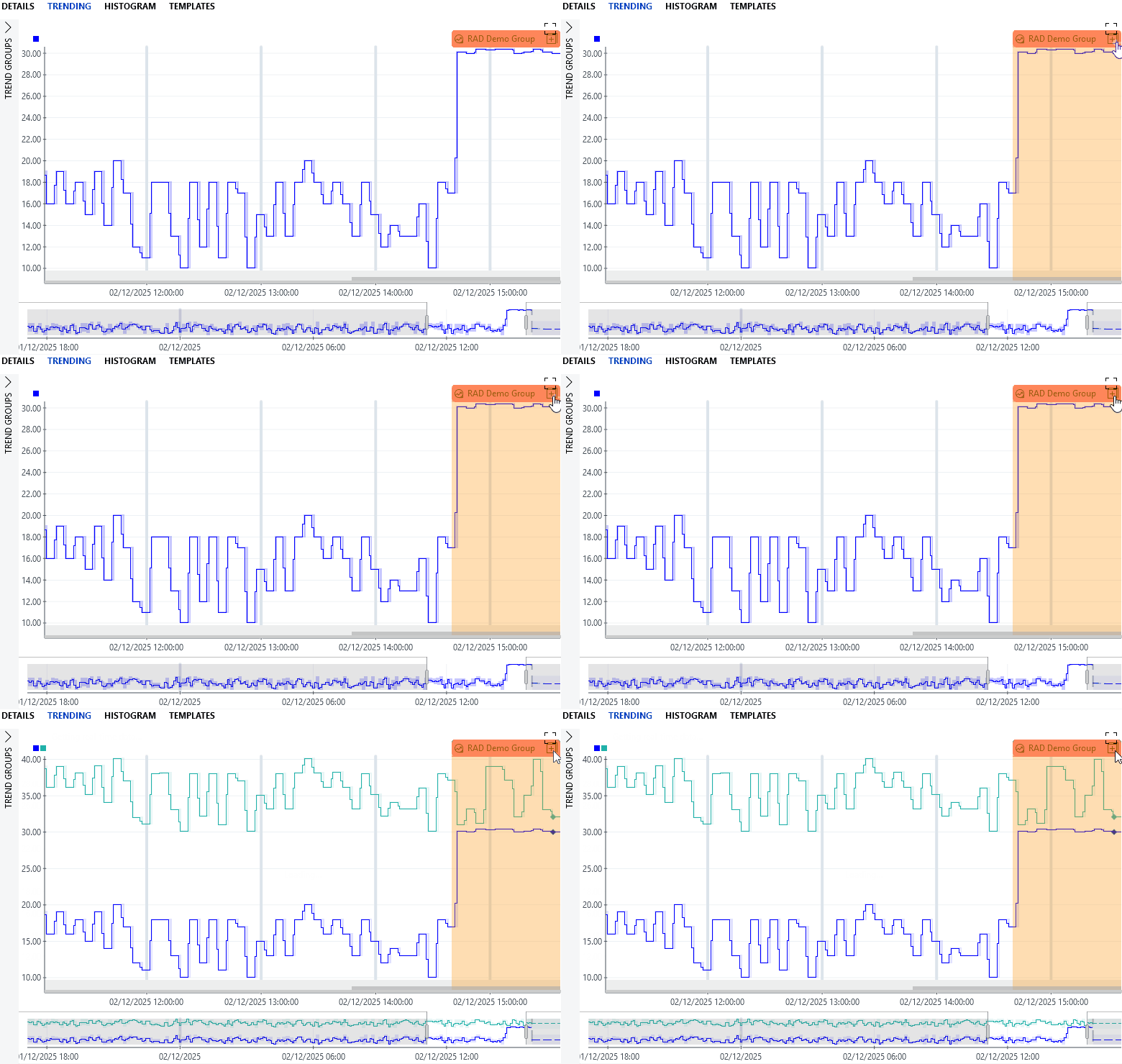
Trend graph showing a relational anomaly in DataMiner 10.6.5
Limitations
Monitoring parameters hosted on multiple DataMiner Agents within a single relational anomaly group is only supported from DataMiner 10.5.11/10.6.0 onwards. In previous DataMiner versions, all parameters in a group must be hosted on the same DMA. Note also that prior to DataMiner 10.5.9/10.6.0, the RelationalAnomalyDetection.xml file on a given DMA can only include parameters hosted on that same DMA.
Prior to DataMiner 10.5.11/10.6.0, a relational anomaly group will stop working if any elements in that group are swarmed to other DMAs. In more recent DataMiner versions, they will continue to work, but any active anomalies are cleared if elements involved in those anomalies are swarmed. Starting from DataMiner 10.5.12/10.6.0, after an element is swarmed, the relational anomaly group is also moved to the Agent hosting the majority of its parameters if necessary.
Some parameter behavior will cause RAD to work less accurately. For example, if a parameter responds to another parameter with a delay, such as a door opening gradually lowering a room's temperature, RAD may generate less precise results.
Parameters on DVE children can only be monitored directly by RAD from DataMiner 10.5.9/10.6.0 onwards . In earlier versions, you should monitor the corresponding parameter instance on the DVE parent.
Relational anomalies on history set parameters can only be detected from DataMiner 10.5.4/10.6.0 onwards, and only under certain conditions:
- If there is at least one history set parameter in a RAD parameter group, that parameter group will only be processed when all data from all parameters in the group has been received. In other words, if a history set parameter receives data 30 minutes later than the real-time parameters, possible anomalies will only be detected after 30 minutes.
- RAD will only process data received within the last hour. If a history set parameter receives data more than an hour later than the real-time parameters, that data will be disregarded.