Agents
In the context of DataMiner Assistant, agents are autonomous entities within the DataMiner Assistant that can investigate questions, retrieve information, and perform guided actions. They combine tools, skills, and contextual knowledge to carry out tasks on behalf of the user.
These AI agents are not to be confused with "DataMiner Agents", i.e., DataMiner nodes. (See DataMiner System architecture and components.)
AI agents operate by combining:
- Tools: These give the agents the ability to query data and execute actions.
- Skills: These provide the agents with domain-specific workflows and instructions.
Types of agents
Native agents
Native agents are built-in agents that ship with the DataMiner Assistant DxM. They have access to all available tools and skills, and they combine multiple DataMiner Intelligence capabilities to autonomously investigate questions, retrieve information, and perform guided actions.
The following native agents are available:
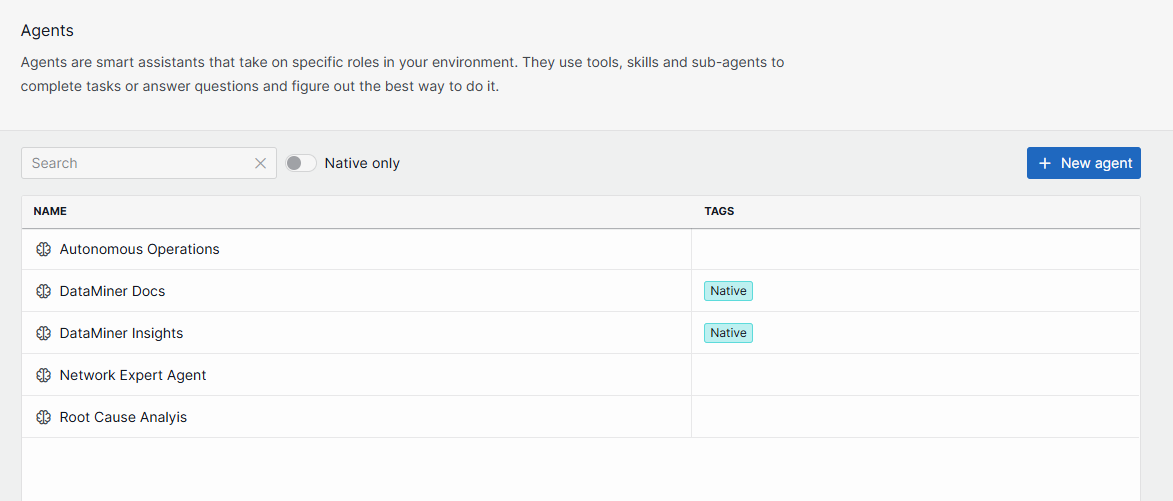
- DataMiner Insights: Investigates questions about your DataMiner System using data tools and skills.
- DataMiner Docs: Provides answers based on DataMiner documentation.
On the agents overview page, native agents are labeled with a "Native" tag. You can use the Native only toggle button to filter the list and show only native agents. Native agents open in read-only mode, so editing and deleting is not possible for them.
Specialized agents
Specialized agents are user-defined agents that bundle a name, description, instructions, and a curated set of references into a reusable, purpose-built entity. You can create them to have agents that are specifically tailored to certain operational workflows or domains.
Specialized agents only have access to the specific tools and skills assigned to them.
Agent context
When a chat session is opened, agents receive contextual metadata about the user and their environment. This helps them produce more relevant and consistently formatted responses.
The following metadata is available to agents:
- Username: The name of the user interacting with the agent.
- Time zone: The user's time zone, used to determine the current local time. This helps agents interpret time-relative instructions such as "in the last 2 hours" or "from 8 to 10".
- Culture: The user's culture (locale), which provides formatting conventions for dates, times, and numbers. This helps agents produce responses that match the user's expected format.
Time zone and culture are optional and depend on the client providing them when opening a chat session.