Spectrum analyzer cards
Spectrum analyzer cards are a special type of element cards in DataMiner Cube. They usually have 2 pages, though depending on the protocol additional pages are possible:
General page: contains general information about the analyzer and some additional functions, e.g., serial number, firmware version, switch screen on/off, run calibration, etc.
Spectrum Analyzer page: contains the Spectrum Analysis user interface.
The Spectrum Analysis user interface consists of four main components.
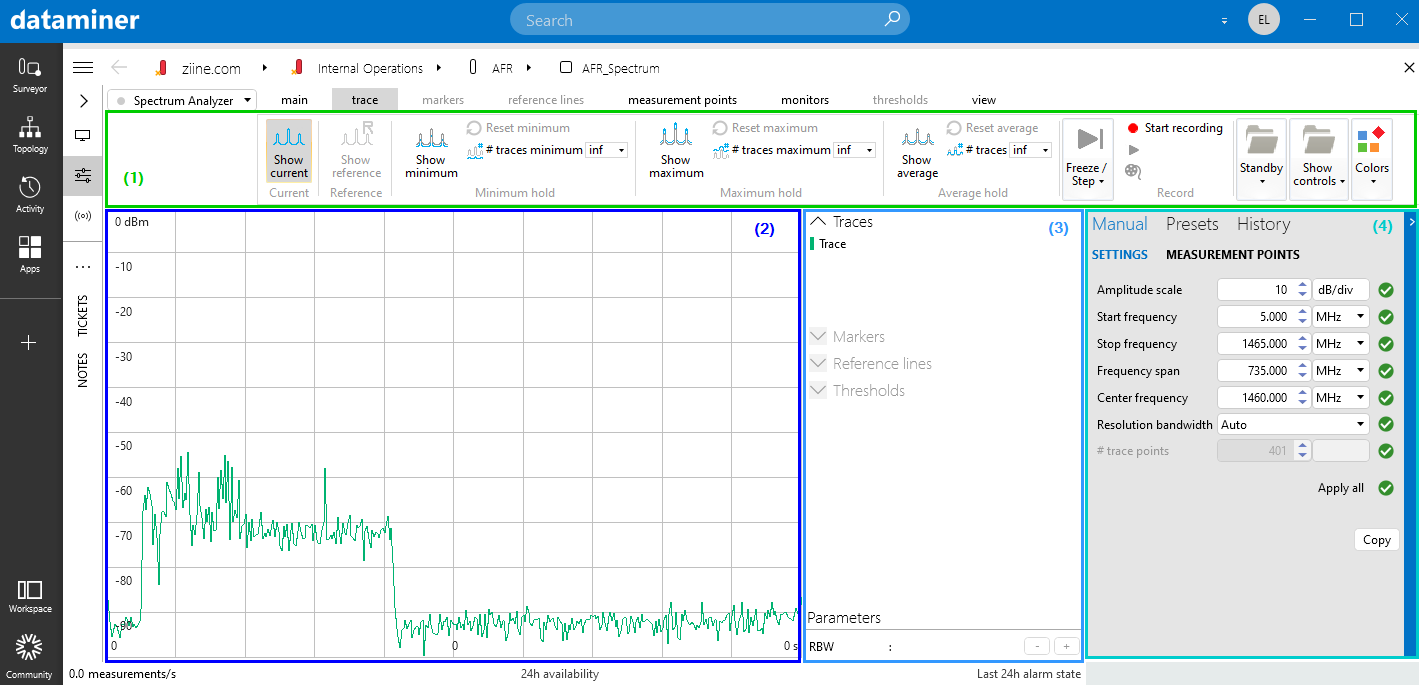
Spectrum Analysis UI in DataMiner 10.4.1
A ribbon (1) at the top of the card.
By default the ribbon is collapsed. Single-click it to quickly access a functionality; double-click the ribbon to expand it.
A real-time display section (2) on the left side of the card, which shows the spectrum trace. See Viewing spectrum analyzer traces.
Note
As soon as more than one client is connected to the spectrum analyzer, the upper-right corner of the display section shows the number of connected clients. Click this field to view detailed information such as the username, client station and connection time for each client.
An info pane (3) to the right of the display section, which displays detailed information about the trace, and allows settings for markers and reference lines.
See Working with markers and Working with reference lines.
Note
This pane can be hidden. This is done with the Info pane option in the View tab of the ribbon.
A collapsible settings pane (4) on the right side of the card, with different tabs.
Manual > Settings: see Changing the spectrum analyzer settings.
At the bottom of this tab, the Copy button allows you to copy the settings to the clipboard.
Manual > Measurement points: See Configuring measurement points.
Presets: See Using Spectrum Analysis presets.
History: See Viewing the history of spectrum monitor traces.