Virtual Signal Groups app
The Virtual Signal Groups app can be used by engineers to create and manage sources and destinations from any device and/or transport technology in large-scale networks.
It allows you to create source and destination endpoints for every individual signal using any transport technology in your network. These endpoints can be grouped in source and destination virtual signal groups organized by level, which allows you to connect multiple endpoints with a single command.
The virtual signal groups can be grouped into categories to allow operators to more easily navigate their control surfaces to find the relevant sources and destinations for their workflows.
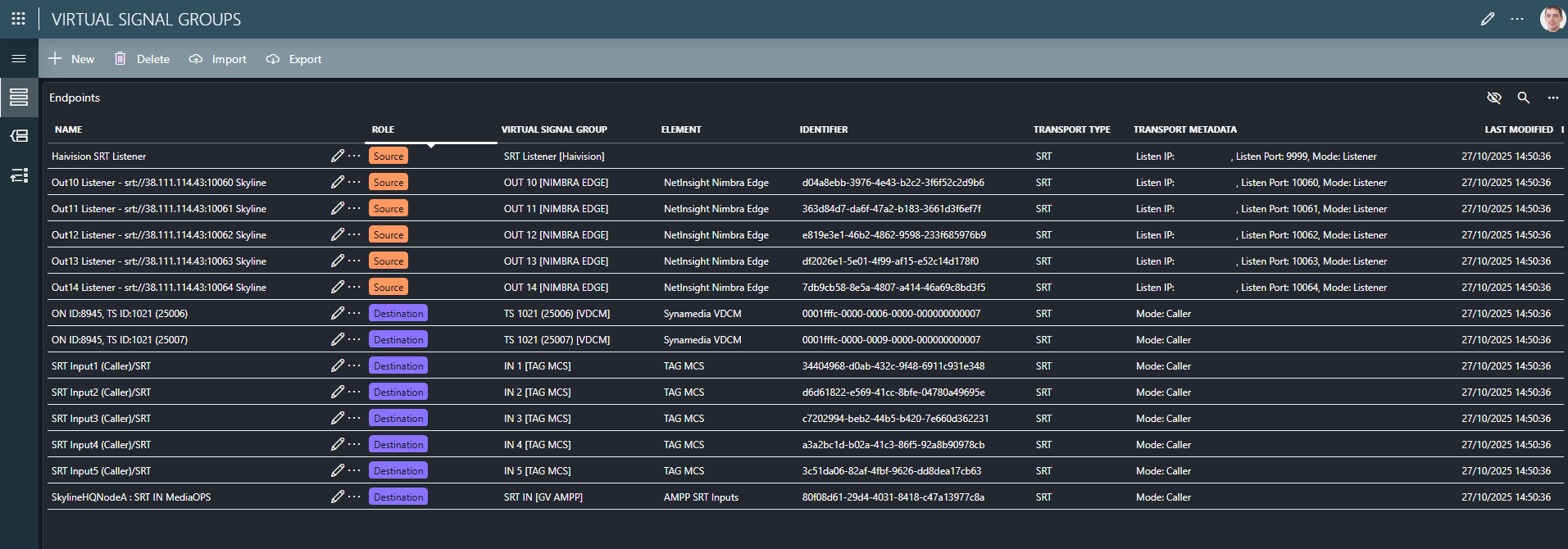
App overview
The following pages are available in the app:
 Endpoints: Allows you to create, edit, delete, import, and export endpoints.
 Virtual Signal Groups: Allows you to create, edit, delete, import, and export virtual signal groups. This page also allows you to manage the categories that virtual signal groups can be assigned to, and it allows you to assign the virtual signal groups to these categories.
 Levels: Allows you to create, edit, and delete levels. This page also allows you to manage the transport types available in your network, and it allows you to configure the transport type for each given level.
Tip
To learn how to use the Virtual Signal Groups app to provision these different objects, follow the manual provisioning tutorial for the Generic Matrix or the IP Matrix.
Endpoints
Endpoints are the lowest-level data object managed by the Virtual Signal Groups app. These objects allow users to describe source and destinations of a single (media) flow. Each endpoint should have a name, must be assigned a transport type, and can optionally be linked to a DataMiner element.
Apart from the common fields that are required for every sender or receiver, additional fields can be used to store the transport parameters needed to set up a connection between endpoints of a specific transport type. These fields depend on the selected transport type and can include things like a source and multicast IP address for IP transport, or caller/listener mode for SRT senders or receivers.
Important
Before you can start creating endpoints, transport types need to be created first.
Transport types
Transport types define the different transport technologies that will be supported in the system, for example, SDI, IP 2110, TSoIP, SRT, etc. When a transport type is created, additional metadata fields can be configured, allowing users to enter the values when they create an endpoint of this transport type.
For example, when an IP transport type is created, the following fields could be added to the transport type: Source IP, Multicast IP, and Multicast Port. For every endpoint created of transport type "IP", the system will be able to store a source IP, multicast IP, and multicast port, so that this information can be used to set up connections with this endpoint.
Note
At present, only free text fields can be defined on a transport type.
Virtual signal groups
Once individual endpoints have been described, users can group them together into a source or a destination virtual signal group. These sources and destinations will be displayed in the Control Surface app, and you will be able to set up connections between them. These virtual signal groups can also be linked to the input or output of a resource in the Resource Studio app in order to schedule connections as part of a job.
When you have created a virtual signal group, you can start adding endpoints to it. Endpoints are added to a virtual signal group on a specific level. By mapping each destination endpoint with the endpoint at the corresponding level of the source, the system knows which endpoints from the source to connect to which endpoints from the destination.
Note
An endpoint can be part of multiple virtual signal groups.
Levels
Levels define a logical structure for the virtual signal groups on the system. Each level is assigned a unique level number, a name, and a specific transport type. Only endpoints that match the type of the level can be added for that level in a virtual signal group.
Levels defined in the Virtual Signal Groups app are defined system-wide, meaning that the level structure of all virtual signal groups is the same. However, each individual signal group can contain an endpoint on a level or not.
Categories
The Virtual Signal Groups app allows the grouping of virtual signal groups into categories. This grouping can be used to more easily find sources and destinations in the Control Surface app.
When the Virtual Signal Groups app is installed, two scopes will automatically be created, one for sources and one for destinations. This allows users to immediately start defining their source and destination categories in the Categories app.
After a category structure is defined, sources and destination can be assigned to one or more categories within the Virtual Signal Groups app. After a virtual signal group is assigned to a category, that category will be displayed as a filter option in the Control Surface app.
Note
Categories are managed in the Categories app, which needs to be installed separately on the system (prior to deploying MediaOps Live).
Managing endpoints and virtual signal groups at scale
The Virtual Signal Groups app is primarily used as an engineering tool to manage and inspect individual endpoints and virtual signal groups. Bulk editing can be done by either exporting and/or importing endpoints and/or virtual signal groups or by using the API in an automation script to create, update, or delete endpoints and virtual signal groups.
Tip
To learn how to manually provision endpoints and virtual signal groups, follow the tutorial Manually provisioning endpoints and virtual signal groups for a Generic Matrix element.
Exporting and importing endpoints and/or virtual signal groups
The Virtual Signal Groups app allows you to export and import endpoints and virtual signal groups using CSV files, so that you can create and edit these objects in bulk.
Tip
To learn how to provision endpoints and virtual signal groups using a CSV import, follow the tutorial Provisioning endpoints and virtual signal groups for a Generic Matrix element using CSV import.
Using the API
MediaOps Live also exposes an API which allows you (amongst other things) to provision endpoints and virtual signal groups through code.
Note
Full API documentation is available on GitHub.
Tip
To learn how to provision endpoints and virtual signal groups using code, follow the tutorial Provisioning endpoints and virtual signal groups for a Generic Matrix element using code.